these softkeys to enter the unit and terminate the entry without
hitting
4
ENTER
5
.
9. The cursor will b e automatically moved to the
BIN 1 HIGH
eld
after entering the low limit of the BIN 1. Enter the high limit of
the BIN 1.
10. The cursor will be automatically moved to the
BIN 2 HIGH
eld. Because the BIN 2 low limit value is as same as the BIN 1
high limit value. Enter the high limit of the BIN 2.
11. Repeat step 5 until the BIN 9 limits are entered. After entering
the BIN 9 high limit, the cursor will be automatically moved to
the
2nd LOW
eld. Enter the low limit value of the secondary
parameter.
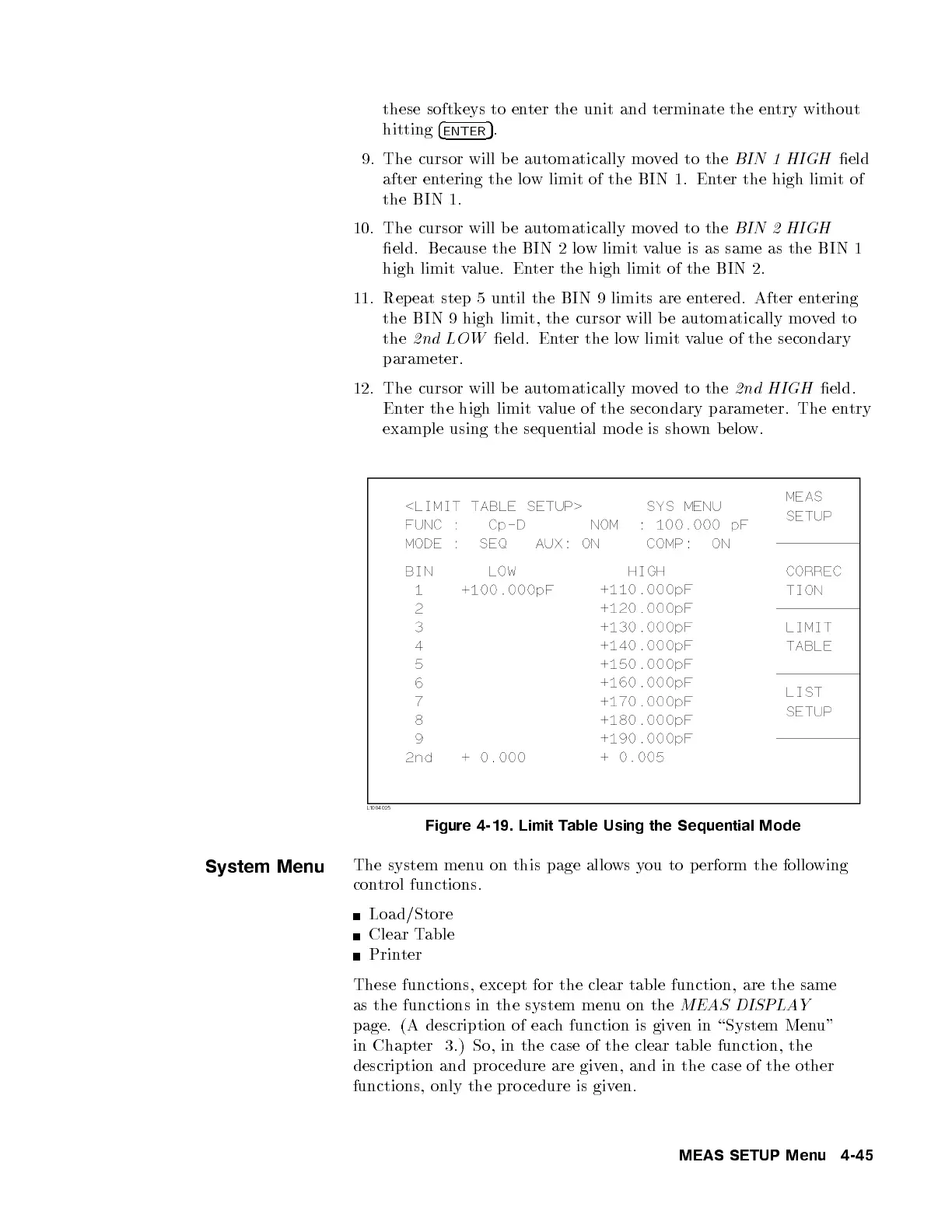
12. The cursor will be automatically moved to the
2nd HIGH
eld.
Enter the high limit value of the secondary parameter. The entry
example using the sequential mo de is shown below.
Figure 4-19. Limit Table Using the Sequential Mode
System Menu
The system menu on this page allows you to perform the following
control functions.
Load/Store
Clear Table
Printer
These functions, except for the clear table function, are the same
as the functions in the system menu on the
MEAS DISPLAY
page. (A description of each function is given in \System Menu"
in Chapter 3.) So, in the case of the clear table function, the
description and pro cedure are given, and in the case of the other
functions, only the pro cedure is given.
MEAS SETUP Menu 4-45



 To Next Page