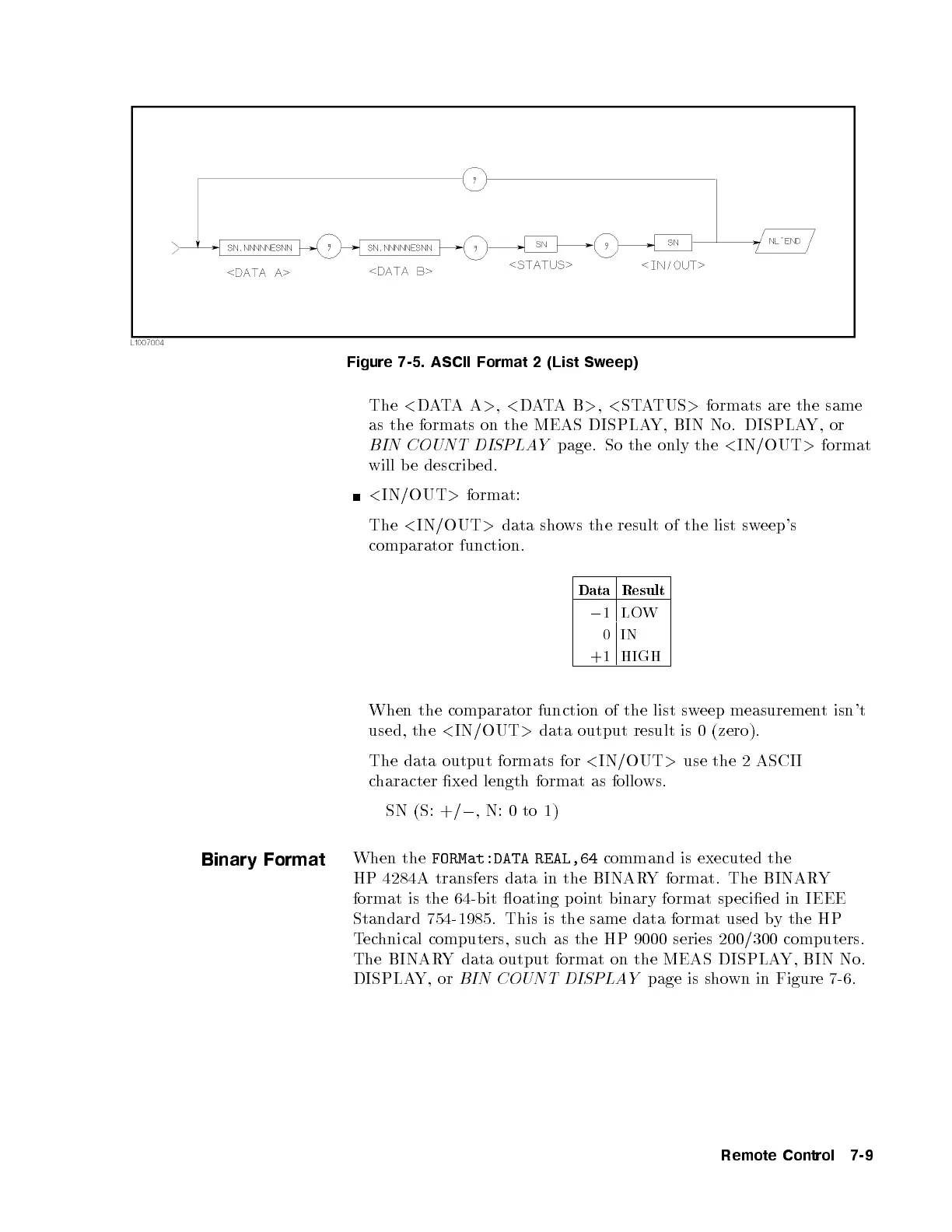
Figure 7-5. ASCII Format 2 (List Sweep)
The
<
DATAA
>
,
<
DATAB
>
,
<
STATUS
>
formats are the same
as the formats on the MEAS DISPLAY, BIN No. DISPLAY, or
BIN COUNT DISPLAY
page. So the only the
<
IN/OUT
>
format
will be described.
<
IN/OUT
>
format:
The
<
IN/OUT
>
data shows the result of the list sweep's
comparator function.
Data Result
0
1LOW
0IN
+1 HIGH
When the comparator function of the list sweep measurement isn't
used, the
<
IN/OUT
>
data output result is 0 (zero).
The data output formats for
<
IN/OUT
>
use the 2 ASCII
character xed length format as follows.
SN (S: +/
0
, N: 0 to 1)
Binary Format
When the
FORMat:DATA REAL,64
command is executed the
HP 4284A transfers data in the BINARY format. The BINARY
format is the 64-bit oating p oint binary format sp ecied in IEEE
Standard 754-1985. This is the same data format used by the HP
Technical computers, such as the HP 9000 series 200/300 computers.
The BINARY data output format on the MEAS DISPLAY, BIN No.
DISPLAY, or
BIN COUNT DISPLAY
page is shown in Figure 7-6.
Remote Control 7-9



 To Next Page