Rack/Handle
Installation
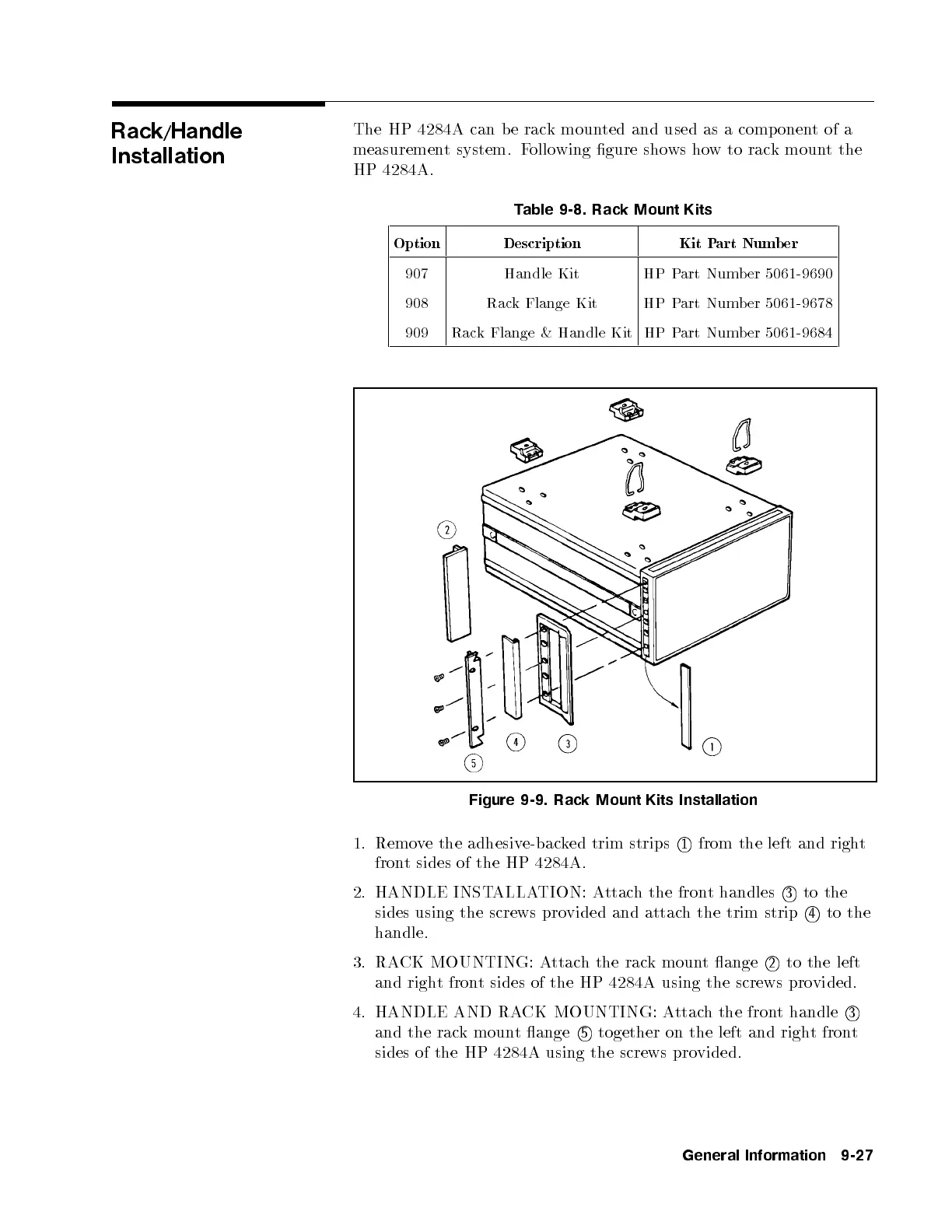
The HP 4284A can be rack mounted and used as a comp onentofa
measurement system. Following gure shows how to rack mount the
HP 4284A.
Table 9-8. Rack Mount Kits
Option Description Kit Part Numb er
907 Handle Kit HP Part Number 5061-9690
908 Rack Flange Kit HP Part Number 5061-9678
909 Rack Flange & Handle Kit HP Part Number 5061-9684
Figure 9-9. Rack Mount Kits Installation
1. Remove the adhesive-backed trim strips
1
from the left and right
front sides of the HP 4284A.
2. HANDLE INSTALLATION: Attach the front handles
3
to the
sides using the screws provided and attach the trim strip
4
to the
handle.
3. RACK MOUNTING: Attach the rack mount ange
2
to the left
and right front sides of the HP 4284A using the screws provided.
4. HANDLE AND RACK MOUNTING: Attach the front handle
3
and the rack mount ange
5
together on the left and right front
sides of the HP 4284A using the screws pro
vided.
General Information 9-27


 To Next Page