Handler Interface
Function Test
(Option 201 only)
Perform this test only when troublesho oting the Option 201 Handler
Interface Board.
This test veries the handler interface functions.
Equipment:
Handler Simulator HP PN 04278-65001
Procedure:
1. Disconnect the power cable from the HP 4284A and allow1
minute for the internal capacitors to discharge.
Warning
Dangerous energy/voltage exists when the HP 4284A is in operation,
and for a time after it is powered down. Allow 1 minutes for the
internal capacitors to discharge.
2. Disconnect the two rear feet whichlock the top cover and rear
panel together.
3. Fully lo osen the top cover retaining screws lo cated on the rear of
the top cover.
4. Slide the top cover toward rear and lift it o. The top shield
plate will b e visible.
5. Remove the top shield plate to expose the PC boards.
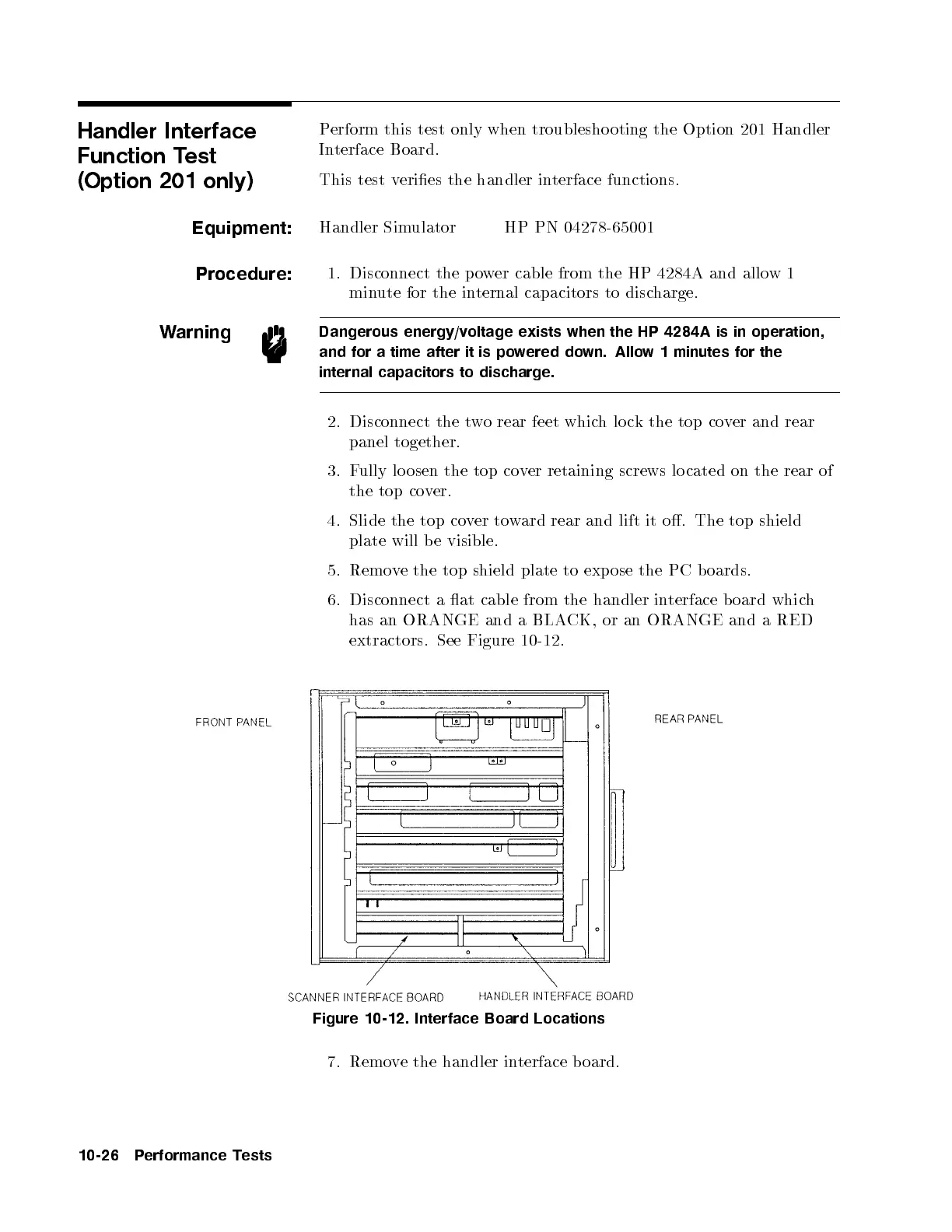
6. Disconnect a at cable from the handler in
terface b oard which
has an ORANGE and a BLACK, or an ORANGE and a RED
extractors. See Figure 10-12 .
Figure 10-12. Interface Board Locations
7. Remove the handler interface board.
10-26 Performance Tests


 To Next Page