Caution
The interface board contains electronic comp onents that can be
damaged by static electricity through electrostatic discharge(ESD).
To prevent ESD damage,maintain frequent contact with any bare
sheet metal surface on the chassis. A grounding wrist strap (or
similar device) is useful for this purpose. Handle the b oard carefully
at all times. Avoid touching electronic comp onents or circuit paths.
Note
Before p erforming step 8, note the jump er settings in order to return
them to the same settings at the end of this function test.
8. Set the jump ers on the handler interface b oard to the same
settings as when the b oard is shipp ed from the factory. Congure
the interface board according the color of the extractors, see
step (1) for ORANGE and BLACK extractors and step (2) for
ORANGE and RED extractors.
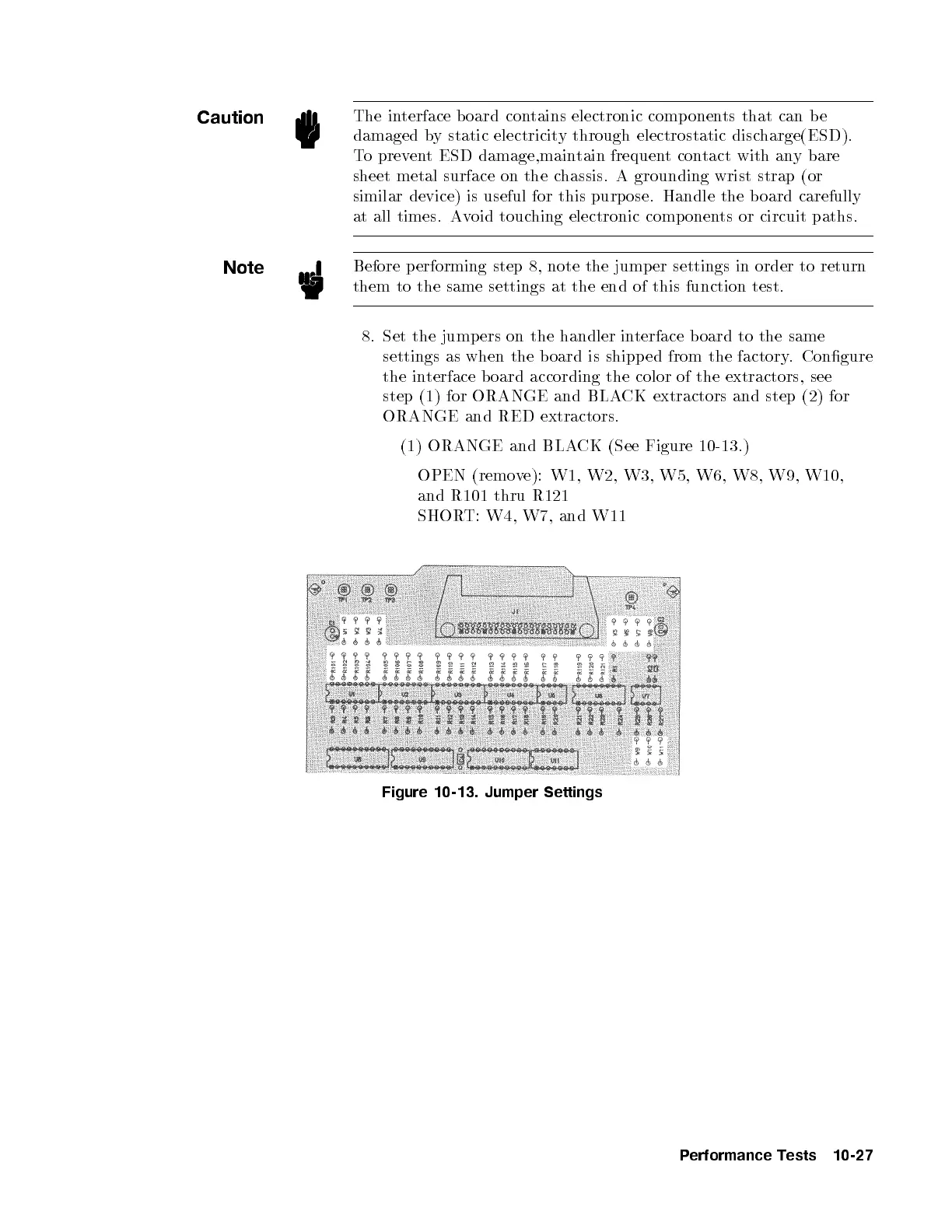
(1) ORANGE and BLACK (See Figure 10-13.)
OPEN (remove): W1, W2, W3, W5, W6, W8, W9, W10,
and R101 thru R121
SHORT: W4, W7, and W11
Figure 10-13. Jumper Settings
Performance Tests 10-27


 To Next Page