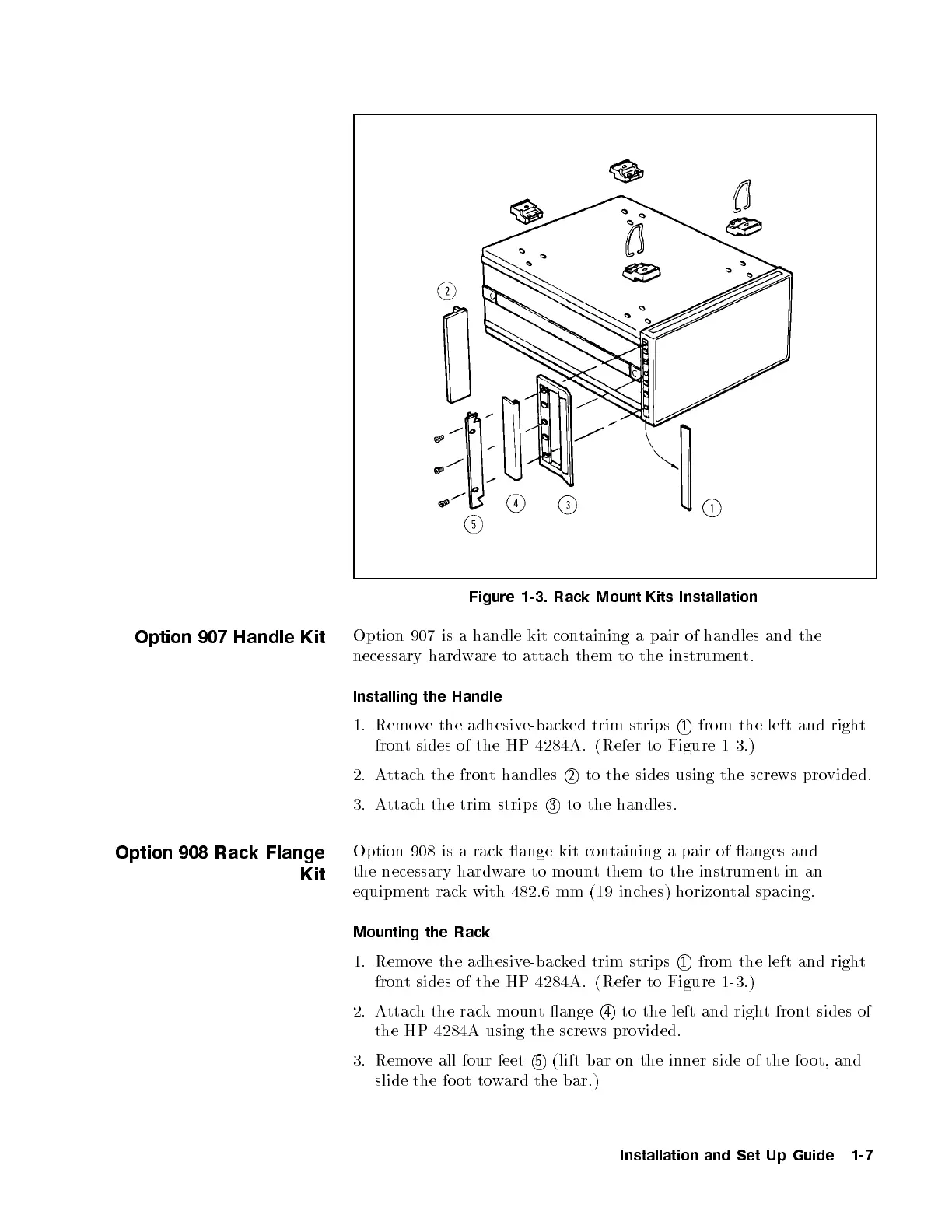
Figure 1-3. Rack Mount Kits Installation
Option 907 Handle Kit
Option 907 is a handle kit containing a pair of handles and the
necessary hardware to attach them to the instrument.
Installing the Handle
1. Remove the adhesive-backed trim strips
1
from the left and right
front sides of the HP 4284A. (Refer to Figure 1-3
.)
2. Attach the front handles
2
to the sides using the screws provided.
3. Attach the trim strips
3
to the handles.
Option 908 Rack Flange
Kit
Option 908 is a rack ange kit containing a pair of anges and
the necessary hardware to mount them to the instrumentin an
equipment rack with 482.6 mm (19 inches) horizontal spacing.
Mounting the Rack
1. Remove the adhesive-backed trim strips
1
from the left and right
front sides of the HP 4284A. (Refer to Figure 1-3.)
2. Attach the rack mount ange
4
to the left and right front sides of
the HP 4284A using the screws provided.
3. Remove all four feet
5
(lift bar on the inner side of the fo ot, and
slide the foot toward the bar.)
Installation and Set Up Guide 1-7



 To Next Page