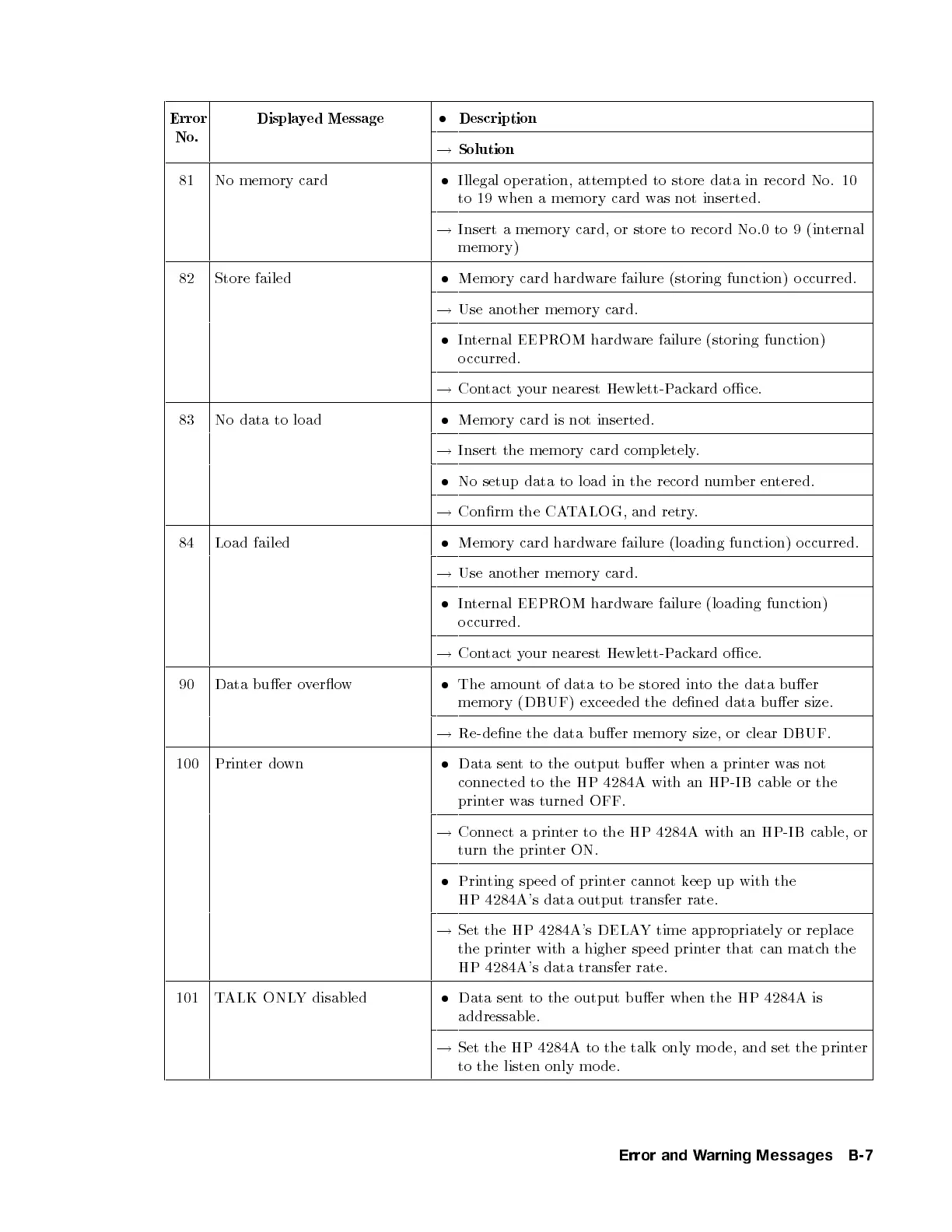
Error
No.
Displayed Message
Description
!
Solution
81 No memory card
Illegal op eration, attempted to store data in record No. 10
to 19 when a memory card was not inserted.
!
Insert a memory card, or store to record No.0 to 9 (internal
memory)
82 Store failed
Memory card hardware failure (storing function) o ccurred.
!
Use another memory card.
Internal EEPROM hardware failure (storing function)
o ccurred.
!
Contact your nearest Hewlett-Packard oce.
83 No data to load
Memory card is not inserted.
!
Insert the memory card completely.
No setup data to load in the record n
umber entered.
!
Conrm the CATALOG, and retry.
84 Load failed
Memory card hardware failure (loading function) o ccurred.
!
Use another memory card.
Internal EEPROM hardware failure (loading function)
o ccurred.
!
Contact your nearest Hewlett-Packard oce.
90 Data buer overow
The amount of data to b e stored in
to the data buer
memory (DBUF) exceeded the dened data buer size.
!
Re-dene the data buer memory size, or clear DBUF.
100 Printer down
Data sent to the output buer when a printer was not
connected to the HP 4284A with an HP-IB cable or the
printer was turned OFF.
!
Connect a printer to the HP 4284A with an HP-IB cable, or
turn the printer ON.
Printing speed of printer cannot keep up with the
HP 4284A's data output transfer rate.
!
Set the HP 4284A's DELAY time appropriately or replace
the printer with a higher speed printer that can match the
HP 4284A's data transfer rate.
101 TALK ONLY disabled
Data sent to the output buer when the HP 4284A is
addressable.
!
Set the HP 4284A to the talk only mo de, and set the prin
ter
to the listen only mo de.
Error and Warning Messages B-7


 To Next Page