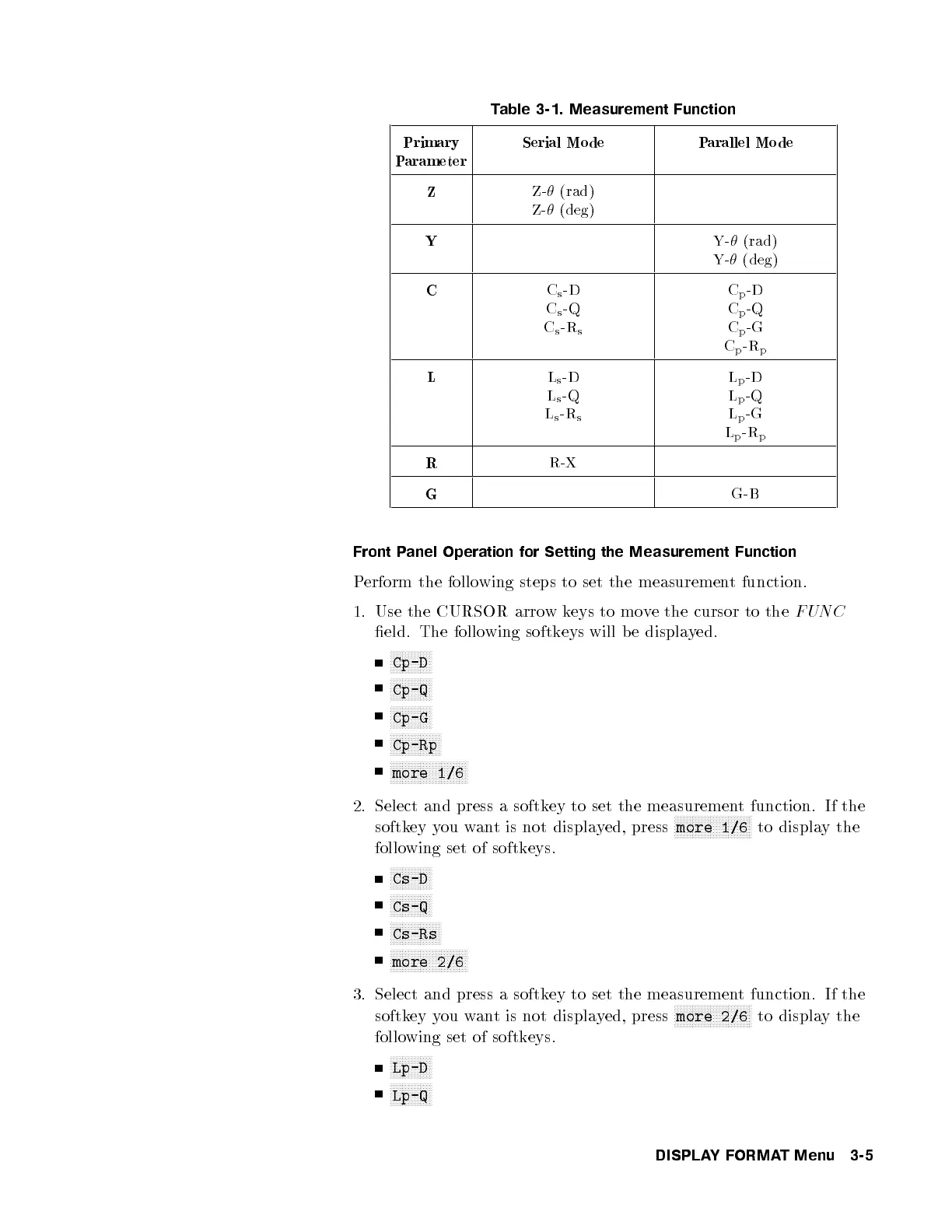
Table 3-1. Measurement Function
Primary
Parameter
Serial Mo de Parallel Mo de
Z
Z-
(rad)
Z-
(deg)
Y
Y-
(rad)
Y-
(deg)
C
C
s
-D
C
s
-Q
C
s
-R
s
C
p
-D
C
p
-Q
C
p
-G
C
p
-R
p
L
L
s
-D
L
s
-Q
L
s
-R
s
L
p
-D
L
p
-Q
L
p
-G
L
p
-R
p
R
R-X
G
G-B
Front Panel Operation for Setting the Measurement Function
Perform the following steps to set the measurement function.
1. Use the CURSOR arrow keys to move the cursor to the
FUNC
eld. The following softkeys will b e displayed.
NNNNNNNNNNNNNN
Cp-D
NNNNNNNNNNNNNN
Cp-Q
NNNNNNNNNNNNNN
Cp-G
NNNNNNNNNNNNNNNNN
Cp-Rp
NNNNNNNNNNNNNNNNNNNNNNNNNN
more 1/6
2. Select and press a softkey to set the measurement function. If the
softkey you want is not displayed, press
NNNNNNNNNNNNNNNNNNNNNNNNNN
more 1/6
to display the
following set of softkeys.
NNNNNNNNNNNNNN
Cs-D
NNNNNNNNNNNNNN
Cs-Q
NNNNNNNNNNNNNNNNN
Cs-Rs
NNNNNNNNNNNNNNNNNNNNNNNNNN
more 2/6
3. Select and press a softkey to set the measurement function. If the
softkey you want is not displayed, press
NNNNNNNNNNNNNNNNNNNNNNNNNN
more 2/6
to display the
following set of softkeys.
NNNNNNNNNNNNNN
Lp-D
NNNNNNNNNNNNNN
Lp-Q
DISPLAYFORMAT Menu 3-5



 To Next Page