yyy
: Most suspicious assembly and should be checked repalced.
yy
: Suspicious assembly and should be checked.
y
: There is some possibility of a fault.
External Tests Failure Troubleshooting
If you can't identify the faulty assembly using the internal tests, you can execute the external
tests in addition to the internal tests. These external tests are also built-in tests and 10 tests
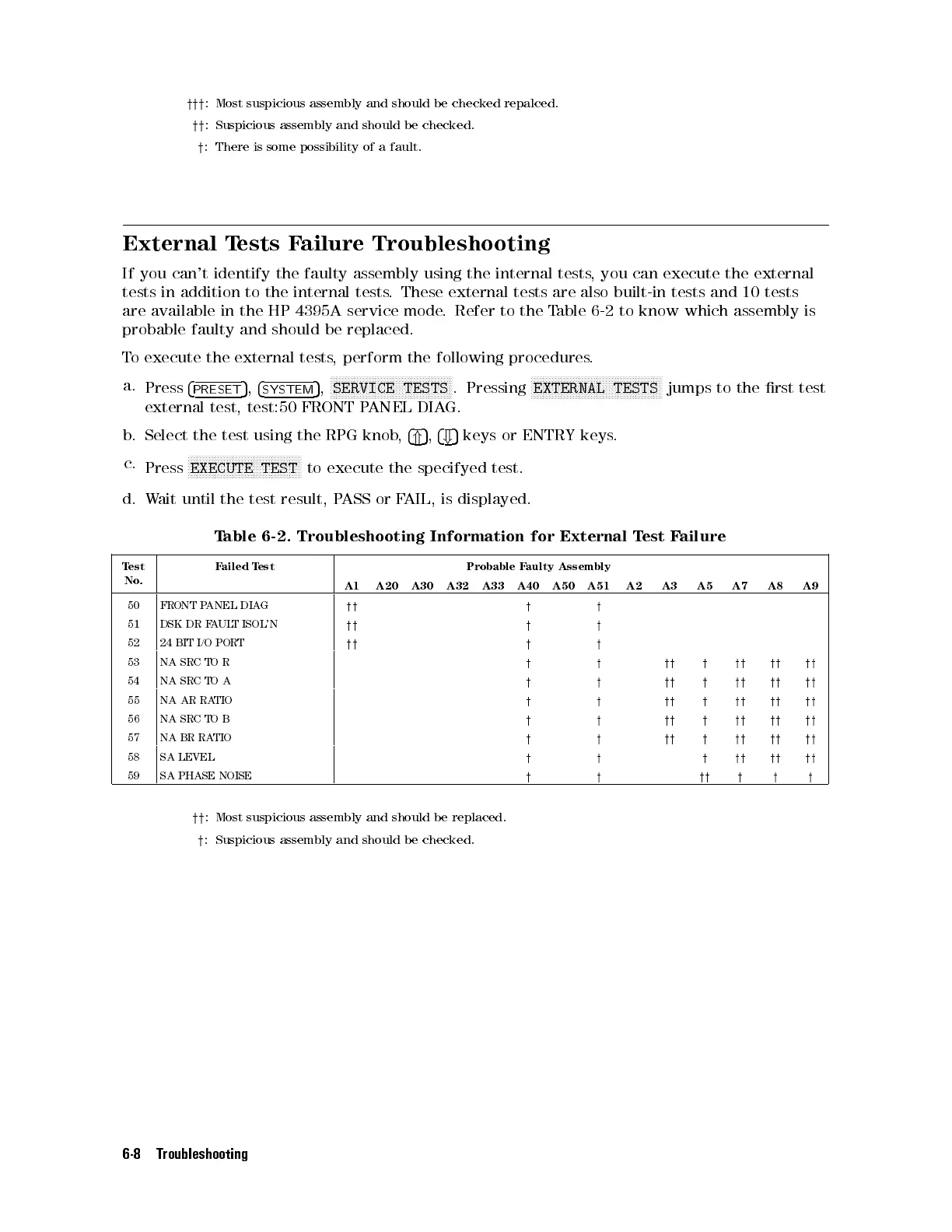
are available in the HP 4395A service mode. Refer to the Table 6-2 to know which assembly is
probable faulty and should be replaced.
To execute the external tests, perform the following procedures.
a.
Press
4
PRESET
5
,
4
SYSTEM
5
,
NNNNNNNNNNNNNNNNNNNNNNNNNNNNNNNNNNNNNNNNN
SERVICE TESTS
. Pressing
NNNNNNNNNNNNNNNNNNNNNNNNNNNNNNNNNNNNNNNNNNNN
EXTERNAL TESTS
jumps to the rst test
external test, test:50 FRONT PANEL DIAG.
b. Select the test using the RPG knob,
4
*
5
,
4
+
5
keys or ENTRY keys.
c.
Press
NNNNNNNNNNNNNNNNNNNNNNNNNNNNNNNNNNNNNN
EXECUTE TEST
to execute the specifyed test.
d. Wait until the test result, PASS or FAIL, is displayed.
Table 6-2. Troubleshooting Information for External Test Failure
Test
No.
Failed Test Probable Faulty Assembly
A1 A20 A30 A32 A33 A40 A50 A51 A2 A3 A5 A7 A8 A9
50 FRONT PANEL DIAG
yy y y
51 DSK DR FAULT ISOL'N
yy y y
52 24 BIT I/O PORT
yy y y
53 NA SRC TO R
y y yy y yy yy yy
54 NA SRC TO A
y y yy y yy yy yy
55 NA AR RATIO
y y yy y yy yy yy
56 NA SRC TO B
y y yy y yy yy yy
57 NA BR RATIO
y y yy y yy yy yy
58 SA LEVEL
y y y yy yy yy
59 SA PHASE NOISE
y y yy y y y
yy
: Most suspicious assembly and should be replaced.
y
: Suspicious assembly and should be checked.
6-8 Troubleshooting



 To Next Page