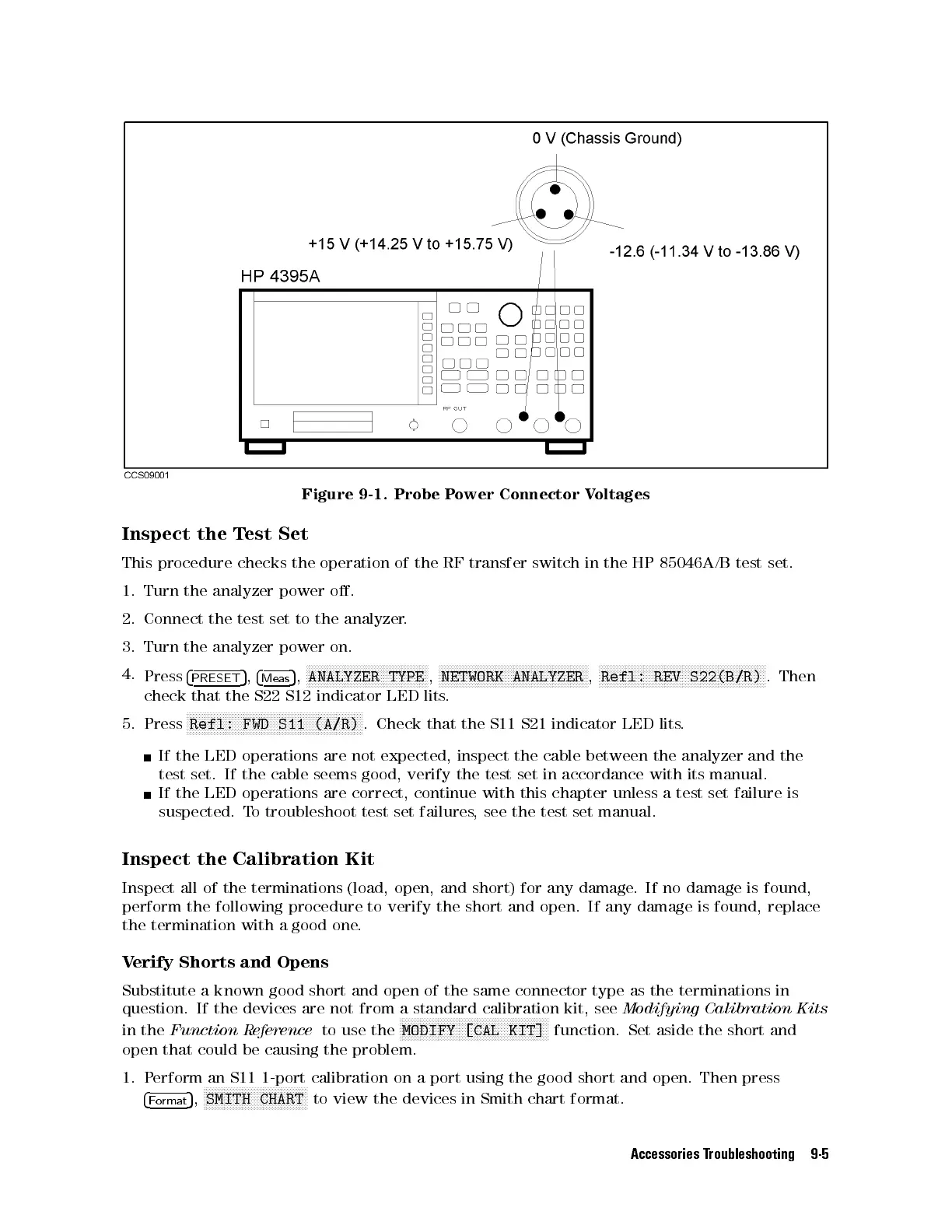
Figure 9-1. Probe Power Connector Voltages
Inspect the Test Set
This procedure checks the operation of the RF transfer switch in the HP 85046A/B test set.
1. Turn the analyzer power o.
2. Connect the test set to the analyzer.
3. Turn the analyzer power on.
4.
Press
4
PRESET
5
,
4
Meas
5
,
NNNNNNNNNNNNNNNNNNNNNNNNNNNNNNNNNNNNNNNNN
ANALYZER TYPE
,
NNNNNNNNNNNNNNNNNNNNNNNNNNNNNNNNNNNNNNNNNNNNNNNNNN
NETWORK ANALYZER
,
NNNNNNNNNNNNNNNNNNNNNNNNNNNNNNNNNNNNNNNNNNNNNNNNNNNNNNNN
Refl: REV S22(B/R)
. Then
check that the S22 S12 indicator LED lits.
5. Press
NNNNNNNNNNNNNNNNNNNNNNNNNNNNNNNNNNNNNNNNNNNNNNNNNNNNNNNNNNN
Refl: FWD S11 (A/R)
. Check that the S11 S21 indicator LED lits
.
If the LED operations are not expected, inspect the cable between the analyzer and the
test set. If the cable seems good, verify the test set in accordance with its manual.
If the LED operations are correct, continue with this chapter unless a test set failure is
suspected. To troubleshoot test set failures, see the test set manual.
Inspect the Calibration Kit
Inspect all of the terminations (load, open, and short) for any damage
. If no damage is found,
perform the following procedure to verify the short and open. If any damage is found, replace
the termination with a good one.
Verify Shorts and Opens
Substitute a known good short and open of the same connector type as the terminations in
question. If the devices are not from a standard calibration kit, see
Modifying Calibration Kits
in the
Function Reference
to use the
NNNNNNNNNNNNNNNNNNNNNNNNNNNNNNNNNNNNNNNNNNNNNNNNNN
MODIFY [CAL KIT]
function. Set aside the short and
open that could be causing the problem.
1. Perform an S11 1-port calibration on a port using the good short and open. Then press
4
Format
5
,
NNNNNNNNNNNNNNNNNNNNNNNNNNNNNNNNNNN
SMITH CHART
to view the devices in Smith chart format.
Accessories Troubleshooting 9-5



 To Next Page