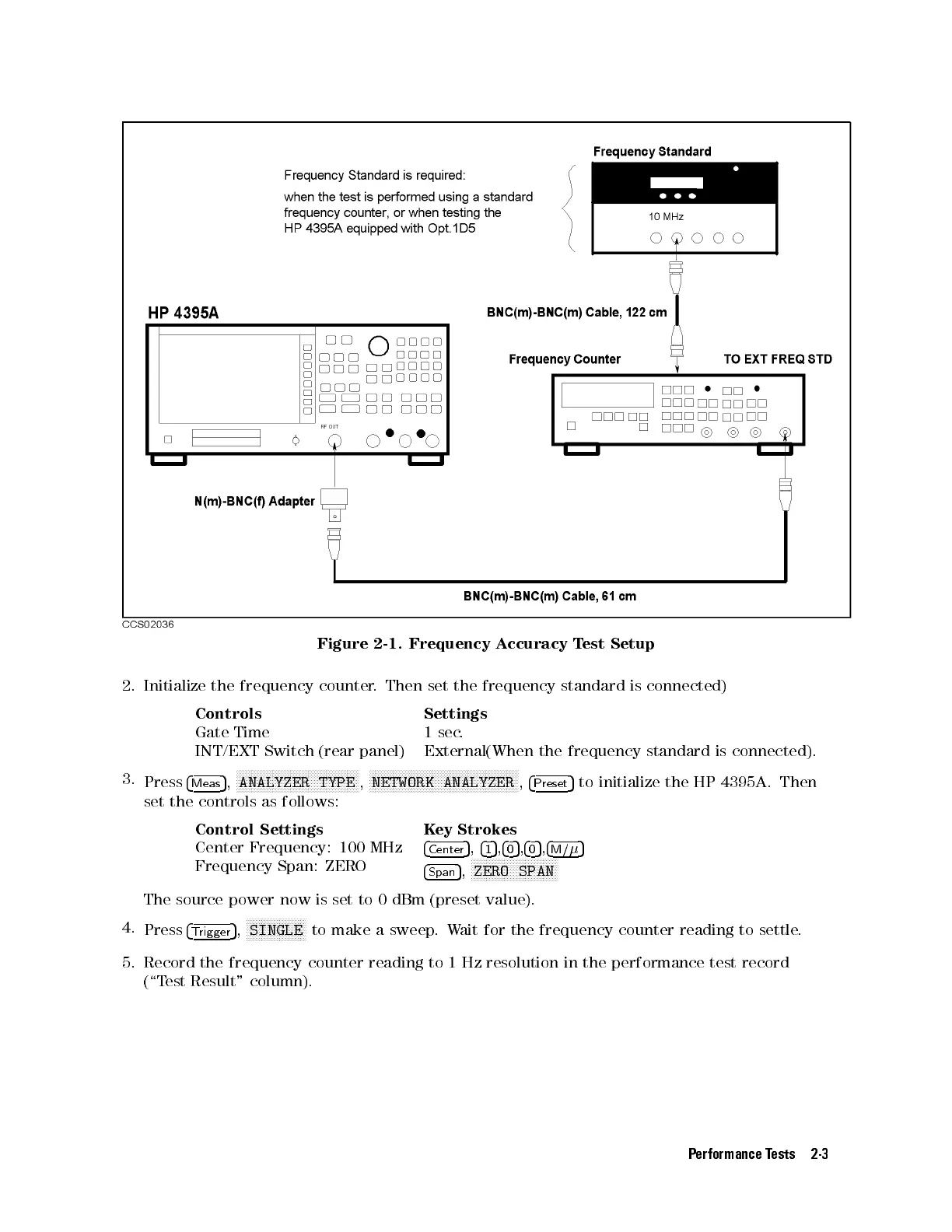
Figure 2-1. Frequency Accuracy Test Setup
2. Initialize the frequency counter. Then set the frequency standard is connected)
Controls Settings
Gate Time 1 sec.
INT/EXT Switch (rear panel) External(When the frequency standard is connected).
3.
Press
4
Meas
5
,
NNNNNNNNNNNNNNNNNNNNNNNNNNNNNNNNNNNNNNNNN
ANALYZER TYPE
,
NNNNNNNNNNNNNNNNNNNNNNNNNNNNNNNNNNNNNNNNNNNNNNNNNN
NETWORK ANALYZER
,
4
Preset
5
to initialize the HP 4395A. Then
set the controls as follows:
Control Settings Key Strokes
Center Frequency: 100 MHz
4
Center
5
,
4
1
5
,
4
0
5
,
4
0
5
,
4
M/
5
Frequency Span: ZERO
4
Span
5
,
NNNNNNNNNNNNNNNNNNNNNNNNNNNNN
ZERO SPAN
The source power now is set to 0 dBm (preset value).
4.
Press
4
Trigger
5
,
NNNNNNNNNNNNNNNNNNNN
SINGLE
to make a sweep.Wait for the frequency counter reading to settle.
5. Record the frequency counter reading to 1 Hz resolution in the performance test record
(\Test Result" column).
Performance Tests 2-3



 To Next Page