Active Channel: CH 1
4
Ch 1
5
Input Port: A/R
4
Meas
5
,
NNNNNNNNNNN
A/R
Format: LOG MAG
4
Format
5
,
NNNNNNNNNNNNNNNNNNNNNNN
LOG MAG
Reference Level:
0
100 dB
4
Scale Ref
5
,
NNNNNNNNNNNNNNNNNNNNNNNNNNNNNNNNNNNNNNNNNNNNNNN
REFERENCE VALUE
,
4
-
5
,
4
1
5
,
4
0
5
,
4
0
5
,
4
x1
5
Active Channel: CH 2
4
Ch 2
5
Input Port: B/R
4
Meas
5
,
NNNNNNNNNNN
B/R
Format: LOG MAG
4
Format
5
,
NNNNNNNNNNNNNNNNNNNNNNN
LOG MAG
Reference Level:
0
100 dB
4
Scale Ref
5
,
NNNNNNNNNNNNNNNNNNNNNNNNNNNNNNNNNNNNNNNNNNNNNNN
REFERENCE VALUE
,
4
-
5
,
4
1
5
,
4
0
5
,
4
0
5
,
4
x1
5
Source Power: +10 dBm
4
Source
5
,
N
NNNNNNNNNNNNNNNN
POWER
,
4
1
5
,
4
0
5
,
4
x1
5
Input Attenuator R: 20dB
4
Scale Ref
5
,
NNNNNNNNNNNNNNNNNNNNNNNNNNNNNNNNNNNNNNNNNNNNNNN
ATTENUATOR MENU
,
NNNNNNNNNNNNNNNNNNNNNNN
ATTEN R
,
4
2
5
,
4
0
5
,
4
x1
5
Input Attenuator A: 0dB
4
Scale Ref
5
,
NNNNNNNNNNNNNNNNNNNNNNNNNNNNNNNNNNNNNNNNNNNNNNN
ATTENUATOR MENU
,
NNNNNNNNNNNNNNNNNNNNNNN
ATTEN A
,
4
0
5
,
4
x1
5
Input Attenuator B: 0dB
4
Scale Ref
5
,
NNNNNNNNNNNNNNNNNNNNNNNNNNNNNNNNNNNNNNNNNNNNNNN
ATTENUATOR MENU
,
NNNNNNNNNNNNNNNNNNNNNNN
ATTEN B
,
4
0
5
,
4
x1
5
3. Press
4
Start
5
,
4
1
5
,
4
0
5
,
4
x1
5
to set the start frequency to the rst test setting 10 Hz listed in
Table 2-11
4. Press
4
Stop
5
,
4
1
5
,
4
k/m
5
to set the stop frequency to the rst test setting 10 kHz listed in
Table 2-11
5. Press
4
Bw/Avg
5
,
NNNNNNNNNNNNNNNNN
IF BW
,
4
2
5
,
4
x1
5
to set the IF Bandwidth to the rst test setting 2 Hz listed in
Table 2-11
6. Press
4
Sweep
5
,
NNNNNNNNNNNNNNNNNNNNNNNNNNNNNNNNNNNNNNNNNNNNNNNNNN
NUMBER of POINTS
,
4
1
5
,
4
1
5
,
4
x1
5
to set the number of points to the rst test
setting 11 listed in Table 2-11
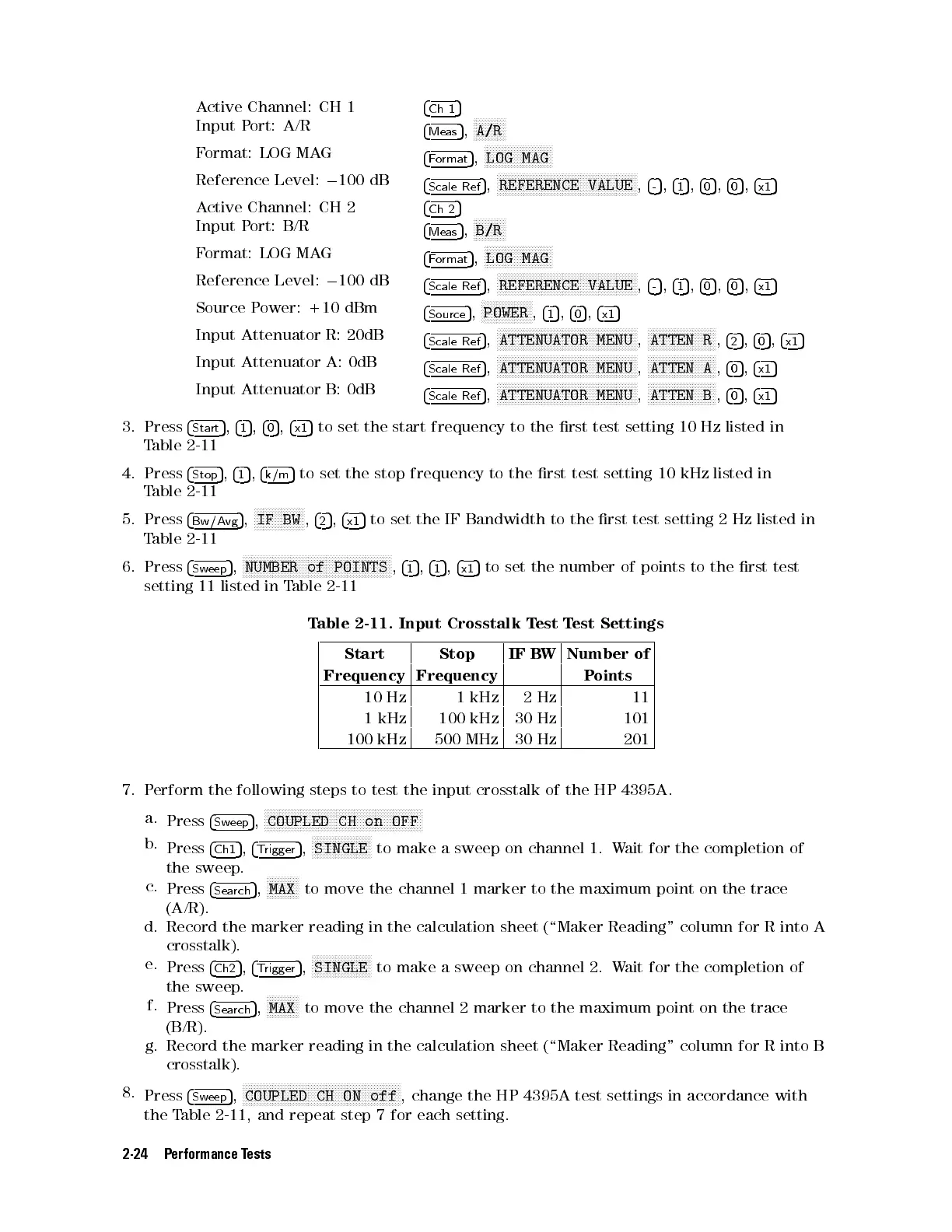
Table 2-11. Input Crosstalk Test Test Settings
Start Stop IF BW Number of
Frequency Frequency Points
10 Hz 1 kHz 2Hz 11
1 kHz 100 kHz 30 Hz 101
100 kHz 500 MHz 30 Hz 201
7. Perform the following steps to test the input crosstalk of the HP 4395A.
a.
Press
4
Sweep
5
,
NNNNNNNNNNNNNNNNNNNNNNNNNNNNNNNNNNNNNNNNNNNNNNNNNNNNN
COUPLED CH on OFF
b.
Press
4
Ch1
5
,
4
Trigger
5
,
NNNNNNNNNNNNNNNNNNNN
SINGLE
to make a sweep on channel 1. Wait for the completion of
the sweep.
c.
Press
4
Search
5
,
NNNNNNNNNNN
MAX
to move the channel 1 marker to the maximum point on the trace
(A/R).
d. Record the marker reading in the calculation sheet (\Maker Reading" column for R into A
crosstalk).
e.
Press
4
Ch2
5
,
4
Trigger
5
,
NNNNNNNNNNNNNNNNNNNN
SINGLE
to make a sweep on channel 2. Wait for the completion of
the sweep.
f.
Press
4
Search
5
,
NNNNNNNNNNN
MAX
to move the channel 2 marker to the maximum point on the trace
(B/R).
g. Record the marker reading in the calculation sheet (\Maker Reading" column for R into B
crosstalk).
8.
Press
4
Sweep
5
,
N
NNNNNNNNNNNNNNNNNNNNNNNNNNNNNNNNNNNNNNNNNNNNNNNNNNNN
COUPLED CH ON off
, change the HP 4395A test settings in accordance with
the Table 2-11 , and repeat step 7 for each setting.
2-24 Performance Tests


 To Next Page
 Loading...







