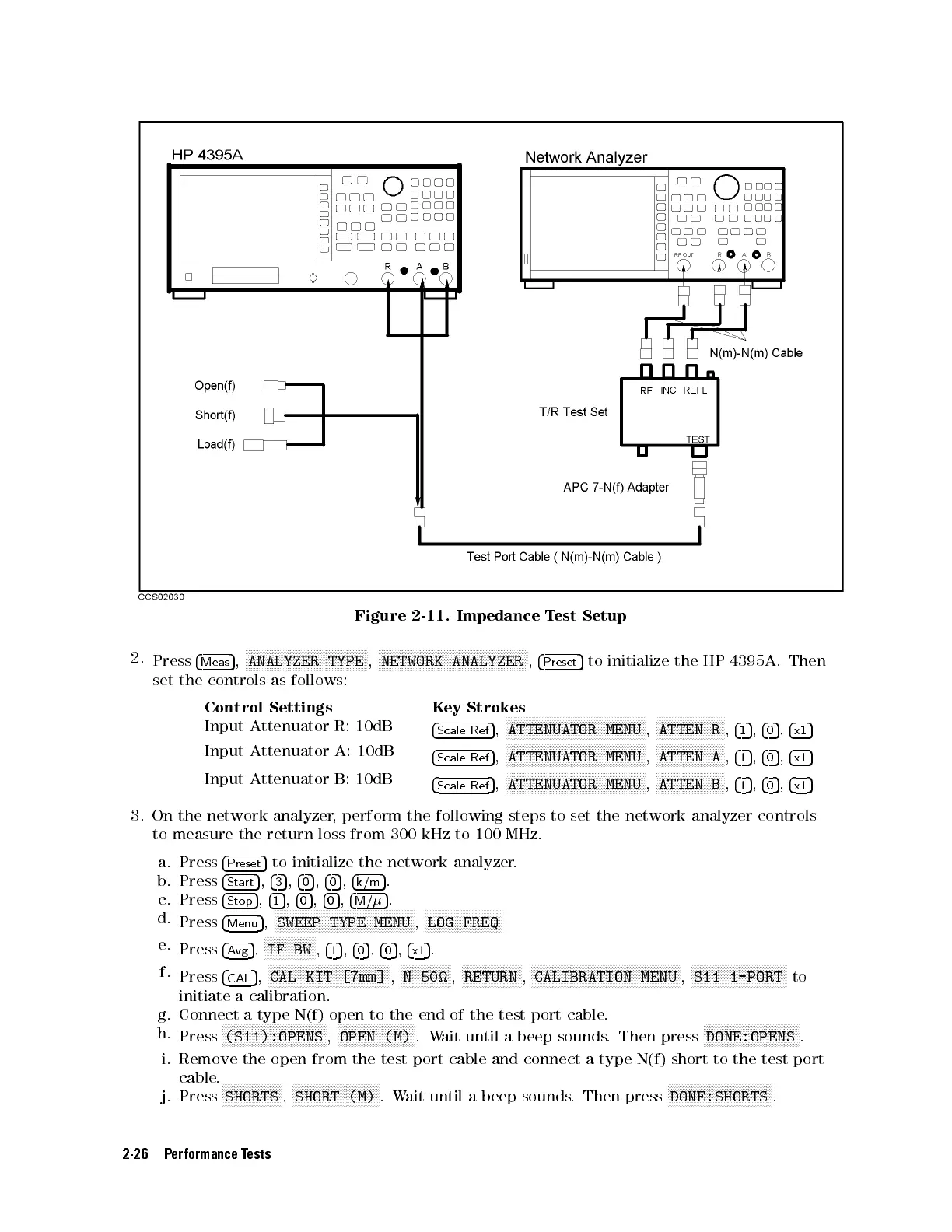
Figure 2-11. Impedance Test Setup
2.
Press
4
Meas
5
,
N
NNNNNNNNNNNNNNNNNNNNNNNNNNNNNNNNNNNNNNNN
ANALYZER TYPE
,
N
NNNNNNNNNNNNNNNNNNNNNNNNNNNNNNNNNNNNNNNNNNNNNNNNN
NETWORK ANALYZER
,
4
Preset
5
to initialize the HP 4395A. Then
set the controls as follows:
Control Settings Key Strokes
Input Attenuator R: 10dB
4
Scale Ref
5
,
NNNNNNNNNNNNNNNNNNNNNNNNNNNNNNNNNNNNNNNNNNNNNNN
ATTENUATOR MENU
,
NNNNNNNNNNNNNNNNNNNNNNN
ATTEN R
,
4
1
5
,
4
0
5
,
4
x1
5
Input Attenuator A: 10dB
4
Scale Ref
5
,
NNNNNNNNNNNNNNNNNNNNNNNNNNNNNNNNNNNNNNNNNNNNNNN
ATTENUATOR MENU
,
NNNNNNNNNNNNNNNNNNNNNNN
ATTEN A
,
4
1
5
,
4
0
5
,
4
x1
5
Input Attenuator B: 10dB
4
Scale Ref
5
,
NNNNNNNNNNNNNNNNNNNNNNNNNNNNNNNNNNNNNNNNNNNNNNN
ATTENUATOR MENU
,
NNNNNNNNNNNNNNNNNNNNNNN
ATTEN B
,
4
1
5
,
4
0
5
,
4
x1
5
3. On the network analyzer, perform the following steps to set the network analyzer controls
to measure the return loss from 300 kHz to 100 MHz.
a. Press
4
Preset
5
to initialize the network analyzer.
b. Press
4
Start
5
,
4
3
5
,
4
0
5
,
4
0
5
,
4
k/m
5
.
c. Press
4
Stop
5
,
4
1
5
,
4
0
5
,
4
0
5
,
4
M/
5
.
d.
Press
4
Menu
5
,
NNNNNNNNNNNNNNNNNNNNNNNNNNNNNNNNNNNNNNNNNNNNNNN
SWEEP TYPE MENU
,
NNNNNNNNNNNNNNNNNNNNNNNNNN
LOG FREQ
e.
Press
4
Avg
5
,
NNNNNNNNNNNNNNNNN
IF BW
,
4
1
5
,
4
0
5
,
4
0
5
,
4
x1
5
.
f.
Press
4
CAL
5
,
NNNNNNNNNNNNNNNNNNNNNNNNNNNNNNNNNNNNNNNNN
CAL KIT [7mm]
,
NNNNNNNNNNNNNNNNN
N 50
,
NNNNNNNNNNNNNNNNNNNN
RETURN
,
NNNNNNNNNNNNNNNNNNNNNNNNNNNNNNNNNNNNNNNNNNNNNNNNNN
CALIBRATION MENU
,
NNNNNNNNNNNNNNNNNNNNNNNNNNNNNNNN
S11 1-PORT
to
initiate a calibration.
g. Connect a type N(f) open to the end of the test port cable.
h.
Press
NNNNNNNNNNNNNNNNNNNNNNNNNNNNNNNNNNN
(S11):OPENS
,
NNNNNNNNNNNNNNNNNNNNNNNNNN
OPEN (M)
.Wait until a beep sounds. Then press
NNNNNNNNNNNNNNNNNNNNNNNNNNNNNNNN
DONE:OPENS
.
i. Remove the open from the test port cable and connect a type N(f) short to the test port
cable.
j. Press
NNNNNNNNNNNNNNNNNNNN
SHORTS
,
NNNNNNNNNNNNNNNNNNNNNNNNNNNNN
SHORT (M)
.Wait until a beep sounds. Then press
NNNNNNNNNNNNNNNNNNNNNNNNNNNNNNNNNNN
DONE:SHORTS
.
2-26 Performance Tests



 To Next Page