Model 8901B Service
(.ls>
Keyboard Key Check
1.
Key in
60.0
SPCL.
As
the Special Function code
is
entered,
60.0
should appear in the display.
This indicates that the Controller responds
to
keyboard interrupts. If faulty, see
@
and
(\/s>
.
While the SPCL key is down, 35 should appear in the display. After releasing the SPCL key, 99
should appear in the display. If another number appears, continue on.
2.
Jumper A13TP3 (INT)
to
A13TP15 (GND). This defeats the keyboard interrupt.
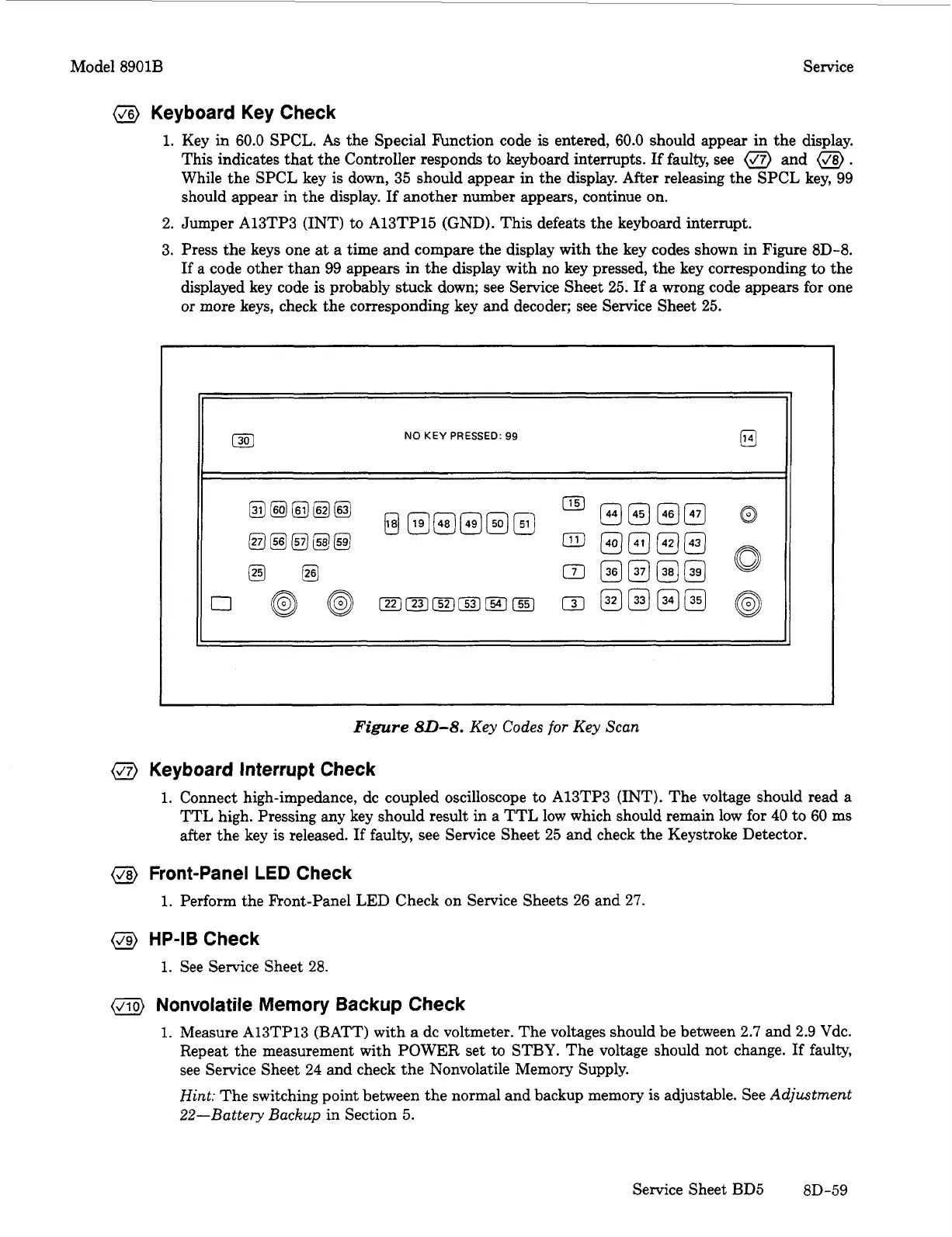
3. Press the keys one at a time and compare the display with the key codes shown in Figure 8D-8.
If
a code other than 99 appears in the display with no key pressed, the key corresponding
to
the
displayed key code is probably stuck down; see Service Sheet 25.
If
a
wrong code appears for one
or more keys, check the corresponding key and decoder; see Service Sheet 25.
El
NO
KEY
PRESSED:
99
[301
Figure
80-8.
Key Codes
for
Key Scan
@
Keyboard Interrupt Check
1.
Connect high-impedance, dc coupled oscilloscope to A13TP3 (INT). The voltage should read a
TTL high. Pressing any key should result in a TTL low which should remain low for
40
to
60
ms
after the key is released.
If
faulty, see Service Sheet 25 and check the Keystroke Detector.
@)
Front-Panel
LED
Check
1.
Perform the F’ront-Panel LED Check on Service Sheets 26 and 27.
@
HP-IB
Check
1.
See Service Sheet
28.
Nonvolatile Memory Backup Check
1.
Measure A13TP13 (BATT) with
a
dc voltmeter. The voltages should be between
2.7
and 2.9 Vdc.
Repeat the measurement with POWER set
to
STBY. The voltage should not change.
If
faulty,
see Service Sheet
24
and check the Nonvolatile Memory Supply.
Hint:
The switching point between the normal and backup memory is adjustable. See
Adjustment
22-Battery Backup
in Section 5.
Service Sheet BD5
8D-59


 To Next Page