9020/9030/9040 Environmental/Installation/PM 2-9
CAUTION
DO
NOT
TOUCH EDGE CONNECTOR
OR
FINSTRA
TE
PLANE.
HOLD
FINSTRA
TE
BY EJECTORS OR SIDE EDGES ONLY.
HAND-
LING FINSTRATE INCORRECTLY COULD CAUSE ELECTROSTA-
TIC DISCHARGE DAMAGE.
WHEN
INSTALLING
FINSTRATE.
HOLD
BY EJECTORS AND MOVE AIR CONTROLLER OUT OF
THE WAY WITH THE SIDE EDGE OF THE FINSTRATE.
7.
(ALL
-
2nd
lOP)
Move
all
finstrates above slot 2 up one slot.
(ALL
-
3rd
lOP)
Move
all
finstrates above slot 3
up
one
slot (Slot 3
is
first
accessible finstrate without
removing door).
8.
(520 - ONLY)
Remove cable clamp from processor stack door by removing two # 1 Pozidriv screws.
9.
(ALL)
Slide the lOP finstrate into the appropriate slot without seating
fin
strate into the mother-
board.
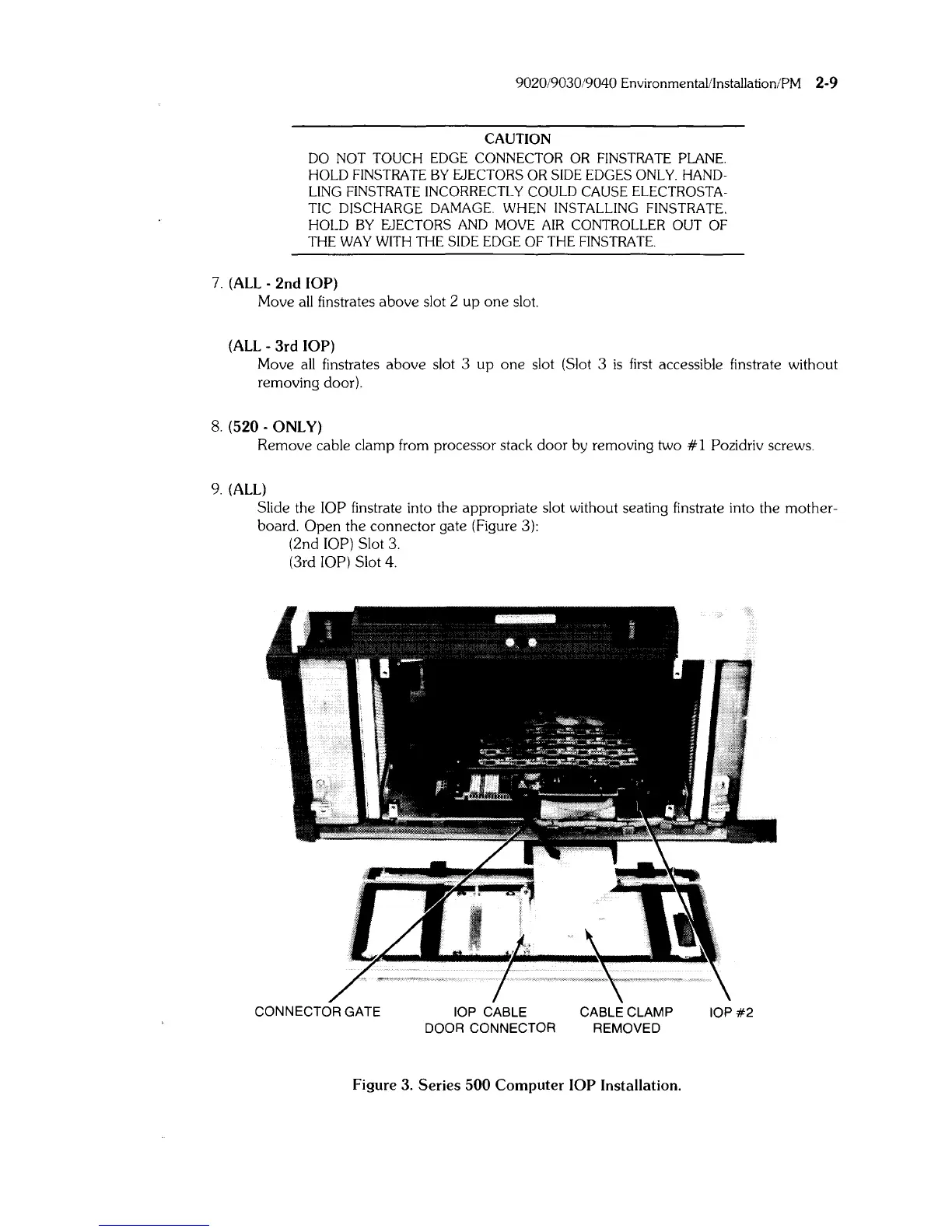
Open the connector gate (Figure 3):
(2nd
lOP) Slot
3.
(3rd lOP) Slot 4.
CONNECTOR GATE
lOP CABLE CABLE CLAMP
IOP#2
DOOR CONNECTOR REMOVED
Figure 3.
Series
500
Computer
lOP
Installation.



 To Next Page