2-18 9020/9030/9040 Environmental/Installation/PM
15.
(520 With
Bootstrap
Loader Card)
Remove Bootstrap Loader card and replace the Bootstrap Loader
ROM
with the new
ROM.
Use tool 8710-0585. Reinstall the card
in
the 1/0 card cage.
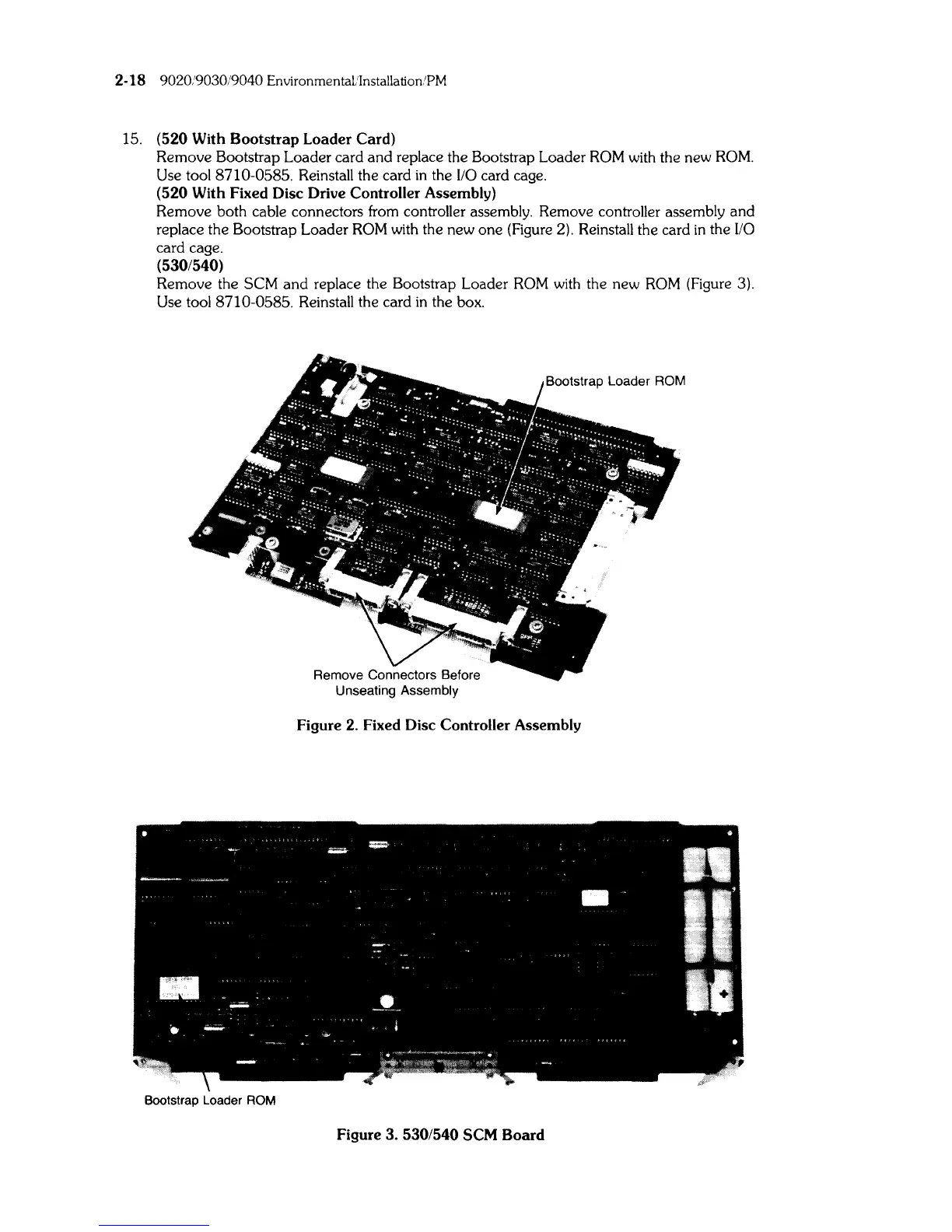
(520 With Fixed Disc Drive Controller Assembly)
Remove both cable connectors from controller assembly. Remove controller assembly and
replace the Bootstrap Loader
ROM
with the new one (Figure 2). Reinstall the card
in
the
110
card cage.
(530/540)
Remove the SCM
and
replace the Bootstrap Loader
ROM
with the new
ROM
(Figure 3).
Use tool 8710-0585. Reinstall the card
in
the box.
Figure 2. Fixed Disc Controller Assembly
Bootstrap Loader ROM
Figure 3. 530/540 SCM
Board



 To Next Page