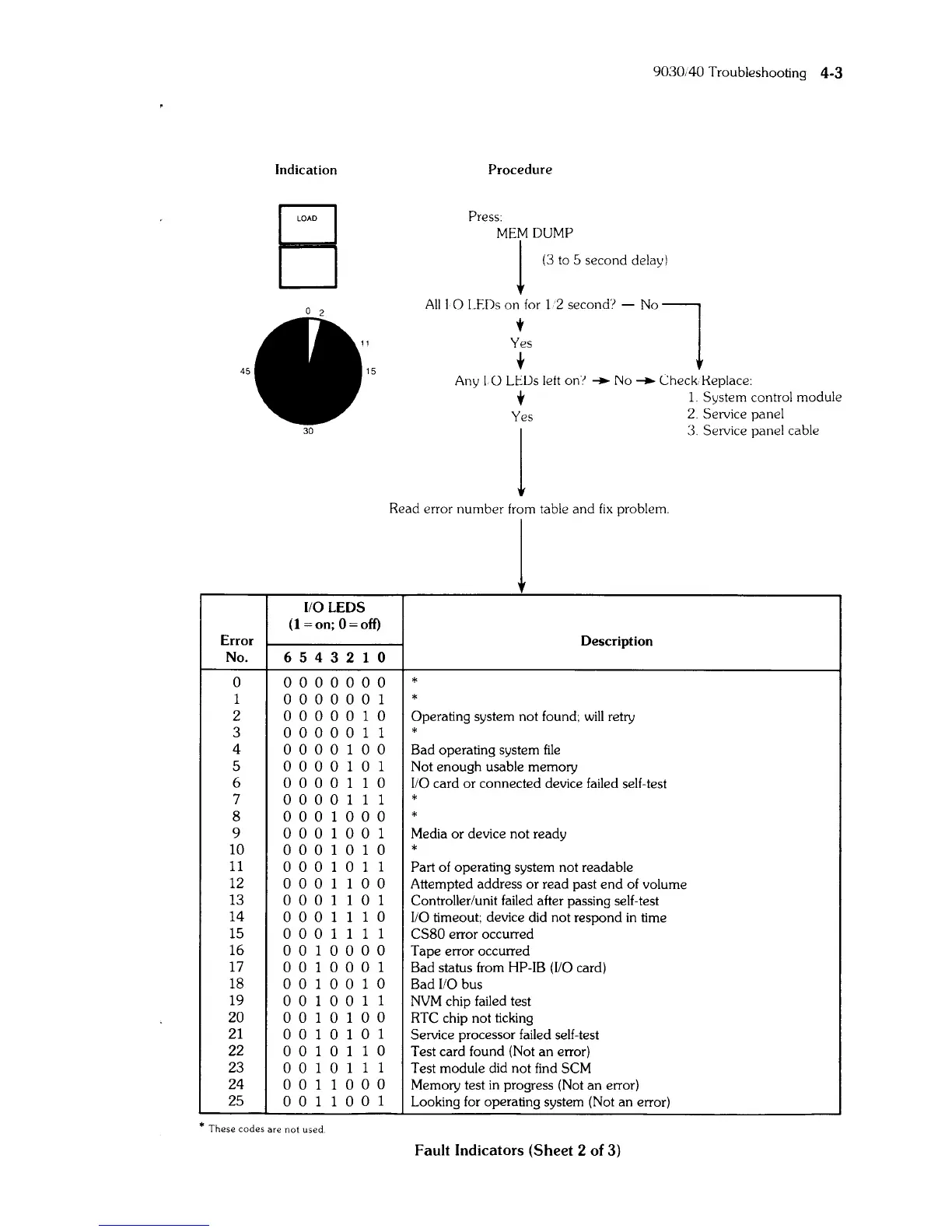
Indication
45
15
I/O LEOS
(l=on;
O=off)
Error
No.
6 5 4 3 2 1 0
0 o 0 0 0
000
1
o 0 0 0 0 0 1
2
0000010
3 o
000
0 1 1
4
o 0
001
0 0
5 o 0
001
0 1
6
o 0 0 0 1 1 0
7
o 0 0 0 1 1 1
8
000
100
0
9
000
100
1
10
000
1
010
11
000
1 0 1 1
12
0001100
13
000
1
101
14
000
1 1 1 0
15
000
1 1 1 1
16
o 0
100
0 0
17
o 0 1
000
1
18
o 0 1 0 0 1 0
19
0010011
20 o 0 1 0 1 0 0
21
o 0
101
0 1
22
0010110
23 o 0 1 0 1 1 1
24
001
1
000
25
001
100
1
*
These
codes
are
not
used
9030;40 Troubleshooting
4-3
Procedure
Press:
MT
"~~:
5 ,econd del,y)
All
I 0
LEDs
on,for
12
second'? -
N0l
Yes
t
Any I 0
LEOs
lett
on~
.....
No
-+-
Check Keplace:
,
1.
System control module
Yes
2.
Service panel
1
3.
Service panel cable
Read error number
from
table and
fix
problem.
1
Description
*
*
Operating system not found;
will
retry
*
Bad operating system
file
Not enough usable memory
[/0
card or connected device failed self-test
*
*
Media or device not ready
*
Part
of
operating system not readable
Attempted address or read past end of volume
Controller/unit failed after passing self-test
I/O
timeout; device did not respond
in
time
CS80 error occurred
Tape error occurred
Bad status from HP-[B
(I/O
card)
Bad
I/O
bus
NVM chip failed test
RTC
chip not ticking
Service processor failed self-test
Test card found (Not an error)
Test module did not find
SCM
Memory test
in
progress (Not an error)
Looking
for
operating system (Not an error)
Fault
Indicators
(Sheet
2
of
3)



 To Next Page