5-12
9825A/B
Diagnostics
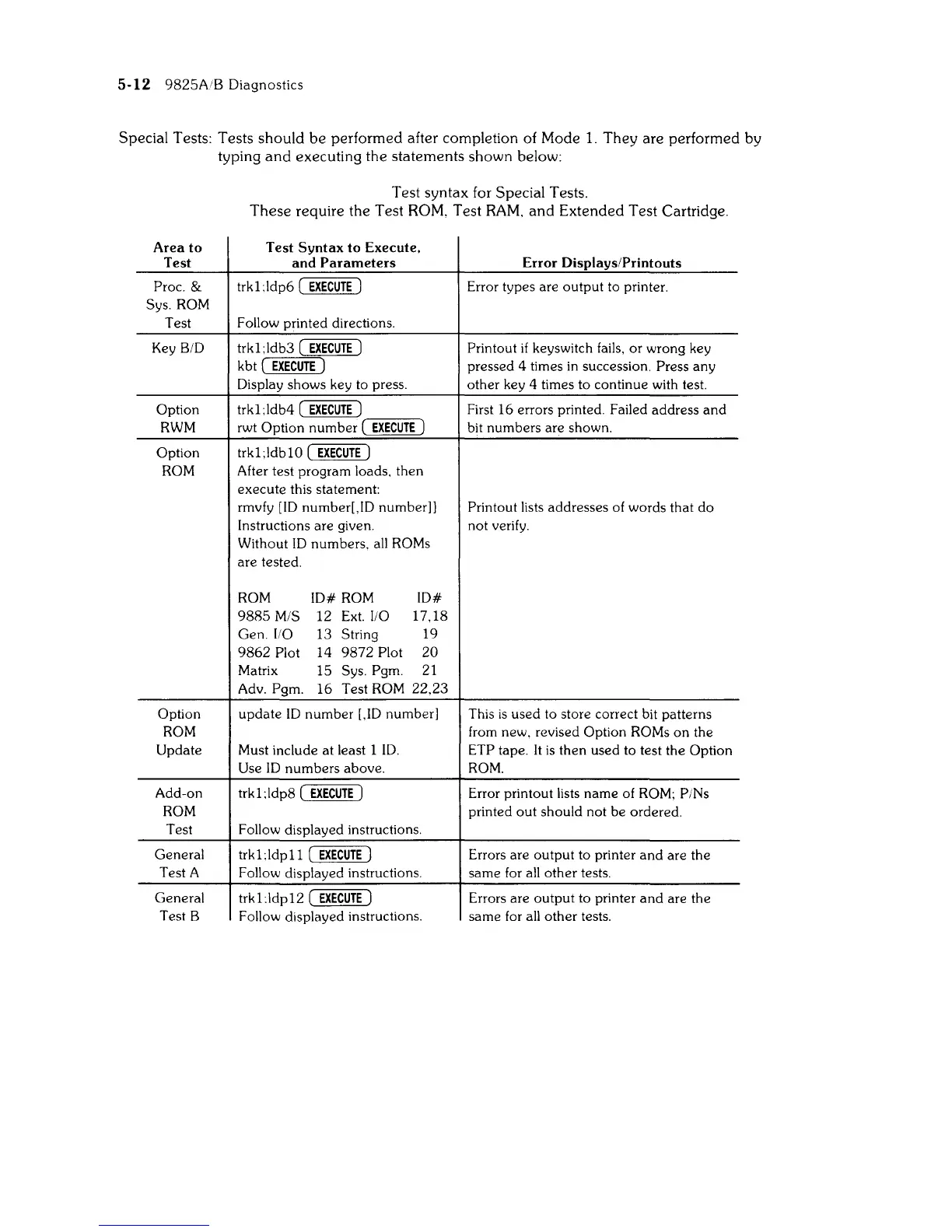
Special Tests: Tests should
be
performed after completion of Mode
1.
They are performed by
typing
and
executing the statements shown below:
Test syntax for Special Tests.
These
require the Test ROM, Test
RAM.
and
Extended Test Cartridge.
Area
to
Test
Syntax
to
Execute.
Test
and
Parameters
Error
Displays/Printouts
Proc. &
trkUdp6
(
EXECUTE)
Error types are
output
to printer.
Sys.
ROM
Test
Follow printed directions.
Key
BID
trkl;ldb3
(
EXECUTE)
Printout
if
keyswitch fails, or wrong key
kbt (
EXECUTE)
pressed 4 times
in
succession. Press any
Display shows key to press.
other key 4 times to continue with test.
Option
trkUdb4
(
EXECUTE)
First
16
errors printed. Failed address
and
RWM
rwt Option
number
(
EXECUTE)
bit numbers are shown.
Option
trkl;ldbl0
(
EXECUTE)
ROM
After test program loads, then
execute
this statement:
rmvfy [lD number[,ID number]]
Printout lists addresses of words that
do
Instructions are given. not verify.
Without
ID
numbers.
all
ROMs
are
tested.
ROM
ID#
ROM
ID#
9885
M/S
12
Ext.
110
17,18
Gen.
110
13 String
19
9862
Plot
14
9872
Plot
20
Matrix
15
Sys. Pgm. 21
Adv.
Pgm.
16
Test ROM
22,23
Option
update
ID
number
[,ID number]
This
is
used to store correct bit patterns
ROM from new, revised Option ROMs
on
the
Update Must include
at
least 1
ID.
ETP tape.
It
is
then used to test the Option
Use
ID
numbers
above.
ROM.
Add-on
trkUdp8
(
EXECUTE)
Error printout lists name of
ROM;
PINs
ROM printed
out
should not
be
ordered.
Test Follow displayed instructions.
General
trkUdpll
(
EXECUTE)
Errors are
output
to printer
and
are the
Test A
Follow displayed instructions. same for all
other
tests.
General
trk1:ldp12 (
EXECUTE)
Errors are
output
to printer
and
are the
Test B
Follow dis
la
ed
instructions.
p y
same
for all
other
tests.



 To Next Page