9825AiB
Diagnostics 5-13
Control Keys Test
1.
Turn
on
calculator, insert extended test cartridge.
2.
Type!
,
..
,
1.,
press m
3.
Press
@ill
(~);
the display should be
::.
d f
0:::
4.
Press
CD;
the test program should load.
5.
Press~;
the
display
should
be
:."
c·
'j' •
6.
Press I!!!!!I; the cartridge should rewind.
7.
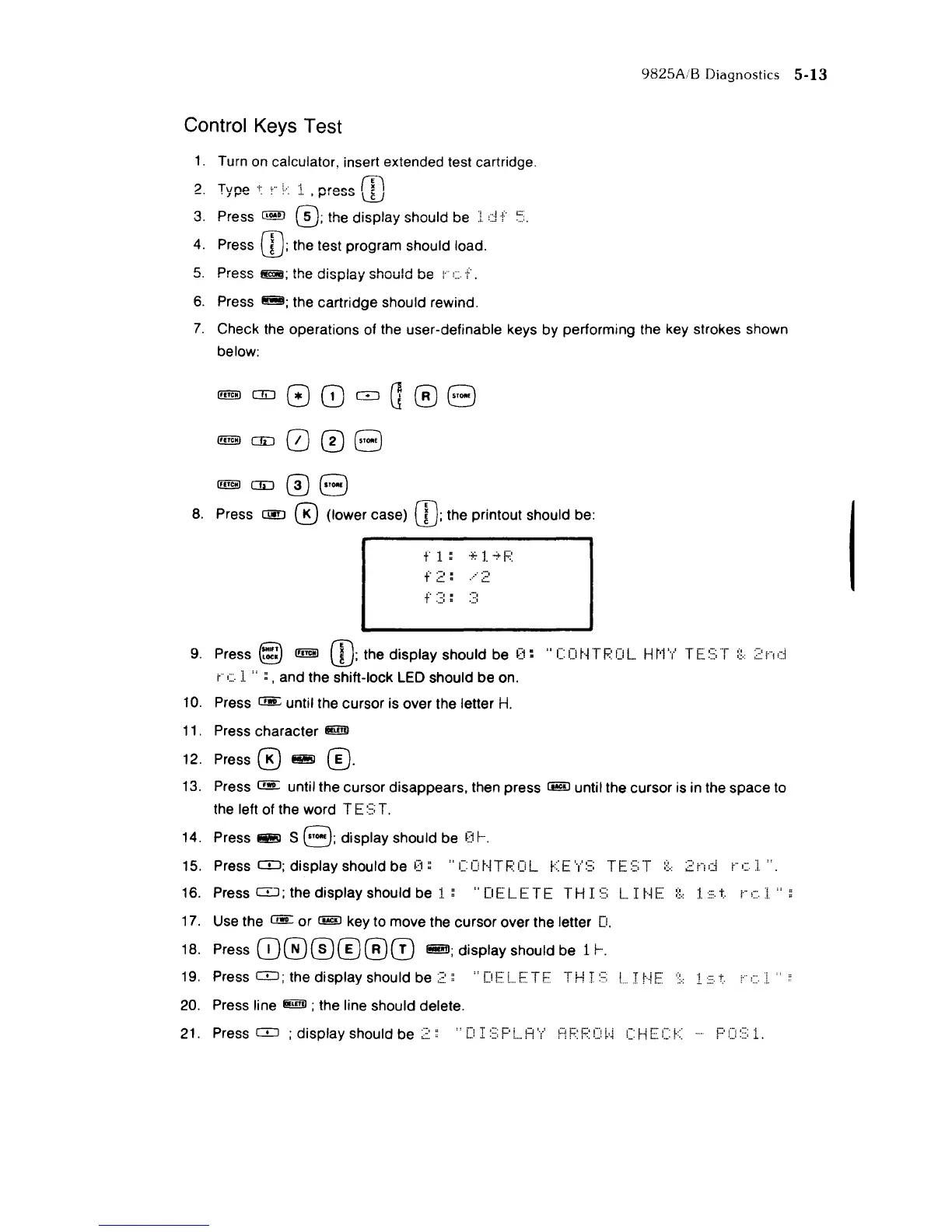
Check the operations of the user-definable keys by performing the key strokes shown
below:
!!lliID0i:J008
!!lliID0i:J08
8.
Press
CI!D
0 (lower case)
CD;
the printout should be:
t'
1:
·:':'l·':"F:
f
2:
·· ..
2
f
3:
3
9.
Press §
!!lliID
CD;
the display should be
0:
"C
0
t·i
T
POL
H
r'1
'y'
T E
:::;
T
:~.:
2
j,"!;:::i
(c.:[
" ; , and the shift-lock LED should be on.
10.
Press
C!!!:
until the cursor is over the letter
H.
11.
Press character
Ii!iffiI
12. Press 0
~
0·
13.
Press C!!r: until the cursor disappears, then press mID until the cursor is in the space to
the left of the word T E
:::;
T.
14. Press
~
S
8;
display should be
f:H
....
15. Press
CD;
display should be
0;
"Ccr'HPCL
t:::E'y':::;
H~:::;T
:~.:
2nd
(c:i. ".
16. Press
CD;
the display should be
1:
"
DE
LET
E T HI::::; L I
t·i
E
:~.:
1.
~::.
t
r-
c·
:i.
17. Use the C!!r: or mID key to move the cursor over the letter
D.
18.
Press
CD®00®0
fi!ffiI; display should be 11-.
19.
Press
CD;
the display should be
2;
"DE:LETF
TH
I
0::;
!
:r
r'~E'
'.'
:1.:::.
20.
Press line
@!ill!)
; the line should delete.
21. Press
CD
; display should be
~~::
"D
I
::;:
F'!
. A
'/
H F
F:
C
~,~
C
t·n::
C:f:::



 To Next Page