9
Setup
button: This button provides quick access to the Setup menu.
10 LED light: This light is not functional on this product.
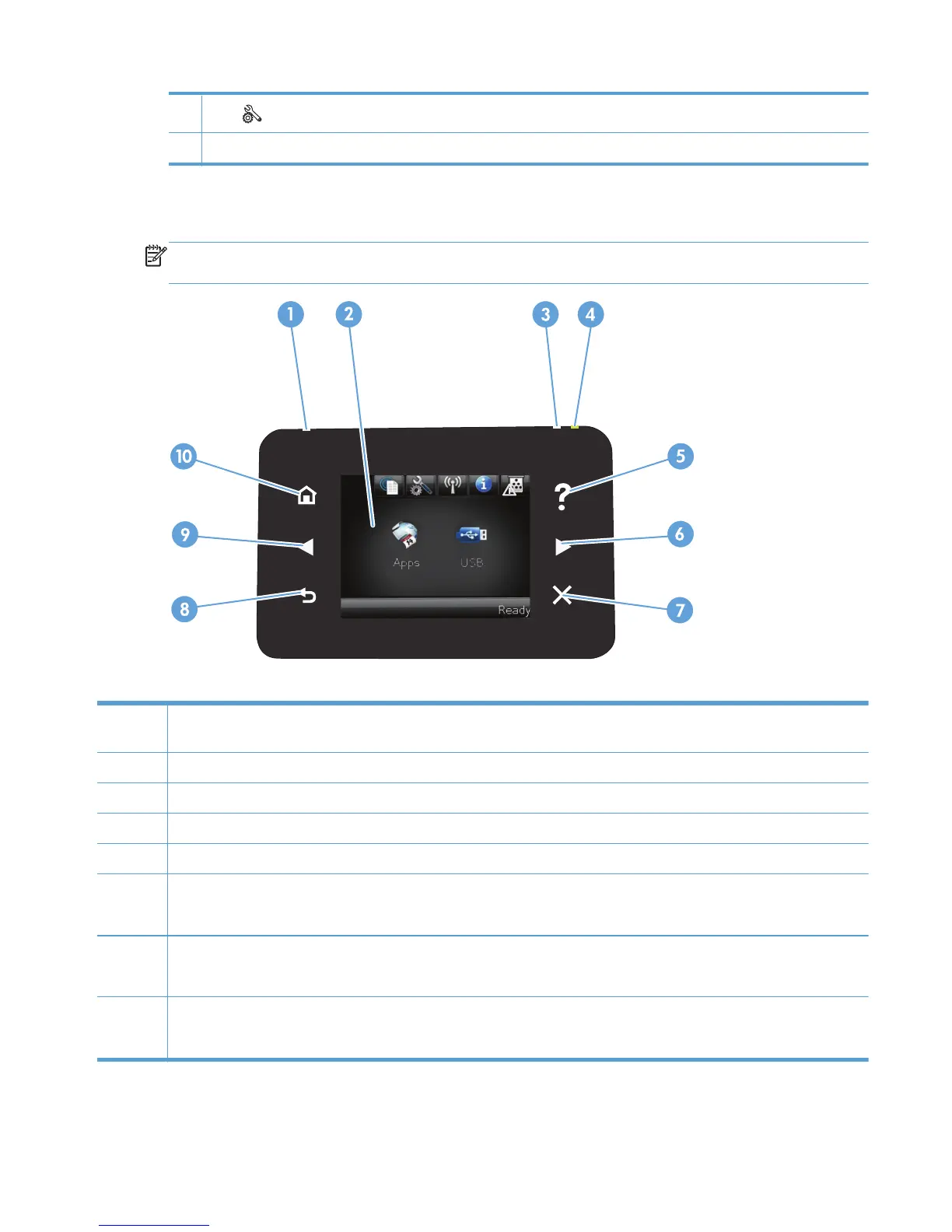
Touchscreen control panel
NOTE: The touchscreen control panel is available on the HP LaserJet Pro 400 M401dn Printer model
and the HP LaserJet Pro 400 M401dw Printer model.
1 Wireless light: indicates the wireless network is enabled. The light blinks while the product is establishing a connection to the
wireless network (available on the HP LaserJet Pro 400 M401dw Printer model only).
2 Touchscreen display
3 Attention light: indicates a problem with the product
4 Ready light: indicates the product is ready
5 Help button and light: provides access to the control panel help system
6 Right arrow button and light: moves the cursor to the right or moves the display image to the next screen
NOTE: This button illuminates only when the current screen can use this feature.
7 Cancel button and light: clears settings, cancels the current job or exits the current screen
NOTE: This button illuminates only when the current screen can use this feature.
8 Back button and light: returns to the previous screen
NOTE: This button illuminates only when the current screen can use this feature.
ENWW
Product views
5



 To Next Page