21
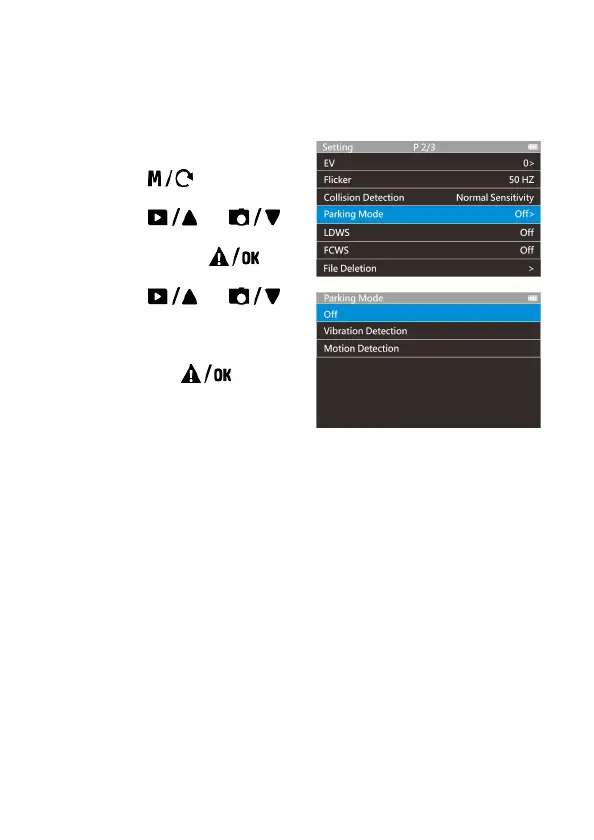
3.6 Parking Mode
To monitor the vehicle when it is parked, you can activate Motion Detection,
or Vibration Detection.
Follow the steps below to change the
settings for Parking Mode:
1. Press the button to
enter the main menu.
2. Press the
or
button to select Parking Mode,
and then press the
button to confirm.
3. Press the
or
button to configure Parking
Mode (Motion Detection /
Vibration Detection / Off), and
then press the button
to complete setting.
3.6.1 Using embedded battery of car camcorder
• Motion Detection:
If disconnected external power supply when the camcorder
is powered on, the system alert message “Press OK to
power off or enter Parking mode after 10 sec.” This means
the system will enter Motion Detection automatically in 10
seconds, and then LCD screen turns off (the camcorder will
turn off the screen temporarily, but still in standby detection
status. Press any button to turn on the operation screen).
In the Motion Detection mode, when the camcorder detects
any motion in front of lens, the automatic record will be
activated.
In this mode, when the camcorder detects any motion in
front of lens, the video recording will be triggered and the
event will be recorded for 10 seconds (per file). If the event



 To Next Page