2 Product walk-around
Product walk-around
Series at a glance
HP Officejet 6500A
e-All-in-One
HP Officejet 6500A Plus
e-All-in-One
Automatic two-sided printing Not available Standard
Wired networking Standard Standard
802.11n wireless networking Optional Standard
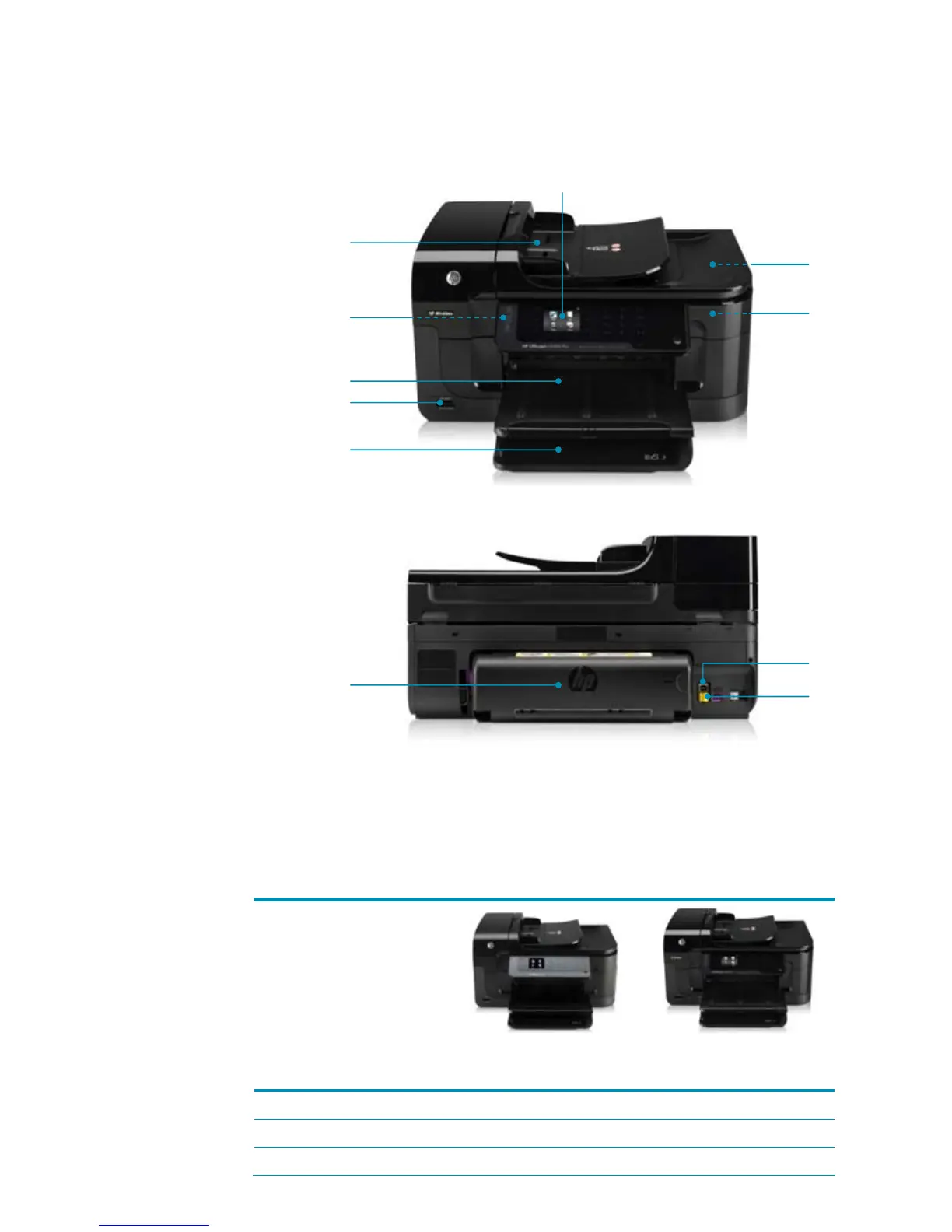
1 Large 2.36-inch intuitive
touchscreen control panel
for copy, scan, and fax
operation
2 35-sheet ADF
automatically copies,
scans, and faxes up to
legal-size documents
3 Built-in wireless 802.11n
4 50-sheet output tray and
output tray extender
5 Memory card slots to
enable you to scan directly
to your memory cards or
print photos directly from a
memory card without a PC
6 250-sheet multipurpose
input tray handles a
variety of paper sizes and
types
7 Flatbed scanner scans
books, magazines, or
single sheets at up to
4800 dpi
8 Convenient access to
separate ink cartridges
and printhead for cost-
effective operation
9 Automatic two-sided
printing accessory
10 Hi-Speed USB 2.0 port,
power connection, 1-LINE
(fax) and 2-EXT (phone)
ports
11 Ethernet networking
HP Officejet 6500A
Plus e-All-in-One
shown
3
5
10
2
4
7
8
1
6
9
11



 To Next Page