Hard drive
Description Spare part number
500-GB, 5400-rpm 778186-005
Before removing the hard drive, follow these steps:
1. Shut down the computer. If you are unsure whether the computer is off or in Hibernation, turn
the computer on, and then shut it down through the operating system.
2. Disconnect all external devices connected to the computer.
3. Disconnect the power from the computer by first unplugging the power cord from the AC outlet,
and then unplugging the AC adapter from the computer.
4. Remove the keyboard (see
Keyboard on page 25).
5. Remove the base enclosure (see
Base enclosure on page 28).
6. Remove the battery (see
Battery on page 36).
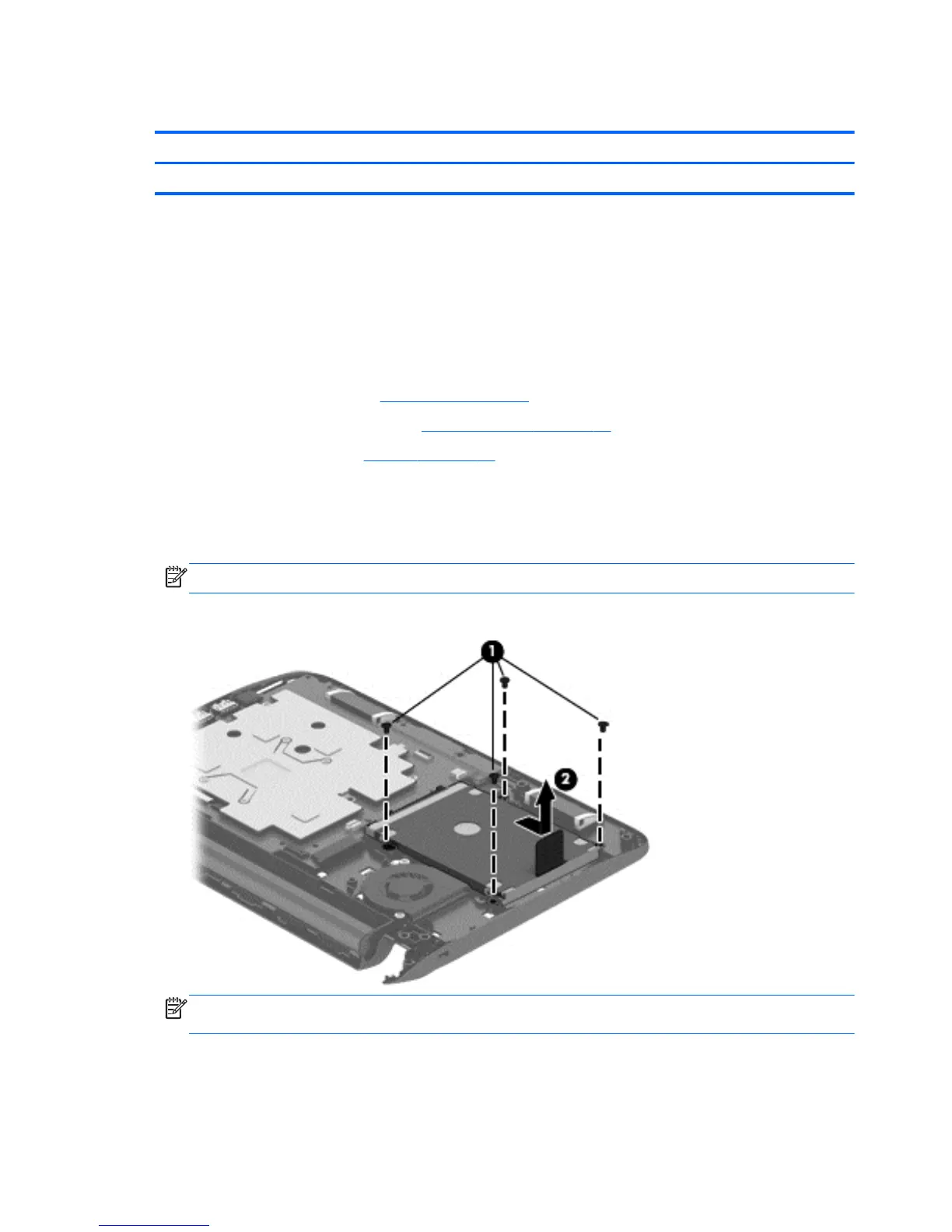
To remove a hard drive:
1. Position the top cover upside down on a flat surface.
Remove the four Phillips 2.5×3.5 screws that secure the hard drive to the top cover (1).
NOTE: Some models may only have two screws.
2. Lift the hard drive (2) out of the hard drive bay.
NOTE: The top side of the top cover has a small hole that you can push through to release the
hard drive.
40 Chapter 5 Removal and replacement procedures for Authorized Service Provider parts




 To Next Page