EasyManua.ls Logo

HP Pavilion p6710f - User Manual

HP Pavilion p6710f
2 pages
Print Icon
To Next Page IconTo Next Page
Loading...
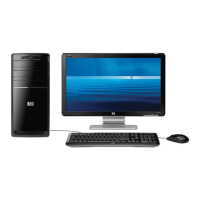
HP Pavilion p6710f PC
Windows
®
. Life without Walls
TM
.
HP recommends Windows 7.
Highlights:
VISION Technology - Premium with AMD Athlon
II 640 Quad-Core Processor
(2)
Genuine Windows
®
7 Home Premium 64-bit
(1)
Get powerful 64-bit performance with 4GB DDR3 system memory
(3)
1TB (Terabyte) hard drive
(4)
stores up to 222,000 songs or 178,000 photos
(5)
SuperMulti DVD burner with LightScribe technology
(6)
ATI Radeon
TM
HD 4200 integrated graphics
(16)
Wireless LAN 802.11b/g/n
(19)
Front-panel 15-in-1 memory card reader
24 x 7 toll-free phone support, one-year HP limited warranty, lifetime use of
HP Support Assistant provide priceless peace of mind
The perfect PC for photos, videos, and music
Whether you’re surfing the Web, editing photos, mixing your soundtracks or
creating your own home videos, HP Pavilion desktop PC’s offer a variety of
ways to make your computing experience richer and more rewarding.
(10)
As
you would expect from the leader in consumer PC’s, every HP Pavilion PC
includes many intuitive features that make capturing and sharing your digital
experiences easier than ever.
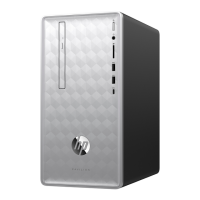
Power button and card reader on top.
Marquee signature design with lighting and chrome.
Sliding door concealing ports for a clean look.
The front-panel 15-in-1 memory card reader makes it easy to transfer
photos, music, and other files to and from your digital camera and other
peripheral devices.
The SuperMulti DVD burner with LightScribe technology lets you create
custom, silkscreen-quality labels and artwork directly onto
LightScribe-enabled CD and DVD discs.
(6)
The Pavilion PC also features Wireless LAN 802.11b/g/n networking.
(19)
Maximize your viewing experience
The HP Pavilion series has all the power and performance you need to
multitask with ease. And with HP Multi-Display Capable technology to support
multiple monitors, you’ll have more space to work. Compare documents side
by side. Quickly drag content from one application to the next. Stream digital
entertainment to one monitor while you work on the other. It’s easy with HP.
HP Exclusive MediaSmart Software Suite
One stop for all your multimedia and entertainment.
Discover and enjoy your digital world.
Share and browse your personal memories via Snapfish by HP.
(10)
Burn your music
(13)
, slideshows & playlists to DVDs for sharing or saving.
Add your favorite music as background to your photo slideshows.
Your PC, your way, with HP & Windows
®
7
(1)
Windows
®
7 makes everyday tasks simple—and makes new things possible.
HP Setup Manager: Learn about your new PC and explore key activities that
can help you transition smoothly and easily from your old PC.
HP Support Assistant: Helps you maintain the performance of your PC and
resolve problems with automated updates and tune-ups, built-in diagnostics,
and guided assistance.
Latest processor technology
Step up from dual-core with the AMD Quad-Core Processor
(2)
that is the perfect
match for Windows
®
7
and delivers phenomenal performance for media and
multi-tasking.
Relax with 24/7 Support
While your PC is within Warranty, HP Care Pack Support gives you access to
complimentary help whichever way you prefer:
(10)
From your desktop: Click the HP Support Assistant icon for quick access to
automated maintenance, preinstalled content, diagnostic tools, and multiple
assistance options.
Through the Internet: Visit our Consumer Support Forum, available 24/7 in
English, French or Spanish at www.hp.com/support/consumer-forum. In the
US, go to www.hp.com/go/totalcare.
By telephone: In the U.S., call HP at 1.800.HP.INVENT (1.800.474.6836).
To continue complimentary access to support, you can extend your Standard
Warranty with an HP Care Pack service. Visit www.hp.com/go/totalcare for
your choice of plans.
If your PC is out-of-warranty, you can visit the Consumer Support
Forum (www.hp.com/support/consumer-forum) at no charge. You can also
call 1.800.HP.INVENT within the U.S. (1.800.474.6836), but support charges
will apply.
Question and Answer IconNeed help?

Do you have a question about the HP Pavilion p6710f and is the answer not in the manual?

HP Pavilion p6710f Specifications

General IconGeneral
BrandHP
ModelPavilion p6710f
CategoryDesktop
LanguageEnglish

Summary

HP Pavilion p6710 f PC Overview

Key Features and Highlights

Lists primary technological and functional features of the HP Pavilion p6710f PC.

HP Pavilion PC Experience

Describes how HP Pavilion PCs enhance digital experiences for photos, videos, and music.

Enhanced Viewing Experience

Details how the HP Pavilion series supports multitasking and multiple monitors for productivity.

HP MediaSmart Software Suite

A comprehensive suite for multimedia and entertainment, including photo sharing and DVD burning.

HP and Windows 7 Integration

HP Setup Manager

Guides users through new PC setup and transitions from older systems.

HP Support Assistant

Tool for PC performance maintenance, automated updates, diagnostics, and guided assistance.

Advanced Processor Technology

Highlights the AMD Quad-Core Processor for enhanced media and multitasking performance.

HP 24;7 Support Options

Details access to technical assistance via desktop icon, online forums, and phone support.

HP Pavilion p6710 f PC Specifications

Operating System and Processor Details

Specifies the OS (Windows 7 Home Premium 64-bit) and AMD Athlon II 640 Quad-Core Processor.

Memory and Hard Drive Specifications

Details system memory (4GB DDR3) and hard drive (1TB) specifications.

Optical Drive and Graphics

Covers SuperMulti DVD Burner with LightScribe and ATI Radeon HD 4200 integrated graphics.

Network and Wireless Connectivity

Details the 10/100Base-T network interface and Wireless LAN 802.11b/g/n.

Memory Slots and Expansion Bays

Specifies available memory slots and external/internal expansion bay configurations.

External Ports and Connectivity

Lists front and back panel ports including USB, audio, and video outputs.

Multi-Display Capability

Confirms the PC's capability to support multiple displays for expanded workspace.

Mouse, Keyboard, Dimensions, and Weight

Provides details on included peripherals, physical dimensions, and product weight.

Warranty and Support Information

Warranty Options

Outlines the standard one-year limited hardware and software support with 24/7 assistance.

Service Options and Delivery

Details hardware and software service coverage, including customer replaceable parts.

Support Options and Access

Explains how to access support via desktop icon, online forums, and phone.

Software Features

Photo and Video Software

HP MediaSmart Software Suite for multimedia creation and management.

Entertainment Software

Includes Cyberlink DVD Suite Deluxe for video editing and disc creation.

Productivity Software

Features HP Support Assistant and HP Setup Manager for PC maintenance and setup.

PC Security Software

Includes Norton Online Backup and Norton Internet Security for system protection.

Additional Product Information

Product Number and Dates

Lists product number, embargo date, and UPC code for identification.

Origin and Tariff Details

Specifies country of origin, tariff number, and pallet information.
Related product manuals