Need help?
Do you have a question about the HP PAVILLION ZD7000 and is the answer not in the manual?
Details notebook model naming conventions and specific configurations.
Lists the key features and specifications of the notebook.
Provides steps to clear BIOS passwords and reset CMOS settings.
Describes the notebook's power management features for extended battery life.
Identifies and describes the external ports and connectors on the notebook.
Provides a high-level overview of the notebook's internal components and their connections.
Introduces system management utilities for setup and diagnostics.
Guides on using the Windows-based diagnostic tools for system testing.
Outlines common troubleshooting procedures and their corresponding flowcharts.
Shows where to find the notebook's serial number for service requests.
Provides an exploded view and list of major notebook parts.
Lists and illustrates plastic parts included in a service kit.
Lists and illustrates cables included in a service kit.
Details specifications and part numbers for hard drives and optical drives.
Lists various miscellaneous spare parts like AC adapters and power cords.
Lists the necessary tools for performing disassembly and reassembly.
Covers general precautions for handling plastic parts and cables during service.
Offers guidance on safely handling and preventing damage to storage drives.
Explains the risks of ESD and how to prevent it.
Details safe practices for packaging and transporting sensitive equipment.
Outlines essential grounding and handling precautions for service workstations.
Describes proper grounding techniques and equipment for ESD prevention.
Reiterates the importance of the serial number for service and part orders.
Provides a guide to the order of component removal and screw counts.
Outlines essential initial steps before disassembling the notebook.
Details how to replace the adhesive rubber feet on the notebook.
Provides instructions for removing and replacing the memory modules.
Explains how to remove and replace the wireless LAN card.
Details the process for removing and replacing the optical drive (CD/DVD).
Provides step-by-step instructions for removing the notebook keyboard.
Explains the procedure for removing the keyboard cover.
Details how to remove and replace the notebook's display panel.
Provides instructions for removing and replacing the notebook's top cover.
Details the process for removing and replacing the main system board.
Explains how to remove and replace the real-time clock battery.
Details the steps for removing and replacing the heat sink and fans.
Provides instructions for removing and replacing the CPU.
Explains how to remove and replace the SD card slot and infrared module.
Details the procedure for removing and replacing the left and right speakers.
Lists general physical and performance specifications for the notebook.
Details the specifications for the 15.4-inch Wide SXGA+ TFT display.
Details the specifications for the 15.4-inch Wide XGA+ TFT display.
Lists specifications for various hard drive capacities and types.
Provides specifications for the external AC adapter.
Details specifications for the 12-cell Li-Ion battery pack.
Lists specifications for the 24X DVD/CD-RW optical drive.
Lists specifications for the 24X CD-RW optical drive.
Lists specifications for the 8X DVD-ROM optical drive.
Lists specifications for the 24X CD-ROM optical drive.
Details Direct Memory Access channel assignments and their functions.
Lists hardware interrupt requests (IRQ) and their system functions.
Lists system Input/Output addresses and their assigned functions.
Details the memory map of the system, including address ranges and functions.
Details the pinout for the RJ-45 Ethernet network connector.
Details the pinout for the RJ-11 modem connector.
Details the pinout for the USB connectors.
Details the pinout for the S-Video connector.
Details the pinout for the external monitor connector (VGA).
Details the pinout for the audio line-out jack.
Details the pinout for the microphone jack.
Details the pinout for the parallel port connector.
Specifies requirements for 3-conductor power cords.
Outlines general requirements applicable to power cords in all countries.
Lists country-specific requirements for power cord certification and configuration.
Details screw specifications and usage for Phillips PM2.5x4.0 screws.
Details screw specifications and usage for Phillips PM2.5x5.0 screws.
Details screw specifications and usage for Phillips PM2.5x8.0 screws.
Details screw specifications and usage for Slotted M1.5x10.0 shoulder screws.
Details specifications and usage for HM5.0x8.5 standoffs.
Details screw specifications and usage for PM1.5x12.0 spring-loaded shoulder screws.
Details screw specifications and usage for Phillips PM1.5x4.0 screws.
 General
| Brand | HP |
|---|---|
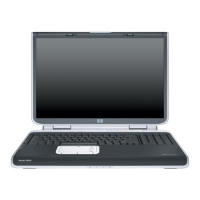
| Model | Pavilion ZD7000 |
| Processor | Intel Pentium 4 |
| Processor Speed | 3.2 GHz |
| Display Size | 17 inches |
| Display Resolution | 1440 x 900 |
| Wireless Connectivity | 802.11b/g |
| Storage | 80 GB HDD |
| Graphics Card | NVIDIA GeForce FX Go 5600 |
| Operating System | Windows XP |
| Optical Drive | DVD±RW |
| Battery Life | 2 hours |
| Ports | USB 2.0, Ethernet, VGA, FireWire |


 To Next Page