Description Spare part number
AMD Sempron processor:
X2 190, 2.5 GHz, 1-MB L2 cache 666889-001
1. Prepare the computer for disassembly (Preparation for Disassembly on page 42).
2. Remove the access panel (
Access Panel on page 43).
3. Lay the computer on its side with the rear facing toward you.
4. Remove the fan sink
Fan Sink Assembly on page 85).
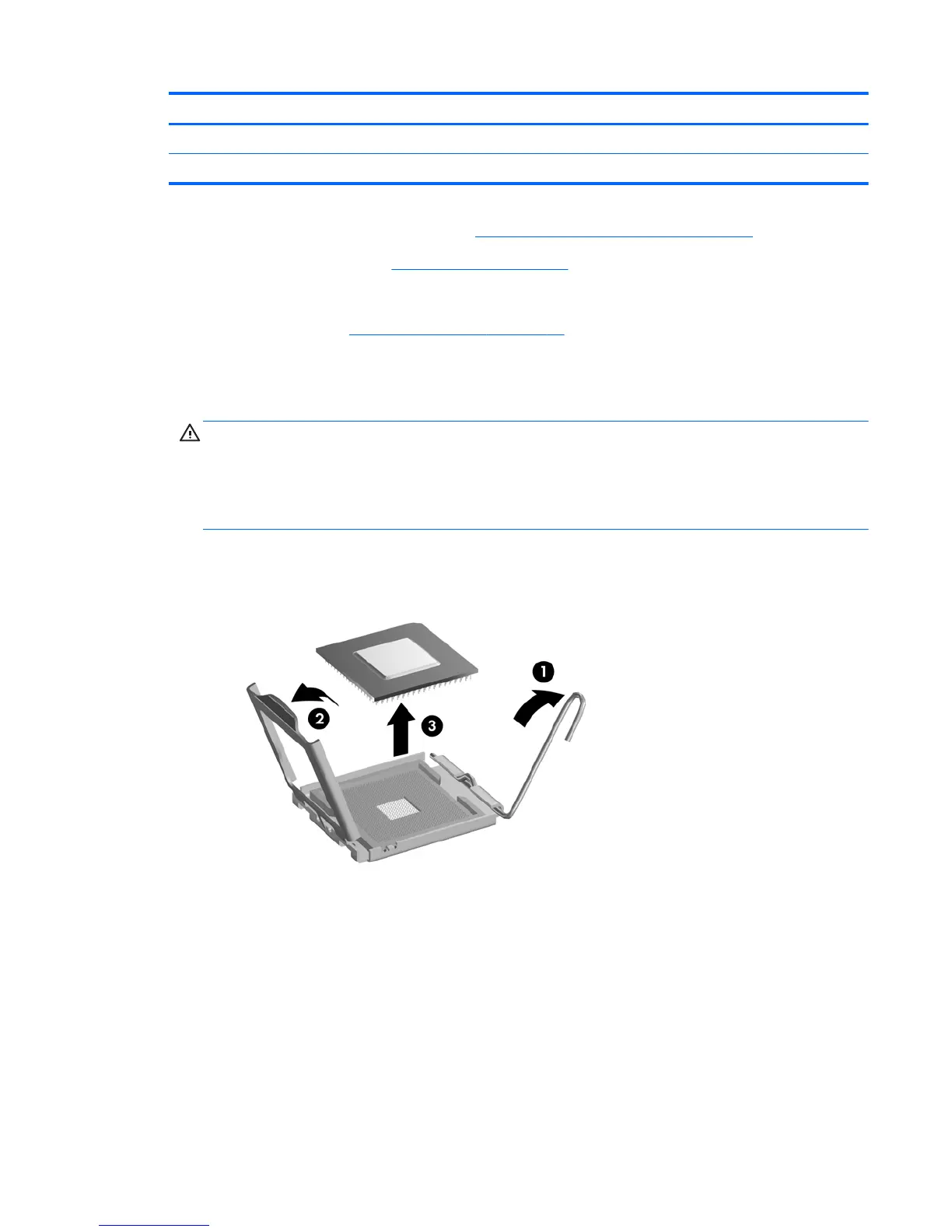
5. If you are removing an Intel processor, rotate the locking lever to its full open position (1), raise
and rotate the microprocessor retainer to its full open position (2), and then carefully lift the
processor from the socket (3).
CAUTION: Do NOT handle the pins in the processor socket. These pins are very fragile and
handling them could cause irreparable damage. Once pins are damaged it may be necessary to
replace the system board.
CAUTION: The heat sink must be installed within 24 hours of installing the processor to
prevent damage to the processor’s solder connections.
Figure 7-46 Removing an Intel processor
To install a new processor:
1. Place the processor in its socket.
2. If installing an Intel processor, close the retainer.
3. Secure the locking lever.
If reusing the existing heat sink, go to step 4.
If using a new heat sink, go to step 7.
Processor 87


 To Next Page