Setup 23
The contents of the server shipping carton include:
• Server
• Power cord
• Keyboard and mouse (not included in all configurations)
• Hardware documentation, Documentation CD, and software media
In addition to the supplied items, you may need:
• Optional hard drives, array controllers, and tape drives
• Operating system or application software
• UPS or PDU
Installing hardware options
Install any hardware options before initializing the server. For options installation information, refer to the
option documentation. For server-specific information, refer to "Hardware options installation (on page
25)."
Setting up a server
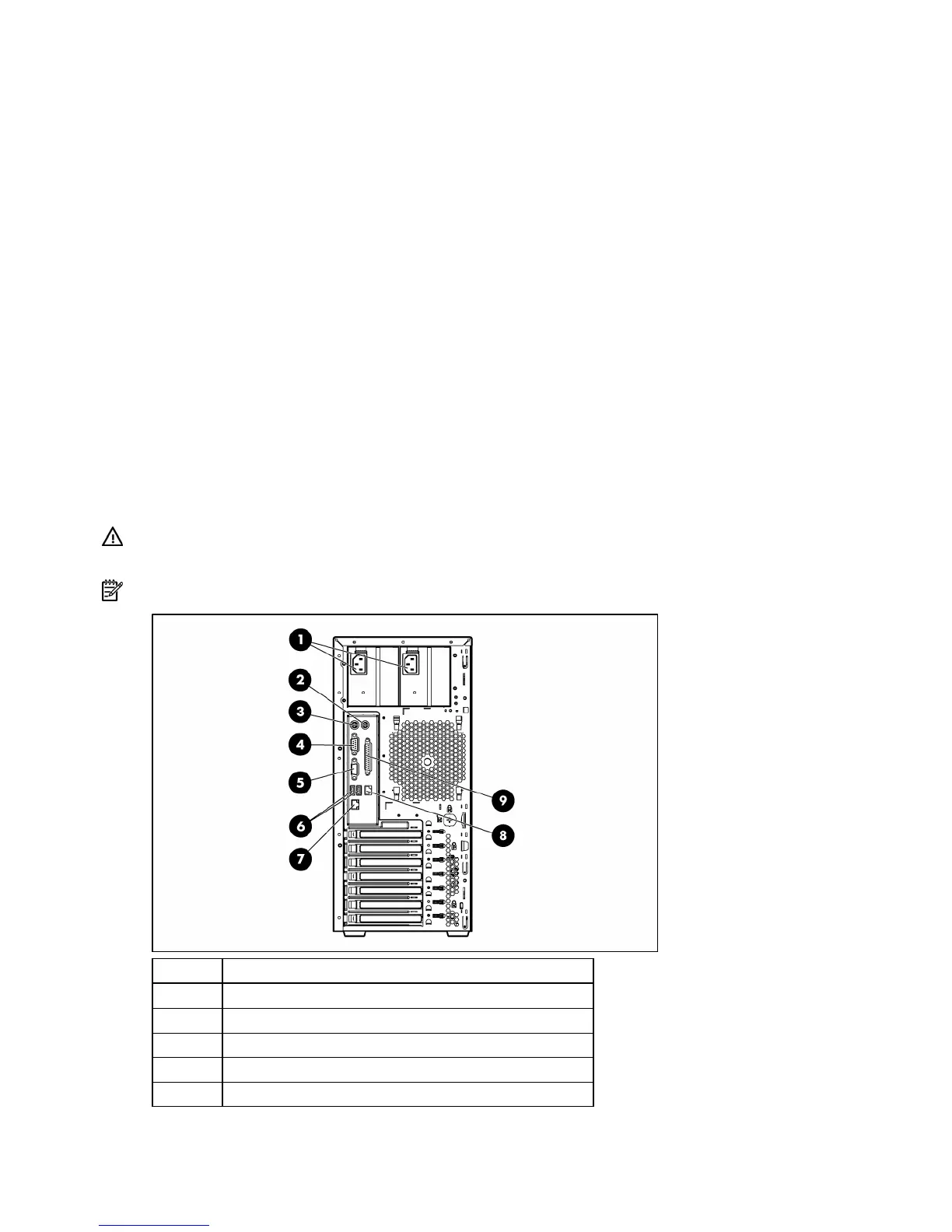
1. Connect peripheral devices to the server.
WARNING: To reduce the risk of electric shock, fire, or damage to the equipment, do not
plug telephone or telecommunications connectors into RJ-45 connectors.
NOTE: The server may look different from that shown.
Item Description
1 Power supply connectors
2 Mouse connector
3 Keyboard connector
4 Serial connector
5 Video connector










 To Next Page