EasyManua.ls Logo

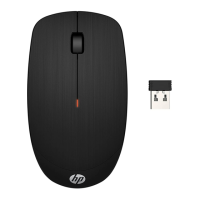
HP X200 - User Manual

HP X200
2 pages
Print Icon
To Next Page IconTo Next Page
Loading...
*L64248-B21*
L64248-B21
1
2
1
1
2
2
Color Side 1:
BLACK
Flat size:
8.268 x 8.739 in.
Fold 1:
In half
Fold 2:
3-panel accordion
Color Side 2:
BLACK
Finished size:
4.134 x 2.913 in. (A7)
20008 Champion Forest Dr.
Suite 1102
Spring, TX 77379
832.717.4331
Printed in China
Imprimé en Chine
Stampato in Cina
Impreso en China
Impresso na China
中国印刷
중국에서 인쇄
Complies with
IDA Standards
DB106008
60279/SDPPI/2019
2141
CNC ID: H-16459
IFT:
RCPHPRX16-1149
TA-201
6/719
APPROVED
MSIP-CRM-ACX-RXE
Acrox Technologies Co., Ltd
NR:2019-03-I-000181
Question and Answer IconNeed help?

Do you have a question about the HP X200 and is the answer not in the manual?

HP X200 Specifications

General IconGeneral
Connectivity TechnologyWireless
Operating Distance10 m
Buttons Quantity3
Scroll WheelYes
Movement Detection TechnologyOptical
Sensor TechnologyOptical
ColorBlack
Wireless Technology2.4 GHz

Summary

Mouse Functionality and Status

Adjusting DPI Settings

Change DPI settings by holding mouse buttons. Cycles through 1200, 1600, and 800.

Interpreting Light Status Indicators

Describes mouse status based on light: solid, flashing (2s), or flashing (1 min).

Related product manuals