EasyManua.ls Logo

HPE Aruba Networking 630 Series - User Manual

HPE Aruba Networking 630 Series
24 pages
Print Icon
To Next Page IconTo Next Page
Loading...
HPE Aruba Networking 630
Series Campus Access Point
Installation Guide
Question and Answer IconNeed help?

Do you have a question about the HPE Aruba Networking 630 Series and is the answer not in the manual?

Overview

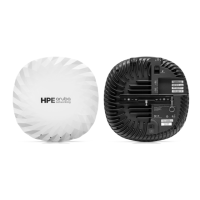
The HPE Aruba Networking 630 Series Campus Access Point is a high-performance wireless access point designed to support the IEEE 802.11ax WLAN standard, including the 6 GHz band (Wi-Fi 6E), as well as the 5 GHz and 2.4 GHz bands. It leverages MIMO (Multiple-Input, Multiple-Output) and OFDMA (Orthogonal Frequency Division Multiple Access) technologies to deliver high performance and capacity, while also maintaining support for legacy IEEE 802.11a/b/g/n/ac wireless services. This device is intended for campus environments, providing robust and reliable wireless connectivity.

Technical Specifications:

  • Wireless Standards: IEEE 802.11ax (Wi-Fi 6E) in 6 GHz, 5 GHz, and 2.4 GHz bands. Also supports IEEE 802.11a/b/g/n/ac.
  • Antenna: The AP-634 access point features two sets of two RP-SMA female connectors for external antennas. The first set (labeled as A0 and A1) supports 2.4GHz and 5GHz, combined (duplexed), while the second set (labeled as B0 and B1) supports 6GHz. For optimal performance and regulatory compliance, it is crucial to use manufacturer-approved antennas. The Equivalent Isotropically Radiated Power (EIRP) levels for all external antenna devices must not exceed the regulatory limit set by the host country/domain. A list of approved antennas can be found in the ordering guide at https://www.arubanetworks.com/resource/aruba-630-series-campus-access-points-ordering-guide.
  • Ports:
    • USB 2.0 Interface: The USB 2.0 interface is located on the top of the HPE Aruba Networking 630 Series Campus Access Point and is compatible with selected cellular modems and other peripherals. When active, this interface can supply up to 5W/1A to a connected device.
    • Micro-B Console Port: A Micro-B connector located on the back of the access point. This port uses the proprietary AP-CBL-SERU cable or AP-MOD-SERU module (sold separately) for direct management when connected to a serial terminal or laptop. The pinout for the Micro-B console port is: 1: NC, 2: RXD, 3: TXD, 4: GND, 5: GND.
    • Ethernet Ports: The access point is equipped with two 100/1000/2500Base-T auto-sensing MDI/MDX with RJ45 Ethernet ports (E0 and E1). These 2.5Gbps speeds comply with NBase-T and 802.3bz specifications. Both ports are compliant with 802.3ab 1000Base-T Gigabit Ethernet and 802.3az (Energy Efficient Ethernet) standards. Both ports support 802.3at and 802.3bt Power over Ethernet compliance to accept power from a PoE source, such as a PoE midspan injector, or a network switch. The cable guiding features on the chassis are useful only in specific use cases, such as using the extension cables or other cables with short plugs. To use the cable guiding feature, the Ethernet cable bend radius should be no more than 20 mm.
    • Kensington Lock Slot: The HPE Aruba Networking 630 Series Campus Access Point is equipped with a Kensington lock slot for additional physical security.
  • Power:
    • PoE (Power over Ethernet): Both E0 and E1 ports support PoE-in (AP is a PoE-PD device), allowing the device to draw power from compliant PoE power sources.
    • DC Power: If PoE is not available, a proprietary AP-AC2-12B power adapter (sold separately) can be used to power the access point. When both PoE and DC power sources are available, the DC power source takes precedence. If the DC source fails, the access point simultaneously draws a minimal current from the PoE source. In the event that the DC source fails, the access point switches to the PoE sources.
    • Intelligent Power Monitoring (IPM): This feature may be used to manage the power consumption preferences for this device. When enabled, the user may enable/disable power restrictions for the access point using HPE Aruba Networking AP management software. Refer to the HPE Aruba Networking 630 Series Campus Access Point datasheet for details on possible functional restrictions when the AP is powered by PoE, and how IPM can help to avoid or minimize these restrictions.
    • Power over Ethernet (PoE): 802.3at or 802.3bt compliant source.
    • 12V DC power interface: Supports powering through AC-to-DC power adapter (AP-AC2-12B).
  • Environmental Specifications:
    • Operating Temperature Range: 0 °C to 50 °C (32 °F to 122 °F).
    • Humidity Range: 5% to 95% non-condensing.
    • Storage and Transportation Temperature Range: -25 °C to 55 °C (-13 °F to 131 °F).
    • Humidity Range: 10% to 100% non-condensing.
  • Bluetooth: Integrated BLE 5.0 Low Energy and 802.15.4 Radio. The access point is equipped with an integrated BLE 5.0 and 802.15.4 radio that provides the following capabilities: location beacon applications, wireless console access, and IoT gateway applications.
  • Reset Button: The reset button is located on the bottom of the device and can be used to reset the access point to factory default settings or turn off/on the LED display. To reset during normal operation, hold the reset button for more than 10 seconds while the access point is running, and then release the reset button. To reset during power up, hold the reset button while the access point is powering up. The system status LED will flash again within 15 seconds indicating that the reset is completed. The access point will now continue to boot with the factory default settings. To toggle the LED display into off mode or back to software defined mode, press the reset button for a short duration (less than 10 seconds).
  • LEDs: The LED indicators located on the front cover of the access point indicate the following functions:
    • System Status LED:
      • Off: Device Powered off.
      • Green- solid: Device ready, fully functional, no network restrictions.
      • Green- blinking 1: Device booting, not ready.
      • Green- flashing off 2: Device ready, fully functional, uplink negotiated in sub-optimal speed (< 1 Gbps).
      • Green- flashing on 3: Device in deep-sleep mode.
      • Amber- solid: Device ready, restricted power mode (limited PoE power available, or IPM restrictions applied), no network restrictions.
      • Amber- flashing off: Device ready, restricted power mode (limited PoE power available, or IPM restrictions applied), uplink negotiated in sub-optimal speed (< 1 Gbps).
      • Red: System error condition - Immediate attention required.
      • Blinking 1: one second on, one second off, 2 seconds cycle.
      • Flashing off 2: mostly on, fraction of a second off, 2 seconds cycle.
      • Flashing on 3: mostly off, fraction of a second on, 2 seconds cycle.
    • 2GHz/5GHz/6GHz Radio Status LEDs: These LEDs indicate the operating mode of the access point's 2GHz/5GHz/6GHz radios.
      • Off: Device Powered off, or radio disabled.
      • Green- solid: Radio enabled in access mode.
      • Green- flashing off 1: Radio enabled in uplink or mesh mode.
      • Amber- solid: Radio enabled in monitor or spectrum analysis mode.
      • Flashing off 1: mostly on, fraction of a second off, 2 seconds cycle.
    • LED Display Settings: The LEDs have three operating modes that can be selected in the system management software: Default mode (refer to Table 3 and Table 4), Off mode (all LEDs are off), and Blink mode (all LEDs blink green (synchronized)). To force the LEDs into off mode or back to software defined mode, press the reset button for a short duration (less than 10 seconds). Pressing the reset button for longer than 10 seconds may cause the AP to reset and return to factory default state.

Usage Features:

  • Installation: The HPE Aruba Networking 630 Series Campus Access Point is designed for ceiling or wall mounted deployments. Several optional mount kits are available to attach the access point to a variety of surfaces. These mount kits are available as accessories and must be ordered separately. Refer to the HPE Aruba Networking 630 Series Campus Access Point ordering guide at https://www.arubanetworks.com.
    • Pre-Installation Checklist: Before installing the access point, ensure you have the following (not included with the AP): a mount kit compatible with the AP and mount surface, one or two Cat5E or better UTP cables with network access, and compatible antenna(s) when installing AP-634.
    • Optional Items: A compatible power adapter with power cord, a compatible PoE midspan injector with power cord, an AP-CBL-SERU console cable, and an AP-MOD-SERU console module.
    • Power Adapter Note: If a power adapter other than the HPE Aruba Networking-approved adapter is used in the US or Canada, it should be NRTL listed, with an output rated 12V DC, minimum 0.75A, marked "LPS" and "Class 2," and suitable for plugging into a standard power receptacle in the US and Canada.
  • Software Configuration: For instructions on choosing operating modes and initial software configuration, refer to the AP Software Quick Start Guide. HPE Aruba Networking access points are classified as radio transmission devices, and are subject to government regulations of the host country. The network administrator(s) is/are responsible for ensuring that configuration and operation of this equipment is in compliance with their country's regulations. For a complete list of approved channels in your country, refer to the HPE Aruba Networking Downloadable Regulatory Table.
  • Verifying Post-Installation Connectivity: The integrated LED on the access point can be used to verify that the access point is receiving power and initializing successfully (see Table 1-Table 2). Refer to the AP Software Quick Start Guide for further details on verifying post-installation network connectivity.
  • Identifying Known RF Absorbers/Reflectors/Interference Sources: Identifying known RF absorbers, reflectors, and interference sources while in the field during the installation phase is critical. Make sure that these sources are taken into consideration when you attach an access point to its fixed location.
    • RF absorbers include: Cement/concrete (old concrete has high levels of water dissipation, which dries out the concrete, allowing for potential RF propagation. New concrete has high levels of water concentration in the concrete, blocking RF signals), natural items (fish tanks, water fountains, ponds, and trees), and brick.
    • RF reflectors include: Metal objects (metal pans between floors, rebar, fire doors, air conditioning/heating ducts, mesh windows, blinds, chain link fences (depending on aperture size), refrigerators, racks, shelves, and filing cabinets). Do not place an access point between two air conditioning/heating ducts. Make sure that access points are placed below ducts to avoid RF disturbances.
    • RF interference sources include: Microwave ovens and other 2.4 or 5 GHz objects (such as cordless phones), and cordless headset such as those used in call centers or lunch rooms.
  • Regulatory Compliance: The device complies with various international and regional regulatory standards, including FCC, CE, UKCA, Japan, Korea, Medical, Mexico, Morocco, Peru, Philippines, Singapore, Taiwan, Thailand, Ukraine, and United States regulations. Specific details regarding maximum EIRP for different radio bands and countries are provided in the manual.
    • FCC Statement: Improper termination of access points installed in the United States configured to non-US model controllers will be in violation of the FCC grant of equipment authorization. Any such willful or intentional violation may result in a requirement by the FCC for immediate termination of operation and may be subject to forfeiture (47 CFR 1.80).
    • FCC Regulations restrict the operation of this device to indoor use only.
    • The operation of this device is prohibited on oil platforms, cars, trains, boats, and aircraft, except that operation of this device is permitted in large aircraft while flying above 10,000 feet.
    • Operation in the 5.9725-7.125GHz band is prohibited for control of or communication with unnamed aircraft systems.
    • Portable RF communications equipment (including peripherals such as antenna cables and external antennas) should be used no closer than 30 cm (12 inches) to any part of the access point. Otherwise, degradation of the performance of this equipment could result.
    • Use of accessories, transducers and cables other than those specified or provided by the manufacturer of this equipment could result in increased electromagnetic emissions or decreased electromagnetic immunity of this equipment and result in improper operation.
    • This device is intended for indoor use in professional healthcare facilities.
    • This device has no IEC/EN60601-1-2 essential performance.
    • Compliance is based on the use of HPE Aruba Networking approved accessories. Refer to the ordering guide for this access point at https://www.arubanetworks.com.

Maintenance Features:

  • Package Contents Verification: Upon receiving the package, inform your supplier to check for any incorrect, missing, or damaged parts. Retain the carton, including the original packing materials, to repack and return the unit to the supplier if needed.
  • Cleaning: Wipe with a dry cloth, no additional maintenance required.
  • Serviceability: No serviceable parts, the unit must be sent back to the manufacturer for repair. No modifications are allowed without approval from HPE Aruba Networking.
  • Troubleshooting: Use of this equipment adjacent to or stacked with other equipment should be avoided because it could result in improper operation. If such use is necessary, this equipment and the other equipment should be observed to verify that they are operating normally.
  • Software Updates: For instructions on choosing operating modes and initial software configuration, refer to the AP Software Quick Start Guide.
  • Contacting Support:
    • Main Site: arubanetworks.com
    • Support Site: asp.arubanetworks.com
    • Airheads Social Forums and Knowledge Base: community.arubanetworks.com
    • North American Telephone: 1-800-943-4526 (Toll Free), 1-408-754-1200
    • International Telephone: arubanetworks.com/support-services/contact-support/
    • Software Licensing Site: lms.arubanetworks.com
    • End-of-life Information: arubanetworks.com/support-services/end-of-life/
    • Security Incident Response Team: Site: arubanetworks.com/support-services/security-bulletins/, Email: aruba-sirt@hpe.com

HPE Aruba Networking 630 Series Specifications

General IconGeneral
BrandHPE
ModelAruba Networking 630 Series
CategoryWireless Access Point
LanguageEnglish

Related product manuals