EasyManua.ls Logo

HPM 630R02WE - User Manual

HPM 630R02WE
4 pages
Print Icon
To Next Page IconTo Next Page
Loading...
Instruction Manual
360° PIR Movement Sensor
Cat No. 630R02WE
This product must be installed by a licensed electrician.
1. Specifications
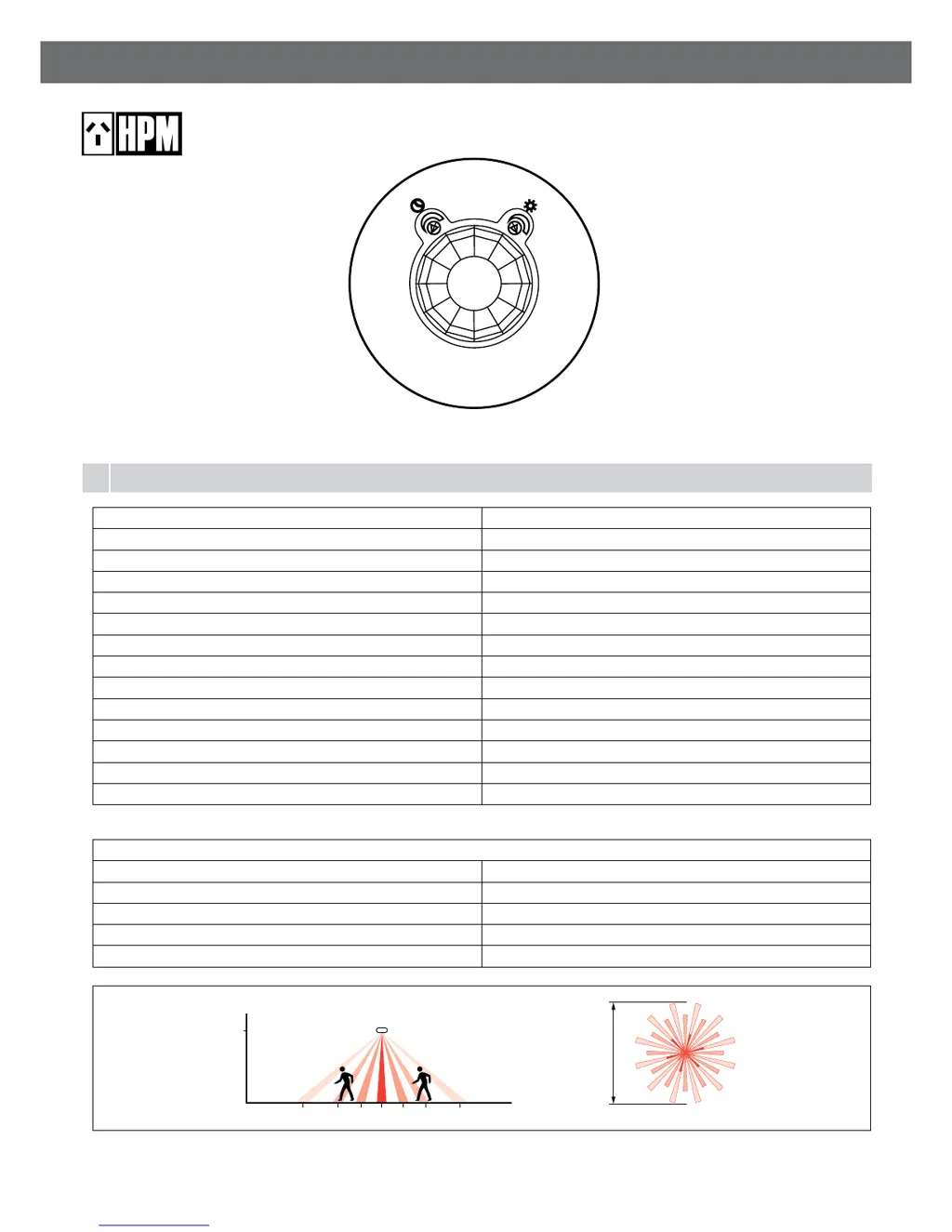
Detection method Passive Infrared (PIR)
Supply voltage 230-240V a.c. 50Hz
Terminal wiring size 1x2.5mm
2
to 2x1.5mm
2
Standby power 0.6W
Detection/View angle 360°
Detection range (ceiling height 2.5m) Ø8m
Lux adjustment range 10lux – 1275lux
Time adjustment range 10sec – 10min (approximately)
Switching function Auto Mode only
IP rating IP41
Ceiling cut-out size Ø65mm
Fascia size Ø78mm
Depth into ceiling 39mm
Weight 70g
Maximum Lighting Load
Incandescent 1000W (4.3A)
Fluorescent 360W (2.1A)
Extra low voltage halogen 500VA (2.1A)
Compact Fluorescent Lamp (CFL) 250VA (1.1A)
LED 250W (1.1A)
2.5m
4m 2m 1m 0 1m 2m 4m
Ø8m
Fig. 1

Questions and Answers

  • G
    grayjeremyAug 3, 2025
    Why does my HPM 630R02WE light switch on for no apparent reason?
    • S
      Samantha HicksAug 3, 2025
      If your HPM Accessories light is turning on for no obvious reason, several factors could be at play. It might be triggered by heat sources like an air conditioner, heater, dryer, or barbecue; in this case, try relocating the unit. Animals such as birds or pets could also be responsible, which may be unavoidable. Interference from other electrical devices on the same circuit is another possibility; you can check or replace faulty switches, replace noisy fluoro tubes/starters, or connect the unit to a different circuit. Finally, reflective objects like swimming pools within the coverage area could be the cause, suggesting the need to relocate the unit.
  • C
    Chelsea RoseAug 7, 2025
    How to fix HPM 630R02WE light that does not switch on with movement?
    • K
      Krystal JeffersonAug 8, 2025
      If your HPM Accessories light isn't switching on when there's movement, start by checking the power connections, switches, and fuse to ensure power is available. A faulty light or globe could also be the culprit, so try replacing it. Incorrect wiring can prevent the light from activating, so recheck all wiring. Also, verify that the controls are set correctly by adjusting the LUX knob. Finally, nearby bright lighting might be interfering, so consider relocating the unit.
  • C
    christopherleeAug 14, 2025
    What to do if HPM 630R02WE Accessories light does not switch off after set time?
    • M
      Matthew PalmerAug 14, 2025
      If your HPM Accessories light doesn't switch off after the set time, first try reducing the time by adjusting the TIME knob. Incorrect wiring can also cause this issue, so recheck all wiring. Lastly, the unit might be damaged due to exceeding the maximum load, using an incompatible load type, or a failure of the load (like a short circuit). Identify and fix the cause of the failure. If necessary, replace the unit with a new one.
  • D
    Dr. Albert MitchellAug 20, 2025
    Why is my HPM Accessories light turning on during daylight?
    • A
      Alexandra PinedaAug 20, 2025
      If your HPM Accessories light is turning on during daylight, the LUX knob is likely set to the daylight position. To correct this, turn the LUX knob anti-clockwise to suit your desired light setting.
  • L
    laurensilvaAug 26, 2025
    Why detection distance becomes shorter on HPM 630R02WE Accessories?
    • A
      alexandriarobbinsAug 26, 2025
      If you notice the detection distance of your HPM Accessories becoming shorter when setting the controls in daylight, it's likely due to interference from sunlight. Try re-setting the controls at night to avoid this issue.

Summary

Specifications

Sensor locations to be avoided

Installation

Setting the controls

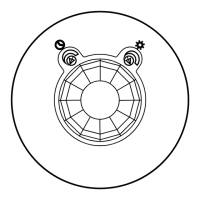
Time Adjustment

Controls how long lights stay on after movement is detected. Rotating clockwise increases duration.

Lux Adjustment

Controls the ambient light level at which the sensor switches on. Sets 24-hour operation or night-only.

Maintenance and Cleaning

Troubleshooting

Disclaimers

HPM 630R02WE Specifications

General IconGeneral
BrandHPM
Model630R02WE
CategoryAccessories
LanguageEnglish

Related product manuals