Need help?
Do you have a question about the HST HST-HP201-2AB and is the answer not in the manual?
Details two onboard detection loops, supporting up to 250 devices each.
Lists onboard programmable relays and 24VDC output options.
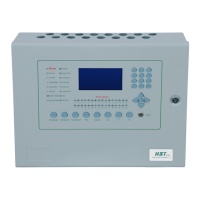
Describes the graphical LCD, navigation, and numeric keypad.
Explains the power supply, protection fuses, and battery backup.
Covers Class A loops, device capacity, and HST protocol.
Details free and programmable 24VDC outputs for external devices.
Describes the 3 dry contact inputs and 2 sounder circuits.
Explains the 3 form C relays and RS232 port for PC connection.
Details the numeric keypad and navigation keys for operation.
Explains the MENU key and 5 fire function keys for actions.
Describes the Enable key for saving settings and security.
Details the graphical LCD for panel information and status.
Explains the 30 onboard LEDs for various panel statuses.
Describes LEDs for faults (Power, Loop, Sounder) and general statuses.
Covers zone LEDs and the panel buzzer functionality.
Details panel mounting, cable entry, and accessing the main board.
Covers panel power-on, checks, and the loop learning phase.
Details the information shown on the main LCD after initialization.
Describes all three access levels for panel operation and security.
Explains Init & Stop, Learn, PC, Normal, Alarm, Fault, and Supervisory states.
Describes icons for access level, enable key, power, battery, and various faults.
Details the main screen layout and how alarm/fault events are displayed.
Explains how to view and navigate detailed event logs.
Details the display of fault and supervisory events and their navigation.
Explains how to identify specific faults using icons and menus.
Details the Evacuate key and panel buzzer responses to events.
Covers how alarms activate output devices and can be silenced.
Explains silencing, re-sounding alarms, and performing a fire reset.
Describes how the panel switches access levels automatically.
Explains programming via keypad/PC and navigating configuration menus.
Explains the System configuration menu for general panel settings.
Covers On board, Loops, and Advanced configuration menus.
Details configuring panel date and time settings.
Explains changing Level 2 password and panel name.
Covers settings like auto-learn, resound, and output delay.
Explains how to view log status and stored events.
Details configuring onboard sounder lines and their parameters.
Details configuring onboard relays, including event activation.
Details configuring onboard auxiliary power outputs.
Details configuring onboard dry inputs, including name and event selection.
Details configuring onboard loops and their status.
Explains how to enable or disable loops and their impact.
Details configuring individual loop devices.
Covers naming devices and selecting trigger events.
Covers device silence state, disable state, and delay configurations.
Explains the manual process of adding and removing devices to loops.
Explains how to configure software zones for devices.
Covers configuring zone names and their disabled state.
Displays loop status and device counts for the system.
Initiates scanning and saving of connected devices.
Details changing the Level 3 access password.
Covers clearing log events and restoring factory settings.
Provides a list of default configuration settings for panel items.
Lists default values for input configurations and loop status.
 General
| Category | Control Panel |
|---|---|
| Model | HST-HP201-2AB |
| Display Type | TFT LCD |
| Storage Temperature | -20°C to 60°C |
| Weight | 1.2 kg |
| Display Size | 10.1 inch |
| Resolution | 1024 x 600 |
| Communication Interface | Ethernet |


 To Next Page