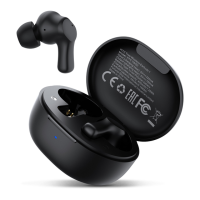
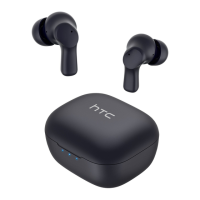
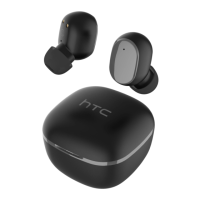
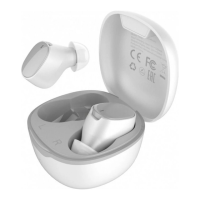
The HTC True Wireless Earbuds 7 (Model HTC TWS7) are a pair of wireless earbuds designed for audio playback and communication, featuring touch controls and a charging case.
Function Description:
The HTC True Wireless Earbuds 7 are designed to provide a seamless audio experience with a focus on ease of use and portability. They automatically power on when removed from the charging case and power off when placed back in the case. Once paired with a mobile device, they will automatically reconnect when taken out of the charging case. The earbuds offer touch controls for various functions, including playing/pausing music, skipping tracks, answering/ending calls, declining calls, activating a game mode, and summoning a voice assistant. The included charging case not only protects the earbuds but also recharges them, extending their usage time. The device also includes a mechanism for checking product authenticity via a QR code and a scratch-off code.
Important Technical Specifications:
- Bluetooth Version: 5.3, ensuring a stable and efficient wireless connection.
- Sweat and Water Resistant: IPX4 rating, making them suitable for workouts and light rain.
- Bluetooth Range: Up to 10 meters (≤ 10 m), providing flexibility in movement.
- Play Time: Approximately 6.0 hours at 50% volume level, offering extended listening.
- Talk Time: Approximately 3.0 hours at 50% volume level for calls.
- Standby Time: Up to 40 hours, indicating good battery retention when not in use.
- Earbud Charges (when case is fully charged): Around 3 charges, significantly extending total usage time.
- Earbud Battery Capacity: 30 mAh per earbud.
- Charging Case Battery Capacity: 300 mAh, providing multiple recharges for the earbuds.
- Charging Case Input Voltage: 5V.
- Charging Interface: Type-C, a modern and widely used charging standard.
- Charging Case Power Input Rating: 5V / 320 mA.
- Net Weight (single earbud): 4 g, making them lightweight and comfortable.
- Net Weight (both earbuds with case): 41 g, maintaining overall portability.
Usage Features:
- Automatic Power On/Off: Earbuds turn on when removed from the charging case and off when placed back in.
- Easy Pairing: Pair with "HTC TWS7" via Bluetooth settings. If not visible, a quick tap of 5 times on each earbud can reset them.
- Touch Controls:
- Power on/off: Automatic with case interaction.
- Play next: Double-tap the right earbud quickly.
- Play previous: Double-tap the left earbud quickly.
- Play / Pause: Tap either earbud.
- Game model on/off: Tap and hold either earbud for 2 seconds.
- Answer call / End call: Tap either earbud.
- Decline call: Tap and hold either earbud for 2 seconds.
- Assistant: Triple-tap either earbud.
- LED Notifications:
- Charging case:
- Solid blue (1 LED): Over 30% charged.
- Solid blue (2 LEDs): Over 60% charged.
- Solid blue (3 LEDs): Fully charged.
- Flashing blue: Connected to power and charging.
- Blue on all LEDs: Case is fully charged.
- Flashing blue on the first LED: Low battery warning.
- Earbud:
- Blue: Charging the earbuds.
- Red: Charging.
- Flashing blue: Pairing.
- Blue: Game model on.
- Off: Fully charged or paired with mobile device.
- Automatic Reconnection: Once paired, the earbuds automatically connect to the mobile device when taken out of the charging case.
- Auto-off: If not connected to any mobile device, the earbuds will turn off automatically after 5 minutes.
Maintenance Features:
- Protective Film Removal: Before initial use, users must tear off the protective film on the earbuds.
- Initial Charging: Before using the charging case for the first time, ensure it is charged using a 5-volt charger.
- Regular Charging: Recharge the charging case with a 5V charger periodically when not using the earbuds to keep them charged.
- Temperature Guidelines: HTC True Wireless Earbuds 7 should not be used in extreme temperatures to ensure optimal performance and longevity.
- FCC Compliance: The device complies with Part 15 of the FCC Rules, indicating it meets standards for electromagnetic interference. Users are advised on measures to correct potential interference, such as reorienting antennas or increasing separation from other equipment. Any unauthorized modifications to the unit could void the user's authority to operate the equipment.
- Product Authenticity Check: Users can scan a QR code on the package and scratch off a coating to reveal a code. Entering the last four digits of this code on their phone will verify if the product is genuine, helping to prevent counterfeiting.

 Need help?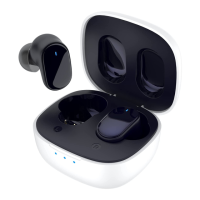

 To Next Page
 General