2
Installing the WGW-SL1 Gateway
PLEASE READ THIS DOCUMENT BEFORE YOU INSTALL AND USE THIS DEVICE.
***If you have not yet requested a Valet license, please visit our
website to request your free license.***
The WGW-SL1 device is used to connect an HTD Whole-House Controller (MC-66, MCA-66, Lync6, Lync12)
WIRELESSLY into your home’s wireless or wired network.
When properly installed and congured, you will be able to control your Whole-House Controller from a wire-
less smart device (such as an iPod Touch, iPhone™, Android™ or other “smartphone” or tablet devices.)
Your device must have access to your home’s wireless or wired network.
iPod Touch and iPhone are Trademarks of Apple Computer
Android is a Trademark of Google
The WGW-SL1 includes the following items:
While working through the following steps, if you have any
questions, feel free to contact us.
Toll Free: 1-866-483-2834
Email: valet@htd.com
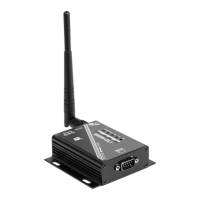
1.One (1) WGW-SL1 Gateway unit (software is already installed in it)
2.One (1) 120/240VAC Power Supply & Cord
3.One (1) 6 foot-long RS232 Serial Cable for connecting between the WGW-SL1
Gateway and the RS232 Serial Connector on the back of your MC-66, MCA-66,
Lync6, or Lync12 Controller
4.One (1) Wireless Antenna to installed on the WGW-SL1
Power Supply Cable
RS232 Serial Cable
WGW-SL1 Gateway
(Software already installed)
WGW-SL1 Antenna


 To Next Page