English
3
Firmware update
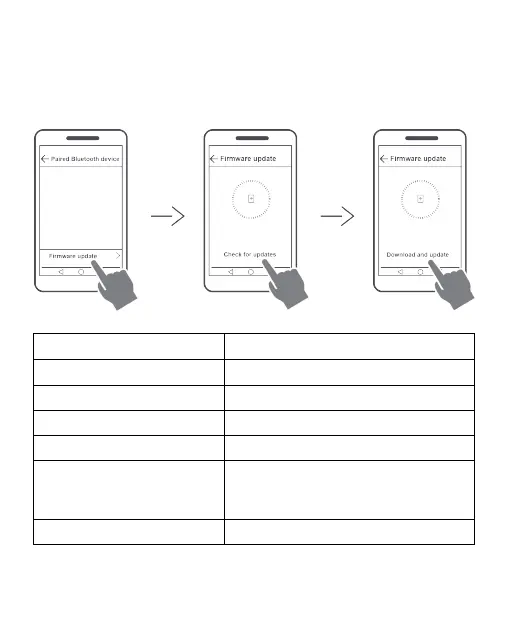
If a firmware update is available, you can update your earbuds from your phone (EMUI 9.1
or later) by performing the following:
Go to the Paired Bluetooth device screen and touch Firmware update, then touch
Check for updates to check for available updates.
If an update is available, touch Download and update, then follow the onscreen
instructions to complete the update process.
Indicator descriptions
Power on Steady white for 1 second
Power off Steady red for 1 second
Automatic connection mode Flashes white twice every 3 seconds
Pairing mode Flashes white three times every second
Incoming/outgoing call Flashes white twice every second
Charging Flashes red: Low battery level
Flashes white: Sufficient battery level
Steady white: Fully charged
Low battery Flashes red twice every 10 seconds










 To Next Page