
 Need help?
Do you have a question about the Huawei FreeBuds Lipstick and is the answer not in the manual?
Download and install the HUAWEI AI Life app for enhanced features and customization.
Open case, press and hold Function button until inner indicator flashes white to enable Pairing mode.
Earphones automatically enter Pairing mode when the case is opened for the first time.
Manage volume, music playback, calls, and noise canceling using touch gestures on the earbuds.
Connect the case to a USB-C cable for charging.
Place earphones in the charging case and close it to start charging automatically.
Earphones inside will not charge when the charging case is open.
Open case, press and hold Function button for 10s until inner indicator flashes red to re-enter Pairing mode.
Semi-open ANC earphones better cancel low-frequency noise, but cannot eliminate all noise.
ANC performance depends on earphone fit; ensure a tight and secure fit for best results.
 General
| Type | True Wireless Stereo (TWS) |
|---|---|
| Frequency Response | 20 Hz - 20 kHz |
| Bluetooth Version | 5.2 |
| Bluetooth Codec | AAC, SBC |
| Water Resistance | IPX4 |
| Active Noise Cancellation | Yes |
| Charging Port | USB-C |
| Wireless Charging | Yes |
| Weight (Earbuds) | 4.1 g each |
| Touch Controls | Yes |
| Voice Assistant | Yes |
| Compatibility | Android, iOS |
| Bluetooth Profiles | A2DP, AVRCP, HFP |
| Battery Life (Earbuds) | 4 hours (ANC on) |
| Battery Life (with Charging Case) | 20 hours (ANC off), 14 hours (ANC on) |
| Charging Time | 90 minutes (case) |
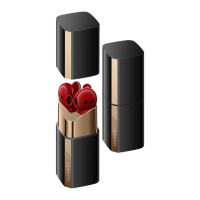
| Colors | Red |
| Design | Lipstick-shaped case with open-fit earbuds |





 To Next Page