The Huawei HG8245 is a GPON (Gigabit Passive Optical Network) Optical Network Terminal (ONT) designed for home and small office use, serving as a crucial component in fiber-to-the-home (FTTH) networks. Its primary function is to provide high-speed internet access, voice services, and video services by converting optical signals from the OLT (Optical Line Terminal) into electrical signals for connected devices. This device acts as a modem, bridging the optical fiber network with the user's local area network (LAN).
Function Description:
The Huawei HG8245 integrates multiple functionalities to deliver a comprehensive service experience. It supports GPON upstream and provides various downstream interfaces for connecting different types of user equipment. Key functions include:
- High-Speed Internet Access: Through its LAN ports and integrated Wi-Fi, the device enables high-speed internet connectivity for computers, smart TVs, gaming consoles, and other IP-enabled devices.
- Voice Services: Equipped with TEL ports, it supports voice over IP (VoIP) services, allowing users to connect traditional telephones or fax machines for making and receiving calls.
- Video Services: The device can facilitate the delivery of video services, such as IPTV, by connecting to IP set-top boxes (STBs).
- Local Area Networking: With multiple LAN ports, it allows for wired connections to multiple devices, ensuring stable and fast data transfer within the local network.
- Wireless Connectivity: The integrated Wi-Fi terminal provides wireless internet access, offering convenience and flexibility for mobile devices and other wireless-enabled equipment.
- USB Storage: A USB port allows for connecting USB storage devices, potentially enabling network-attached storage (NAS) functionalities or media sharing within the home network.
- Backup Power: The inclusion of a backup battery unit (BBU) port indicates support for an external battery, ensuring continued operation of critical services during power outages.
Important Technical Specifications (Inferred from the manual):
- GPON Interface: The device features an optical port for connecting to the fiber optic network, adhering to GPON standards for high-bandwidth upstream and downstream communication.
- Ethernet Ports: It includes four LAN ports (LAN1, LAN2, LAN3, LAN4), likely Gigabit Ethernet ports, for wired connections to PCs, IP set-top boxes, and other network devices.
- Telephone Ports: Two TEL ports (TEL1, TEL2) are available for connecting telephones or fax machines, supporting VoIP services.
- USB Port: A single USB port is present for connecting USB storage devices.
- Wi-Fi: An integrated Wi-Fi terminal provides wireless connectivity, supporting common Wi-Fi standards (e.g., 802.11b/g/n, though specific standards are not detailed in the provided excerpt).
- Power Input: The device requires an external power adapter, connected via the "POWER" port.
- Backup Battery Unit (BBU) Port: A dedicated BBU port allows for connecting an external backup battery, providing power redundancy.
- Reset Button: A "RESET" button is included for factory reset or rebooting the device.
- WPS Button: A "WPS" (Wi-Fi Protected Setup) button simplifies the process of connecting wireless devices securely.
Usage Features:
The Huawei HG8245 is designed for straightforward installation and use, catering to end-users with varying technical expertise.
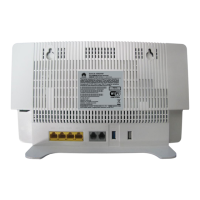
- Easy Connection: The manual clearly illustrates the connection points at the back and side of the device, making it easy for users to connect the necessary cables.
- Back Connections:
- Optical Port (1): Connects to the optical port in the wall (Media Optical port).
- LAN Ports (LAN1-LAN4): Connect to PCs (2), IP set-top boxes (4), or TV sets (5).
- TEL Ports (TEL1-TEL2): Connect to telephone sets (6) or fax machines (7).
- POWER Port: Connects to the power adapter (8).
- Side Connections:
- BBU Port: Connects to the backup battery unit (9).
- USB Port: Connects to USB storage devices (10).
- WLAN WPS Button: For easy Wi-Fi setup.
- RESET Button: For device reset.
- Status Indicators: The device features LED indicators on its front panel to display the operational status of various functions, including:
- WPS: Wi-Fi Protected Setup status.
- WLAN: Wireless LAN status.
- USB: USB port status.
- TEL1/TEL2: Telephone port status.
- LAN1-LAN4: Ethernet port status.
- LOS (Loss of Signal): Indicates the status of the optical signal from the OLT.
- PON (Passive Optical Network): Indicates the connection status to the OLT.
- POWER: Device power status.
- Simplified Troubleshooting: The LED indicators provide immediate visual feedback on the device's status, aiding in basic troubleshooting. For example, the LOS and PON indicators are critical for diagnosing network connectivity issues.
Maintenance Features:
While the manual doesn't explicitly detail maintenance procedures, the design and status indicators imply certain maintenance aspects:
- Self-Diagnosis through LEDs: The comprehensive set of LED indicators (WPS, WLAN, USB, TEL1/TEL2, LAN1-LAN4, LOS, PON, POWER) allows users to quickly assess the operational status of different components. This is a primary maintenance feature, enabling users to identify if a specific service (e.g., Wi-Fi, telephone, internet) is experiencing an issue based on the corresponding LED.
- Reset Functionality: The "RESET" button serves as a crucial maintenance tool, allowing users to restore the device to its factory default settings or simply reboot it to resolve minor software glitches.
- Backup Power Support: The BBU port and the ability to connect a backup battery unit contribute to service continuity, reducing downtime during power outages. This is a proactive maintenance feature ensuring critical services remain operational.
- Optical Signal Monitoring: The LOS and PON indicators are vital for monitoring the health of the optical fiber connection.
- LOS (Loss of Signal) Status:
- Off: Indicates that the ONT was disabled by the OLT, or the connection between ONT and OLT is already done, or the connection between ONT and OLT is not succeeded.
- Blink quickly 2 times/second: Indicates that the ONT is trying to connect to the OLT, or the device is detected by the OLT for ONT connection.
- On: Indicates that the connection between ONT and OLT is already done.
- PON (Passive Optical Network) Status:
- Off: Indicates that the ONT was disabled by the OLT.
- Blink quickly 2 times/second: Indicates that the device is detected by the OLT for ONT connection.
- Blink 1-2 seconds: Indicates that the connection between ONT and OLT is not succeeded.
- On: (Implied, but not explicitly stated in the table for PON "On" status, usually means successful connection).
By understanding the meaning of these LED statuses, users can perform initial diagnostics and determine if a problem lies with the device itself, the optical fiber connection, or the service provider's OLT. This empowers users to provide accurate information to technical support if further assistance is needed. The modular design with distinct ports for different services also simplifies component replacement or troubleshooting if a specific port or service fails.

 Need help?
 General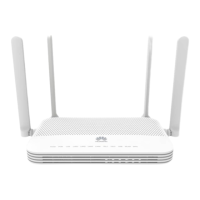







 To Next Page