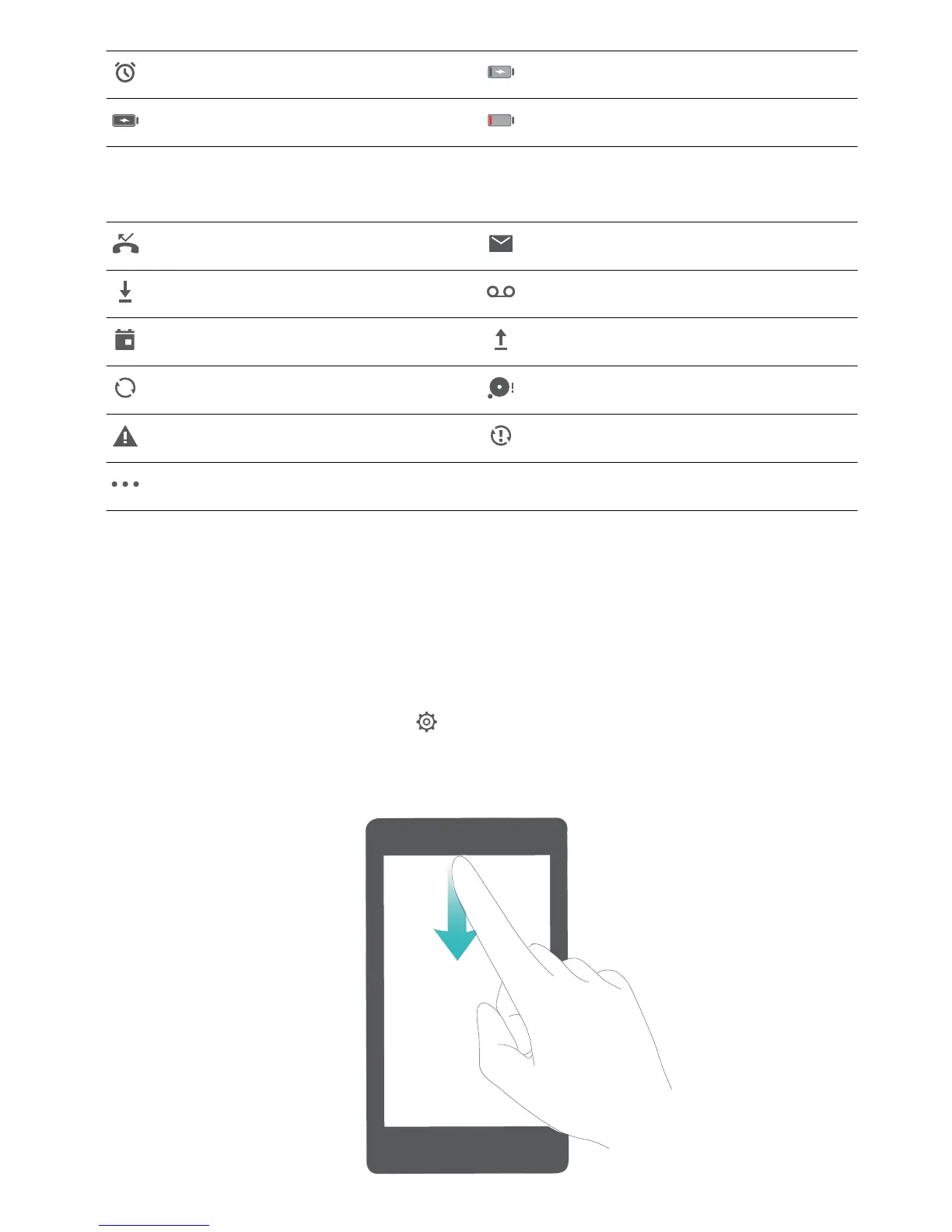
Alarms activated Charging
Battery full Battery low
Notication
icons: Notication icons are displayed on the left-hand side of the status bar when you
receive a new message, notication, or reminder.
Missed calls New emails
Downloading data New voicemail
Upcoming events Uploading data
Synchronizing data Phone memory full
Log in or synchronization error Synchronization failed
More notications
Open the Notication Panel to Get Important Information
Want to ensure that you do not miss out on any important notications? From your Phone's status
bar, you can view real time notication information and your device's operating status.
When there is a notication reminder, you can turn on the screen and swipe down from the status bar
to view the notication. You can access notication and status bar settings in the following ways:
l Access notication and status bar settings when the screen is locked: Turn on the screen and
swipe down from the status bar, touch , enter your password, and then go to Apps &
notications > Notications & status bar > Notication method.
Home Screen
16



 To Next Page