
 Need help?
Do you have a question about the Huawei MediaPad 10 LINK+ and is the answer not in the manual?
Guide to inserting SIM and microSD cards into the device for initial setup.
Instructions for charging the device's battery before first use.
Precautions for using the device safely, avoiding danger or interference.
Guidelines on device use around medical equipment like pacemakers.
Advice on listening volumes with headsets to prevent hearing damage.
Warnings against using the device in areas with flammables or explosives.
Rules and recommendations for safe device use while driving.
Guidelines for ideal operating conditions and avoiding environmental hazards.
Precautions regarding children's use of the device and its parts.
Recommendations for using approved accessories and potential risks.
Important safety instructions for using the device charger.
Critical safety measures related to the device's battery, including handling and disposal.
Instructions for safely cleaning and maintaining the device and accessories.
Information on emergency calls and environmental protection regarding disposal.
Guidance on proper disposal and recycling of the device and batteries.
Information on compliance with regulations concerning hazardous substances.
Details on the device's compliance with European Union regulations.
RF exposure compliance (Body Worn, SAR) for the EU market.
Declaration of conformity with EU directives.
Information regarding compliance with US Federal Communications Commission rules.
RF exposure compliance (Body Worn, SAR) for the US market.
FCC compliance statement for radio frequency interference.
Information on trademarks, logos, usage permissions, and important notices.
Huawei's statement regarding third-party software and applications.
Legal disclaimer concerning the manual's content and product liability.
Compliance requirements for exporting or importing the product.
Information on how personal data is protected and where to find the privacy policy.
This document provides a quick start guide for the HUAWEI MediaPad 10 Link+, a tablet designed for various electronic functions and communication. It outlines the device's physical features, basic setup, safety information, and maintenance guidelines.
The tablet serves as a portable electronic device, enabling users to perform tasks such as browsing the internet, making calls (where supported by the network and service provider), and running various applications. Its design incorporates features for user interaction and connectivity.
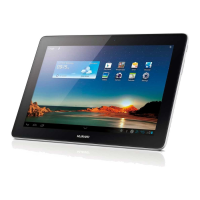
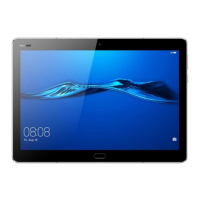
The HUAWEI MediaPad 10 Link+ is equipped with several key components that facilitate its operation. On the front, it features a display screen, a light sensor, and a front camera, which can be used for video calls or taking self-portraits. The power key allows users to turn the device on or off, as well as to activate or deactivate the screen. A volume key is present for adjusting audio levels.
On the rear, the device includes a rear camera for capturing photos and videos. It also has a card slot for inserting a SIM card and a microSD card, which are essential for network connectivity and expandable storage, respectively. A microphone is integrated for audio input, such as during calls or voice recordings. For audio output and private listening, a headset jack is provided. The Micro-USB port serves as the primary interface for charging the device and connecting it to other peripherals. Additionally, a speaker is included for audio playback.
The device supports wireless communication, allowing it to connect to cellular networks for calls and data, as well as Wi-Fi and Bluetooth for local connectivity. It is designed to operate within specific environmental conditions to ensure optimal performance and longevity.
To begin using the HUAWEI MediaPad 10 Link+, users must first install the SIM and microSD cards into their designated slots. The power key is used to power on the device by pressing and holding it. A quick press of the power key will turn the screen on or off, conserving battery life when not in active use.
Charging the battery is a straightforward process, typically involving connecting the device to a power source via the Micro-USB port. It is recommended to use approved chargers and cables to ensure safe and efficient charging.
The tablet is designed for general use, including media consumption, productivity tasks, and communication. When using a headset, users are advised to maintain safe volume levels to protect their hearing. The device's portability makes it suitable for use in various environments, but certain restrictions apply, particularly in areas with flammables, explosives, or where electronic device usage is prohibited, such as during flights or while driving.
For traffic safety, users are strongly advised to concentrate on driving and avoid holding the device. Hands-free accessories are recommended for calls, and it is best to pull over and park safely if a call must be made or answered. RF signals from the device may affect motor vehicle electronic systems, and it should not be placed over or in the deployment area of an airbag.
Proper maintenance is crucial for the device's longevity and performance. Before cleaning or performing any maintenance, all applications should be stopped, and all cables disconnected. The device and its accessories should be cleaned with a clean, soft, and dry cloth. Chemical detergents, powders, alcohol, or benzene should not be used, as these can damage parts or pose a fire hazard.
The device and accessories must be kept dry, and external heat sources like microwave ovens or hair dryers should not be used for drying. To prevent malfunctions, overheating, fire, or explosion, collisions should be avoided. Exposure to extreme heat or cold can interfere with proper function and may lead to damage or explosion. Magnetic stripe cards should not be placed near the device for extended periods to prevent damage.
Users should not attempt to dismantle or remanufacture the device or its accessories, as this voids the warranty and can release the manufacturer from liability for damage. In case of damage, an authorized service center should be contacted. If the screen is broken, usage should immediately cease, and broken parts should not be touched or removed; an authorized service center should be contacted promptly.
Battery safety is emphasized: battery poles should not be connected with conductors, and the battery should be kept away from excessive heat and direct sunlight. Modifying or remanufacturing the battery, inserting foreign objects, or exposing it to water or other liquids is prohibited. If the battery leaks, direct contact with skin or eyes should be avoided, and medical attention sought if contact occurs. Any deformation, color change, or overheating of the battery during charging or storage warrants immediate cessation of use and removal of the battery. Batteries should not be put in fire and must be disposed of according to local regulations. The device has a built-in, non-removable battery, and attempts to remove it can cause damage; battery replacement should be done by an authorized service center.
For personal information and data security, users are advised to place the device in a safe area, set a screen lock with a password or pattern, and periodically back up personal information. Messages or emails from strangers should be deleted without opening if viruses are suspected. When browsing the internet, security-risk websites should be avoided. Passwords should be set for Wi-Fi and Bluetooth services, and these services should be turned off when not in use. Security software should be installed and regularly updated, and third-party applications should only be obtained from legitimate sources and scanned for viruses.
 General
| Processor cores | 4 |
|---|---|
| Processor model | - |
| Processor family | ARM |
| Processor frequency | 1.6 GHz |
| Processor architecture | ARM Cortex-A9 |
| Internal memory | 1 GB |
| Internal memory type | LPDDR2-SDRAM |
| Storage media | Flash |
| Internal storage capacity | - GB |
| Display diagonal | 10.1 \ |
| Touch technology | Multi-touch |
| Touchscreen type | Capacitive |
| Display resolution | 1280 x 800 pixels |
| Rear camera | Yes |
| Rear camera type | Single camera |
| Maximum video resolution | - pixels |
| Rear camera resolution (numeric) | 3 MP |
| Front camera resolution (numeric) | 0.3 MP |
| Bluetooth | No |
| Wi-Fi standards | 802.11b, 802.11g, Wi-Fi 4 (802.11n) |
| Top Wi-Fi standard | Wi-Fi 4 (802.11n) |
| Headphone connectivity | 3.5 mm |
| USB 2.0 ports quantity | 0 |
| Audio formats supported | APE, FLAC, MIDI, MP3, OGG, RA-Lossless, WAV, WMA |
| Video formats supported | 3G2, 3GP, ASF, MOV, MPEG4, RM, RMVB |
| Device type | Mobile tablet |
| Form factor | Slate |
| Product color | Black, Gold |
| Battery capacity | 6600 mAh |
| Battery life (max) | - h |
| Operating system version | Android 4.2+ Emotion UI 1.6 |
| Operating system installed | Android |
| Cables included | USB |
 Weight and Dimensions
| Depth | 9.9 mm |
|---|---|
| Width | 175.9 mm |
| Height | 257.4 mm |
| Weight | 620 g |







 To Next Page
