R230D&R240D
Product Description 2 Hardware Structure
Issue 02 (2015-10-31) Huawei Proprietary and Confidential
Copyright © Huawei Technologies Co., Ltd.
9
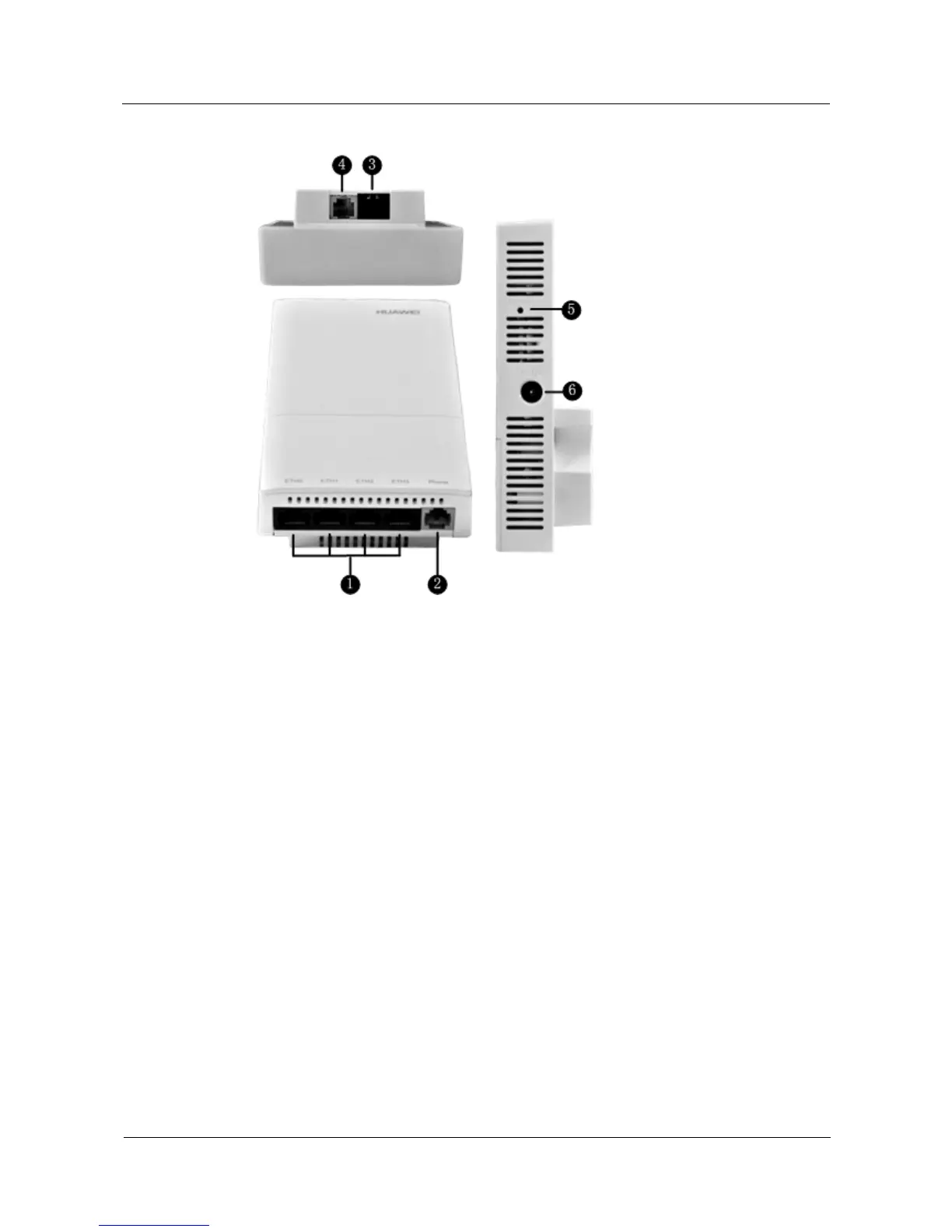
Figure 2-5 Ports
Each port can be described as follows:
1. ETH0~3: 10/100M port used to connect to the wired Ethernet.
2. Phone: Phone interface: connects to a POTS phone or modem device.
3. GE/PoE: 10/100/1000M port used to connect to the wired Ethernet. The port can connect
to a PoE power supply to provide power for the device.
4. Phone: Phone interface: connects to a traditional PSTN.
5. Default: Reset button used to restore factory settings if you hold down the button more
than 3 seconds.
6. Power input interface: 12 V DC.
LED Indicator
R240D provides only one indicator, as shown in Figure 2-6.



 To Next Page