7 AC power socket
NOTE
It is used with an AC power cable.
- -
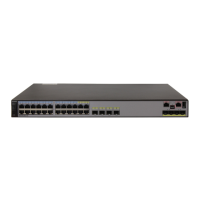
S2751-28TP-PWR-EI-AC
Figure 2-5 Appearance of the S2751-28TP-PWR-EI-AC
12 34 56 78 910 1112
13
14 15 16 17 18 19 20 21 22 23 24
3
4
1
2
MODE
STCK
POE
STAT
SYS
PWR
HUAWEI
S2751-28TP-PWR-EI-AC
1G/STACK-2.5G 1G 1G
CONSOLE
PoE 1-12
~100-240V;50/60Hz;7A
1 2
678
34
5
1 Twelve PoE+ 10/100BASE-TX
electrical ports
2 Twelve 10/100BASE-TX electrical
ports
3 Two 1000BASE-X optical ports
Applicable modules and cables:
l GE optical module
l GE-CWDM optical module
l GE-DWDM optical module
l GE SFP copper module
l Stack optical module
l 1 m, 3 m, 10 m SFP+ copper cables
l 3 m, 10 m AOC cables
4
Two combo ports (10/100/1000BASE-T
+100/1000BASE-X)
Modules applicable to combo optical
ports:
l FE optical module
l GE optical module
l GE-CWDM optical module
l GE-DWDM optical module
5 One console port 6 Ground screw
NOTE
It is used with a ground cable.
7 Jack reserved for AC terminal locking
latch
NOTE
The AC terminal locking latch is not delivered
with the device.
8 AC power socket
NOTE
It is used with an AC power cable.
2.3.3 Indicator Description
Table 2-3 is a quick reference table for indicators of S2750-EI switches.
S2750 Series Ethernet Switches
Hardware Description
2 Chassis
Issue 04 (2014-03-20) Huawei Proprietary and Confidential
Copyright © Huawei Technologies Co., Ltd.
10



 To Next Page
 Loading...