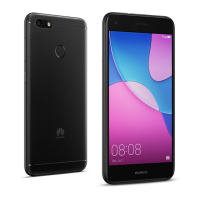
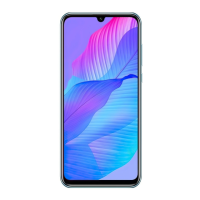
Need help?
Do you have a question about the Huawei STK-LX3 and is the answer not in the manual?
Identifies physical components and ports of the device through a diagram.
Explains how to turn on, turn off, restart, and force restart the device.
Provides safety warnings and instructions for inserting SIM and microSD cards.
Explains the dual card dual standby single pass mode and its operational implications.
Lists website links for device information, FAQs, and support contacts.
Guides users to find legal, safety, and regulatory information on the device.
Covers warnings about hearing damage, power adapters, temperature, and pacemakers.
Provides guidelines on avoiding heat, direct sunlight, driving while using, and flying.
Details compliance with RF specifications and SAR limits for body-worn operation.
Explains FCC rules for digital devices and potential radio interference.
Lists trademarks, registered trademarks, and licensing information for the device.
Directs users to the privacy policy and states copyright information.
This document provides a Quick Start Guide for the STK-LX3 device, offering essential information for its basic operation, setup, safety, and regulatory compliance.
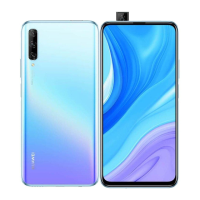
The STK-LX3 is a mobile device designed for communication and various smart functionalities. It supports dual SIM card usage, allowing users to manage two different network connections simultaneously, although it operates on a "dual card dual standby single pass" system. This means that while both SIM cards are active for standby, only one can be actively used for calls or data services at any given time. This single pass feature is implemented to optimize power consumption and extend standby time. The device includes a pop-up front camera, a fingerprint scanner for secure access, and standard ports like a Type-C port and a headset jack. It runs on a system that allows for various applications and features, with pre-installed "Tips" to help users explore its capabilities.
The device offers straightforward controls for power management and interaction. To power on, users press and hold the power button until the screen activates. Powering off involves pressing and holding the power button, then selecting the power off option on the screen. Similarly, restarting the device follows the same initial step, but users select the restart option. In cases where the device becomes unresponsive, a forced restart can be performed by pressing and holding the power button for 10 or more seconds.
The STK-LX3 supports both single SIM and dual SIM configurations. For SIM card installation, an eject pin is provided to open the card tray. Users must ensure the card is correctly aligned and the tray is level when inserting it. The device is designed to work with standard nano-SIM cards and also supports microSD cards for expandable storage. It is crucial not to use cut or modified SIM or microSD cards, as these can damage the card tray and may not be recognized.
The dual SIM functionality allows for flexible network management. While both SIMs are on standby, if one SIM is engaged in a call, the other SIM will be temporarily unavailable for incoming or outgoing calls, and callers will receive a message indicating unavailability. The same principle applies to data services; if one SIM is actively using data, the other SIM's data service will be disabled. To prevent missed calls on the inactive SIM during a call, users can enable call forwarding between the SIMs.
The device's interface includes a fingerprint scanner for biometric authentication, enhancing security and convenience for unlocking the device or authorizing actions. Volume control is managed via dedicated buttons, and the pop-up front camera offers a specific design for capturing selfies or video calls.
For further information and troubleshooting, the device provides access to legal information, safety information, authentication details, and certification logos through its "Settings" menu under "System" and "About phone." This allows users to quickly find relevant details about their device's compliance and features.
Proper maintenance and safe usage are emphasized throughout the guide to ensure the device's longevity and user safety.
Regarding SIM card handling, it is explicitly stated that SIM cards should not be inserted or removed while the device is powered on to prevent potential damage. The eject pin should be handled carefully and stored out of reach of children to avoid accidental swallowing or injury.
The device is designed to operate within specific temperature ranges: 0 °C to 35 °C for ideal operation and -20 °C to +45 °C for storage. Exposing the device and its battery to excessive heat, direct sunlight, or heating devices like microwave ovens, stoves, or radiators should be avoided to prevent damage, fire, or explosion.
The STK-LX3 contains a built-in battery that should not be replaced by the user. If battery replacement is necessary, users are strongly advised to contact a Huawei authorized service center to ensure proper handling and to maintain the device's functionality and safety.
When charging, it is important to use an approved and compatible power adapter and charger. The power adapter should be plugged into an easily accessible socket near the device. The charger should be unplugged from both the electrical outlet and the device when not in use. Using unapproved or incompatible accessories can damage the device, shorten its lifespan, or lead to hazards like fire or explosion.
To protect the device's internal components, it should not be used in dusty, smoky, damp, or dirty environments, or near strong magnetic fields. This helps prevent damage to parts or internal circuits.
For users with pacemakers, a minimum distance of 15 cm should be maintained between the device and the pacemaker to avoid potential interference. It is recommended to hold the device on the side opposite the pacemaker and not carry it in a front pocket.
Disposal of the device, battery, and accessories must comply with local regulations. They should not be discarded with normal household waste, as improper disposal can lead to environmental harm or safety hazards.
The guide also provides information on regulatory compliance, including FCC statements and SAR values, indicating that the device meets established safety standards for radio wave exposure. Users are advised that any unauthorized changes or modifications to the device could void their authority to operate the equipment.
 General
| SIM | Dual SIM (Nano-SIM, dual stand-by) |
|---|---|
| Model | Huawei STK-LX3 |
| RAM | 4 GB |
| Internal Storage | 32GB |
| Rear Camera | 13 MP |
| Operating System | Android 9.0 (Pie) |

 To Next Page