8.
Finishing the Installation
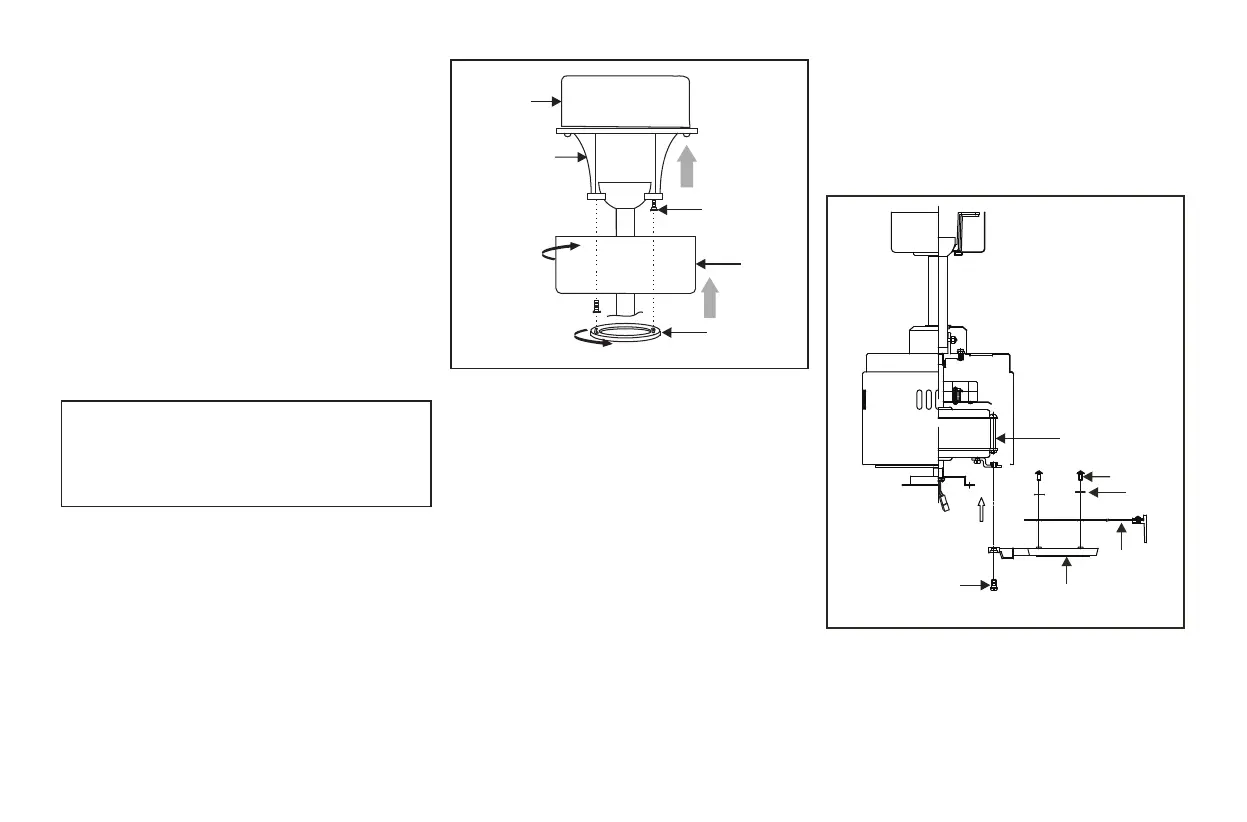
Step 1. Tuck connections neatly into ceiling outlet
box.
Step 2. Slide the canopy up to mounting bracket and
place the key hole on the canopy over the screw on
the mounting bracket, turn canopy until it locks in
place at the narrow section of the key holes. (Fig.
10)
Step 3. Align the circular hole on canopy with the
remaining hole on the mounting bracket, secure by
tightening the two set screws. Note: Adjust the
canopy screws as necessary until the canopy and
WARNING
Make sure the notch on the hanging bracket properly
sits in the groove in the hanger ball before attaching
the canopy to the bracket by turning the housing until
it drops into place.
Outlet box
Canopy
cover
Canopy
Hanger
bracket
Figure 10
Screws
Attaching the Fan
Blades
CAUTION: Remove 8 rubber packing mounts
and discard before installation.
Step 1. Attach the blades to the blade arms using
three screws and fiber washers as shown in
Figure 11. Start a screw into the arm, do not
tighten. Repeat for the 2 remaining screws and
washers.
Step 2. Tighten each screw securely starting with
the center screw. Make sure the blade is straight.
Step 3. Fasten the blade assembly to the motor
using the motor screws provided. (Fig. 12)
Figure 11
Motor
Screws
Fiber
washer
Blade arm
Blade
Screws



 To Next Page