10
Operations
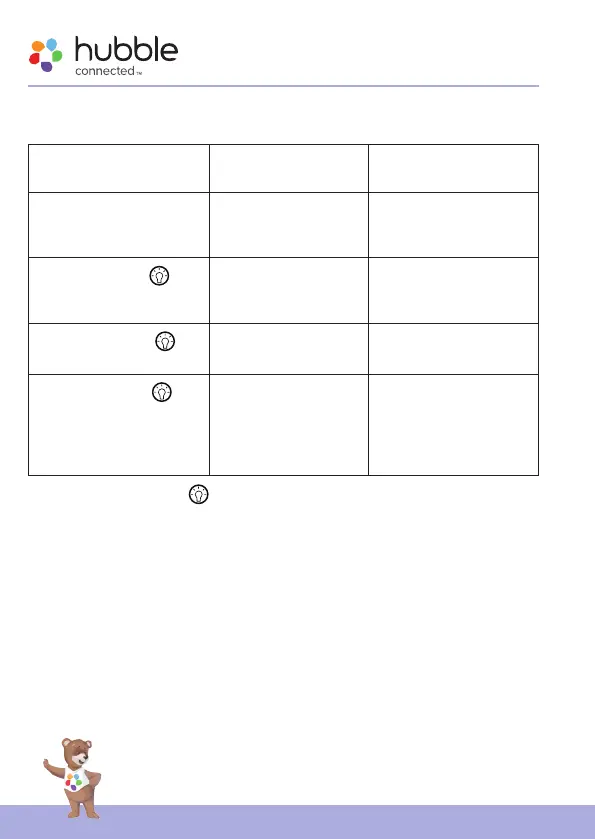
4.4 Night Light Setting
The device gives 7-night light colors for selection.
Key press Action Button backlit
indication
First power up Auto cyclic mode
(or color selection
mode)
Bright blue
Tap 1st time the
button
Stop to select the
desired night light at
auto cyclic.
Dim blue
Tap 2nd time the
button
Switch to steady
white color.
Amber
Tap 3rd time the
button
Repeat the auto
cyclic mode (or color
selection mode)
and subsequent key
actions.
Bright blue
Note: Long press 3s on
button to switch off the Night Light.
4.5 Bluetooth Audio Streaming
When the unit is rst powered up, the unit enters Bluetooth pairing mode
once the unit detects registered Bluetooth-enabled device, they will re-
connect. You need to connect with Bluetooth each time the unit is powered
off and on.
Note:
If the unit is already connected with an electronic device, the Bluetooth
speaker is unable to connect / pair with a third one without switching off
the already paired device.


 To Next Page