Page 8 of 15
Ver 1.2 11/20
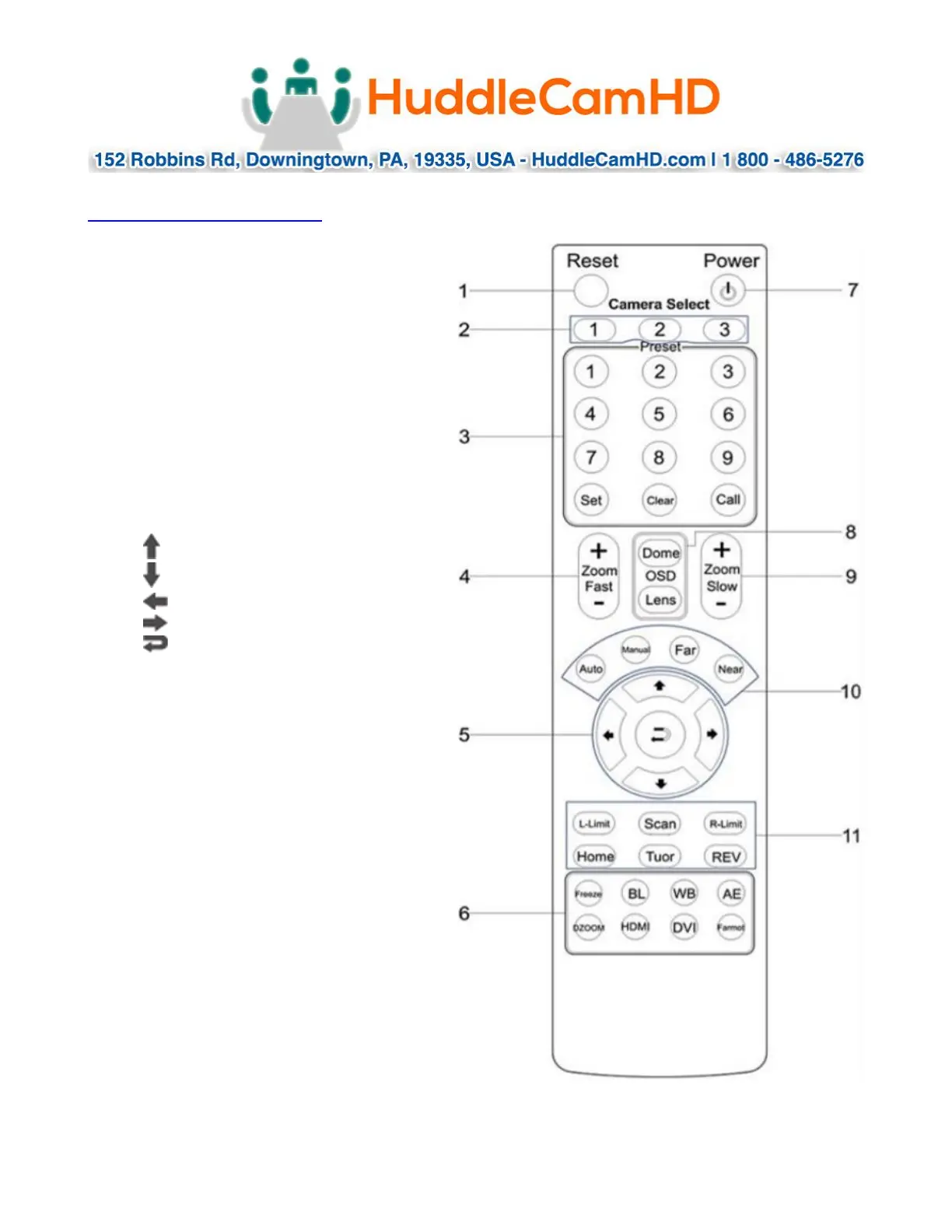
IR Remote Controller (Note: Some buttons do not operate for all camera models)
1. Reset:
Restarts the camera and restores it
to Factory Default settings.
(Note: Will delete all memory).
2. Camera Selection
Select Camera ID: 1, 2 or 3
3. Preset Positions
1-9: Preset Positions
Set: Setting Preset Position
Clear: Clear Preset Position
Call: Call Preset Position
Note: To Set / Call preset position 1, you
should press number key “1”, then press Set /
Call to Set or Call the position.
4. Fast Zoom in/out Control Zone
+: Zoom in quickly
-: Zoom out quickly
5. Pan/Tilt Controller
Move Up
Move Down
Move Left
Move Right
Auto Pan
6. Additional Function Zone
Freeze: Image Freeze
BL: Back-light Compensation
WB: White Balance
AE: Auto Exposure
D Zoom: Digital Zoom
HDMI: Swap to HDMI video output
DVI: Swap to DVI video output
Format: Swap between different formats
7. Power Supply Switch
Power On / Off button
8. OSD Menu Zone
Dome OSD: Enter Pan Tilt Zoom OSD menu
Lens OSD: Enter lens OSD menu
9. Slow Zoom In/Out Zone
+: Zoom in slowly
-: Zoom out slowly
10. Focus Control Zone
Auto: Turn on auto focus
Manual: Turn on manual focus
Far: Set focus at farther distance
Near: Set focus at nearer distance
11. Pan/Tilt Function Zone
L-Limit: Set left boundary limit scanning position
Scan: Enable Boundary Scanning (Auto Panning)
R-Limit: Set right boundary limit scanning position
Home: Go to camera’s Home position
Tour: Enable automatic patrol tour of presets
Rev: Enable image flip for ceiling mounting


 To Next Page