www.humantouch.com
12
13
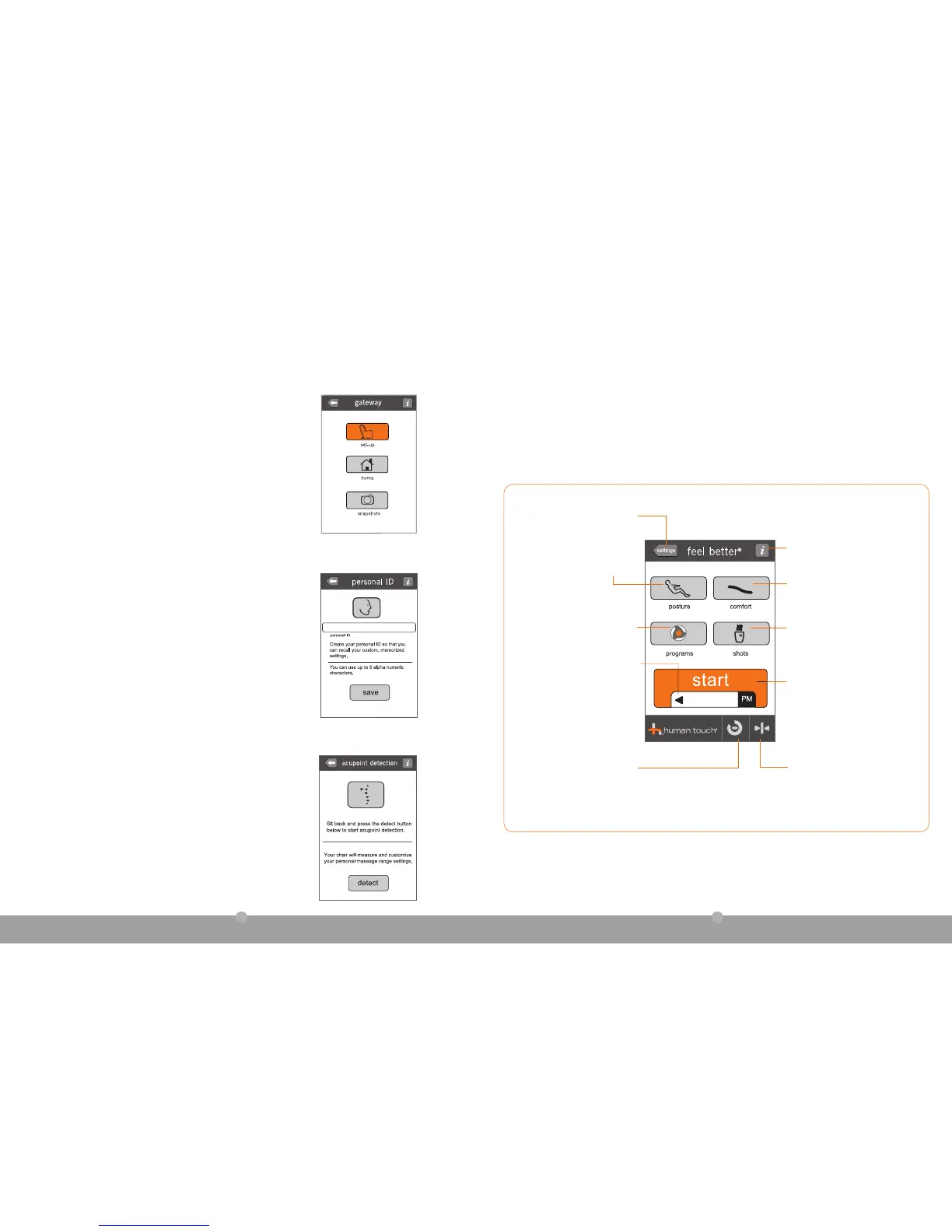
b. You can set up a personal ID to save your favorite massage
settings, including backrest and footrest position, massage
intensity, vertical massage range, and your favorite massage
program. This makes it easy to recall all of your favorites with
the touch of a button.
On the personal ID screen, touch enter personal ID to
display a touchpad keyboard, enter a personal ID using up to
six alphanumeric characters, touch done, then touch save
to save your ID and continue to the acupoint detection screen.
a. On the gateway screen, touch set-up.
c. Lean back against the backrest, then touch detect. Your chair
slightly reclines the backrest, then measures and customizes your
personal massage range settings.
A timer displays during acupoint detection, followed by a
confirmation screen when detection is complete.
NOTE: If you touch cancel during acupoint detection, the
detection interrupted screen is displayed. Touch continue to
skip acupoint detection or retry to resume detection.
When acupoint detection is complete, touch continue to display the feel better
®
home screen.
Comfort - Touch to display massage
comfort controls, including
massage intensity, vertical massage
range and heat.
Posture - Touch to display
posture controls and personal ID
recall button.
Espresso Shots - Touch to display
the espresso shots screen for a
quick targeted massage, or to build
a full 15-minute custom experience.
Auto Programs - Touch to display
automatic programs menu.
Daily Program Start - Touch to start
the daily program that is displayed
in the daily program window. Chair
automatically adjusts posture and
comfort settings to match daily program.
Daily Program Window - Indicates
the daily program that will begin
when you touch the start button.
To choose an alternate program,
touch the daily program window
to display a collection of alternate
daily auto programs.
(see page 15 for more information).
Timer - Touch to display the timer
screen if an automatic program
or Espresso Shot is running.
Restore - Touch to stop any running
functions and restore backrest
to upright position. Automatically
displays the posture screen from
which you can retract the legrest.
Touch for more information about
the current screen.
enter personal ID
daily program
take control
with HT Connect
™
3. Personalize it
4. Get acquainted
Settings - Touch to display
gateway screen for access to set-
up and Wellness Snapshots.



 To Next Page