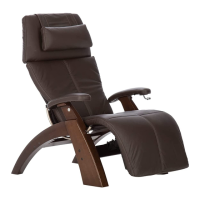
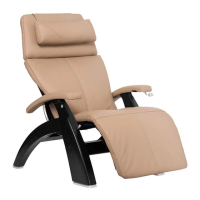
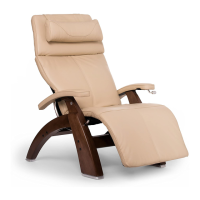
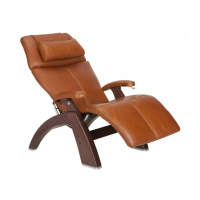
The Human Touch® Perfect Chair® PC-8500 is a sophisticated seating experience designed to transcend traditional comfort standards, blending aesthetics, technology, and ergonomics seamlessly. It offers a virtual weightlessness experience, cradling the body in unparalleled comfort, and goes beyond zero-gravity with its unique PC PRO mode. This extended range of recline and leg elevations is inspired by techniques used by chiropractors to alleviate soreness, tension, and fatigue. The chair incorporates clever memory functions and an intuitive control panel, meticulously designed to provide ultimate relaxation with the push of a button.
Function Description:
The PC-8500 is an electric recliner that allows users to adjust the backrest and footrest to various positions, including a zero-gravity position where the feet are elevated above the heart, promoting a neutral posture for back and spine relief. The chair features a "PRO" mode, which extends the recline and leg elevation beyond the standard zero-gravity position, mimicking positions used in chiropractic practices for enhanced back pain relief. Users can save two custom preferred positions using the memory buttons. The chair also includes a battery backup system to ensure the chair can be returned to an upright position in case of a power failure.
Important Technical Specifications:
- Operating Voltage: 110-120 VAC, 60 Hz
- Power Consumption: 70 watts
- Chair Size (Upright): 41.25" L x 34.5" W x 44.75" H (105 cm L x 88 cm W x 114 cm H)
- Chair Size (Reclined): 61.5" L x 34.5" W x 31.75" H (156 cm L x 88 cm W x 81 cm H)
- Product Weight: 113 lbs (51 kg)
- Recline Clearance Required: 24" (61 cm)
- Maximum Deployed Footrest Load Weight: 75 lbs (34.5 kg)
- Maximum Load Weight: 285 lbs (129.27 kg)
- Battery Backup: Uses two common 9V batteries (not included). Batteries are for single-use emergency exit and must be replaced immediately after use.
Usage Features:
- Easy Assembly: Requires simple assembly, primarily attaching the backrest to the chair base, the headrest to the backrest, and placing the head pillow.
- Plug and Play: Plugs into a standard power source.
- Adjustable Headrest: Can be tilted forward or backward for personalized comfort.
- Recline Control: Buttons for inclining and reclining the backrest.
- Footrest Control: Buttons to deploy, raise, lower, and fully retract the footrest.
- Zero-Gravity Position: A dedicated button automatically deploys the footrest and reclines the chair to the Human Touch Real Zero-Gravity position.
- PRO Mode: Activates an extended recline and leg elevation range beyond zero-gravity. A blue LED indicates when PRO mode is active.
- Custom Position Memory: Two memory buttons allow users to store and recall their favorite recline and leg elevation positions, including PRO mode positions.
- Automated Movement Safety: During automated movements (like Go to Zero), pressing any button on the control panel (except PRO) will immediately stop the chair.
- Battery Backup System: In case of a power failure, the restore button can be pressed and held to return the chair to an upright position using the installed 9V batteries.
Maintenance Features:
- Cleaning:
- Always disconnect from power before cleaning.
- Use a dry cloth for cleaning the control panel or power switch.
- Test cleaning solutions on a small, inconspicuous part of the product to ensure no discoloration.
- Avoid using benzene, thinner, or other solvents.
- For general cleaning, dust frequently or vacuum with a soft brush attachment.
- For SoftSuede® products, use a suede brush.
- For stains, use only water-based upholstery cleaner or a mild foaming detergent/upholstery shampoo.
- Care and Repair:
- The chair's mechanics are designed not to require maintenance, lubrication, or periodic servicing.
- All repairs must be performed by an authorized service center.
- Storage:
- If not in use for an extended period, cover the chair and store it in a dust-free, humidity-controlled environment.
- Remove backup batteries before storage.
- Avoid storing near heat sources, open flames, or direct sunlight for prolonged periods to prevent discoloration or damage.
- Avoid extreme temperatures; if stored in cold temperatures, allow 48 hours at room temperature before use.
- Maintain relative humidity between 10% and 80% to prevent mechanical damage.
Safety Instructions:
- Always unplug the chair after use and before cleaning.
- Never operate with damaged cords or plugs, if it's not working properly, or if it has been dropped or immersed in water.
- Keep children away from the deployed footrest.
- Ensure the area around and beneath the chair is clear before reclining to prevent injury.
- Do not sit or stand on the deployed footrest.
- Wear comfortable clothing when using the product.
- Discontinue use and consult a physician if abnormal discomfort occurs.
- Do not pull on the AC cord.
- Ensure sufficient space behind the chair for recline.
- This product is for household use only; commercial use voids the warranty.
- Do not attempt to repair the product yourself.

 Need help?
 General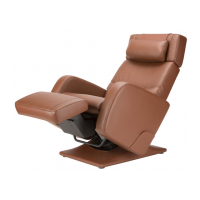

 To Next Page