7
①
②
Weight Adjustment
Your monitor should move up and down easily and stay in place once
adjusted. If it is dicult to adjust or moves without assistance, it is
not properly counterbalanced.
M10 Arm - Total Weight Range: 20-48 lbs. (9-21.7 kg)
Single Monitor - Max weight: 48 lbs. (21.7 kg)
Dual Crossbar - Max weight per monitor: 12.5 lbs. (5.6 kg)
Triple Crossbar - Max weight per monitor: 10 lbs. (4.5 kg)
1
To access the Adjustment Screw (D), use your finger to
pry open the Cover (C) on the Upper Arm Link (B).
2
Using the 5mm Hex Key turn the Adjustment Screw (D)
clockwise to increase the load tension, and counter-clockwise
to decrease the load tension. Turn the Adjustment Screw (D)
until the Monitor is properly balanced.
3
Move the monitor around to ensure that the motion is smooth
and the arm functions as intended and holds the monitor in
place.
4
Reposition the Cover (C) and press until it snaps into place.
CAUTION: Do not over tighten the screws as it can damage the
screw head or threads.
A
B
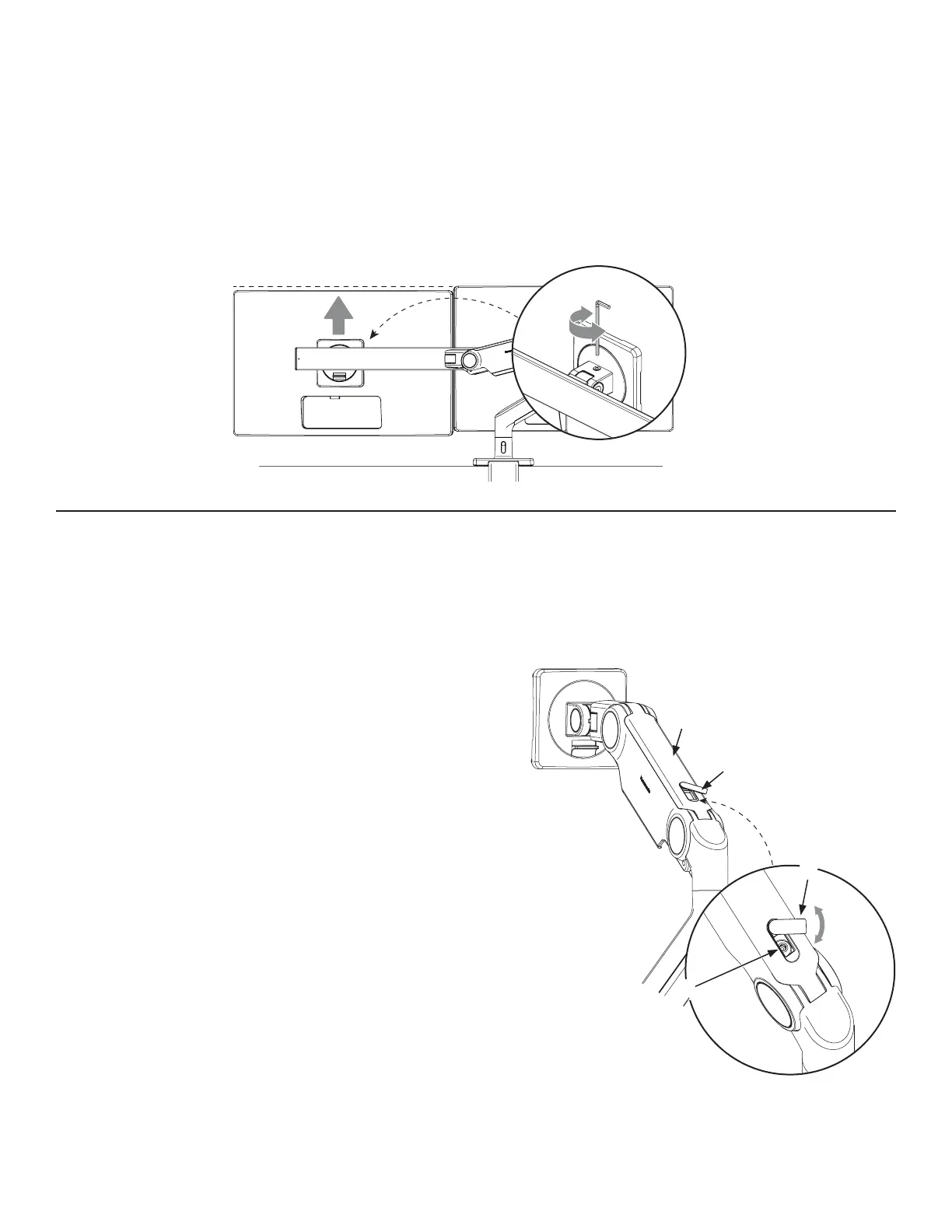
After the monitors are installed on the crossbar, there may be a small height dierence between them.
To align the monitors, use the adjustment screw located on top of the monitor tilt.
1
To raise a monitor, turn the screw clockwise. To lower, turn counter clockwise.
2
(Optional) Attach handle (D) to crossbar by using included screws (E). Adjust the handle to desired
height. Tighten with 4mm hex key until secure.
Leveling The Monitors (Dual-Monitor Application Only)
D
C


 To Next Page