40
7. SET UP THE LIGHTNING FUNCTIONS
1
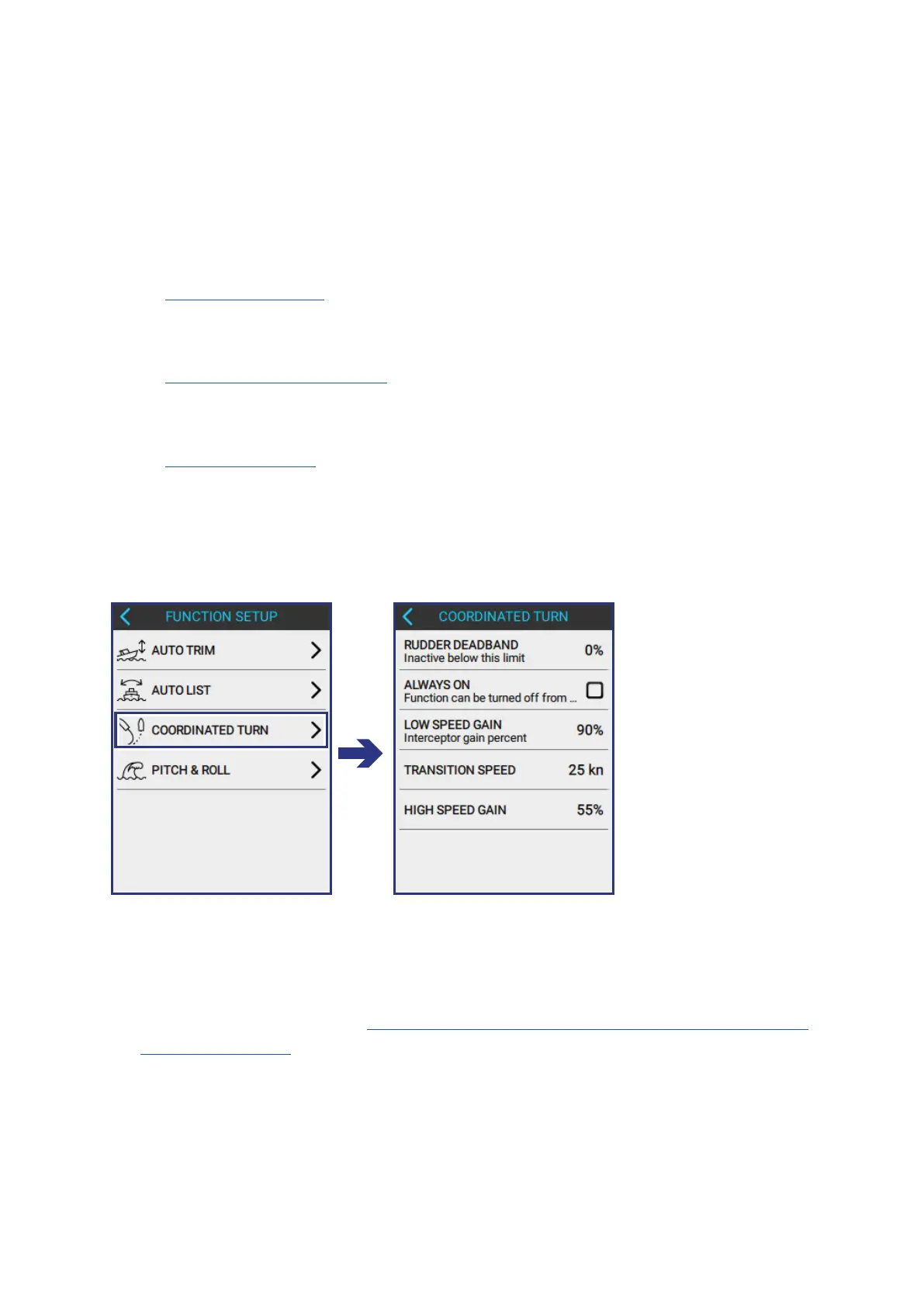
7.3 CONFIGURE COORDINATED TURN
Coordinated Turn automatically adjusts the heeling angle of the boat during turns
to reduce the impact of side forces for people on board. This function makes the
boat ride more comfortable and safer.
To propperly congure the COORDINATED TURN function do the following:
1. Take the boat for a ride to gather the following data:
• Rudder Deadband - enables the Coordinated Turn function to automatically
activate itself. It senses the percentage turn of the rudder; when the rudder
turns past this limit, Coordinated Turn is activated.
• Low and High Speed Gain - sets the percentage of blade deployment
necessary to adjust the heeling angle when the boat turns at low speeds and
at high speeds.
• Transition Speed - for sensing when the Coordinated Turn function must
switch from Low Speed Gain to High Speed Gain and vice versa.
2. Input the collected data into the control panel.
To open the AUTO LIST screen, do the following:
FUNCTION SETUP > COORDINATED TURN
7.3.1 COLLECT TURNING DATA
ENABLE DETAILED CONTROLS for the MANUAL CONTROLS screen.
For more information see Section 7.1.1 Collect Auto Trim Data, Step 1 Enable
Detailed Controls.



 To Next Page