EasyManua.ls Logo

Humzor NC610 - User Manual

Default Icon
38 pages
Print Icon
To Next Page IconTo Next Page
Loading...
HUMZOR NC610
USER’S MANUAL
Car and Truck OBD2 Scan Tool
NC610

Questions and Answers

Summary

Safety Information

Safety Messages

Safety messages help prevent personal injury and equipment damage.

DANGER;WARNING

Indicates an imminently hazardous situation.

Safety Warning

General precautions for safe operation and handling.

Product Instructions

Product Description

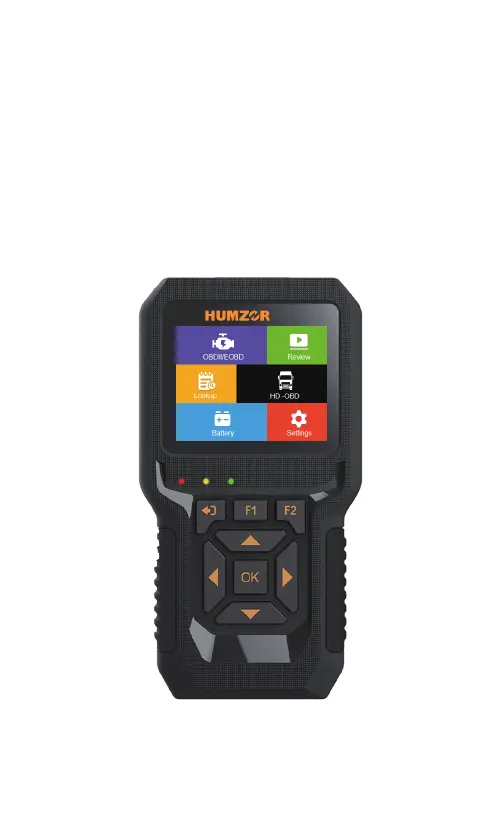
Describes the NC610 as a new generation OBDII diagnostic tool.

Specifications

Details hardware specifications like Display Screen, Temperature, Power.

Accessories Included

Lists included items like User's Manual, USB cable, ABS Case.

Keyboard

Refers to the keyboard layout or functionality.

Power

Explains how the scan tool is powered via the vehicle's Data Link Connector (DLC).

OBD (On-Board Diagnostics) II Introduction

On-Board Diagnostics(OBD)II

Introduces the history and development of OBD II systems.

Data Link Connector (DLC)

Describes the standardized 16-cavity connector for diagnostics.

OBD-II Diagnosis

Read DTCs (Diagnostic Trouble Codes)

Explains how to retrieve Diagnostic Trouble Codes from the vehicle.

Clear DTCs

Explains how to erase Diagnostic Trouble Codes from the vehicle's ECU.

Live Data

Allows viewing and recording of real-time vehicle data.

Freeze Frame Data

Displays operating conditions stored when a DTC is detected.

I;M Readiness Monitors

Checks if emission components have been evaluated by the OBD II system.

MIL Status

Checks the status of the MIL and run time/distance.

Vehicle Information

Retrieves Vehicle Identification Number (VIN) and other calibration data.

Mode 6

Provides On-Board Monitor Test results for emission-related components.

Mode 8

Initiates a leak test for the vehicle's EVAP system.

Smog Check

Checks if vehicle emissions meet standards.

Fuel Analysis

Analyzes instant, idle speed, and average fuel consumption.

HD OBD Diagnosis

Read DTCs

Reads Diagnostic Trouble Codes for Heavy Duty vehicles.

Clear DTCs

Erases Stored and Pending DTCs for Heavy Duty vehicles.

Live Data

Views and records live data for Heavy Duty vehicles.

Vehicle Information

Retrieves vehicle information for Heavy Duty vehicles.

Battery Test

Look up

DTC Definition Lookup

Allows searching for DTC definitions in the built-in library.

Review

Data Review

Views data from the last test recorded by the scan tool.

Settings

Language Settings

Allows selection of the desired language for the tool.

Help Function

Provides information about the tool, OBD, and DataStream.

Unit of Measurement

Sets the unit of measure to English or Metric.

Beep Setting

Turns the beep sound ON or OFF.

Device Self-Test

Checks Screen, LCD display, and Keyboard functionality.

Vehicle Coverage

Supported Vehicle List

Lists the types of vehicles supported by the scan tool.

Protocol Coverage

Supported Communication Protocols

Details the communication protocols supported by the tool.

Test Mode Coverage

OBD II Test Mode Overview

Explains the different OBD II test modes supported.

Product Trouble shooting

Common Problem Solutions

Provides solutions for common problems with the scan tool.

Warranty

Limited One Year Warranty

Outlines the terms and conditions of the product's warranty.

Service Procedures

Instructions on how to get service or repair for the scan tool.

Humzor NC610 Specifications

General IconGeneral
Operating SystemAndroid
ProcessorQuad-core
ConnectivityWi-Fi
PortsUSB
Operating Temperature50°C
Storage Temperature-20°C to 60°C
ProtocolsCAN
UpdateVia Wi-Fi

Related product manuals