
 Need help?
Do you have a question about the HuTools HT02 and is the answer not in the manual?
Confirm door hole size, backset, edge hole size, and door thickness for installation.
Guide latch into door hole, check centering, install latch with screws, and mount strike on frame.
Ensure latch is retracted, route cable, secure mounting plate with screws.
Remove battery cover, connect cable, install interior assembly, secure with screws.
Load batteries and press reset button to teach the lock the door's orientation.
Instructions on how to unlock and lock the door from outside and inside using various methods.
Details on setting up master and user codes, including restrictions on code combinations.
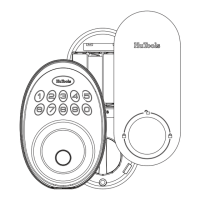
Identifies key components of the exterior and interior lock assemblies.
Explains features like Auto Lock, Vacation Mode, Silent Mode, Wrong Entry Limit, and One Time User Code.
Step-by-step guide to changing the default master code for enhanced security.
Instructions for adding and deleting user codes and fingerprints for access.
Guides on setting silent mode, auto lock, time delay, and vacation mode for customized operation.
Lists default values for Master Code, Auto Lock, Silent Mode, Wrong Code Entry Limit, etc.
Procedure to restore the lock to its original factory default settings, erasing all user codes.
Detailed instructions for successfully scanning and enrolling fingerprints for access.
Addresses common issues like turnpiece not rotating, keypad unresponsive, or forgotten master codes.
This document provides a comprehensive guide for the installation, operation, and maintenance of the HuTools HT02 smart lock. It is designed to ensure users can effectively set up and utilize all features of their new lock, emphasizing security and ease of use.
The HuTools HT02 is a smart lock system that offers multiple methods for unlocking and locking a door, catering to various user preferences and security needs. Its primary function is to provide enhanced security and convenience for residential or commercial properties. The lock integrates both traditional and modern access control mechanisms, making it a versatile security solution.
The core function of the HuTools HT02 is to secure a door while offering flexible access options. It supports unlocking via a master code, user codes, fingerprint identification, and a traditional thumb turn from the inside. For locking, it can be done manually through the keypad or the thumb turn, or automatically via its auto re-lock mode.
The lock operates with a master code, which is essential for programming and feature settings. This code is critical for managing user access and configuring the lock's various modes. User codes, which can be 4 to 10 digits long, allow multiple individuals to access the property without needing a physical key. The system can store up to 20 user codes, plus one temporary one-time user code, providing flexibility for guests or service providers.
Fingerprint identification offers a quick and secure biometric access method. Users can register their fingerprints, allowing them to unlock the door with a simple touch of the sensor. This feature adds a layer of convenience, eliminating the need to remember codes or carry keys.
The auto re-lock mode is a key security feature that automatically locks the deadbolt after a set period (adjustable between 10 and 99 seconds) once the door has been unlocked. This prevents the door from being left unsecured inadvertently. Conversely, the auto re-lock feature can be disabled if manual locking is preferred.
For enhanced security, the lock includes a "wrong entry limit" feature. After 10 unsuccessful attempts to enter a valid PIN code, the unit will shut down for 3 minutes, deterring unauthorized access attempts. Additionally, a "silent mode" allows users to mute the keypad beeping sounds, providing discreet operation, although low battery and system alerts will still be audible.
The "vacation mode" is a specialized security feature designed for extended absences. When enabled, it restricts all user codes, allowing access only via the master code on the keypad. If the lock is unlocked using the thumb turn while in vacation mode, an alarm will sound, alerting the homeowner to potential unauthorized entry.
The "one-time user code" is a practical feature for temporary access. This code can be used only once and is automatically deleted after use, making it ideal for deliveries or single-visit service personnel.
Another security enhancement is the "unlock with fake code" feature. This allows users to enter random digits before or after their actual PIN code, preventing bystanders from discerning the true code sequence, thus protecting against "shoulder surfing."
The HuTools HT02 is designed for straightforward operation. To unlock the door from the outside, users can either enter their master/user code on the keypad or use the fingerprint sensor. For keypad entry, pressing any key for 2 seconds activates the lock in manual mode. In auto re-lock mode, the bolt extends automatically 30 seconds after unlocking.
Unlocking with fingerprint ID involves touching and holding the sensor with a registered finger until the lock unlocks. From the inside, the door can be unlocked by rotating the thumb turn to the unlock position.
Locking the door from the outside in manual mode involves pressing any key on the keypad for 2 seconds. In auto re-lock mode, the bolt will extend automatically 30 seconds after unlocking. From the inside, the door is locked by rotating the thumb turn to the lock position. If auto re-lock mode is active, the device will lock automatically.
Programming the lock involves a series of steps typically initiated by entering the master code followed by specific numerical sequences to access different settings. For instance, changing the master code, adding or deleting user codes, adding or deleting user fingerprints, enabling/disabling silent mode, setting auto lock duration, and activating vacation mode all follow a structured keypad input process. Each successful setting change is usually confirmed by a green light flash and/or a beep.
Maintaining the HuTools HT02 primarily involves ensuring proper battery function and keeping the fingerprint sensor clean. The lock operates on four AA alkaline batteries, which are expected to last up to one year with typical usage (10 open/close operations per day). It is crucial to use new, non-rechargeable alkaline batteries for optimal performance. The device will provide alerts for low battery status.
The installation guide emphasizes the importance of a proper initial setup, including checking door dimensions and ensuring the latch and strike are correctly installed and aligned. A smooth operation test with a screwdriver is recommended for the deadbolt.
For fingerprint ID setup, it is essential to ensure both the sensor and the user's finger are clean and dry. The process involves touching and holding the sensor, then lifting and resting the finger with small adjustments eight times to register the fingerprint accurately.
If the lock encounters issues, a troubleshooting section is provided. If the turnpiece cannot rotate or operate, re-installing the lock and ensuring the turnpiece is in a vertical position is recommended. If the keypad does not respond, checking cable connections and battery installation (new batteries, correct polarity) is advised.
In cases where master codes are forgotten or if all passcodes need to be erased, a factory reset procedure is available. This involves keeping the door open and unlocked, then pressing and holding the reset button while removing and re-inserting one battery, and continuing to hold the button for 3 seconds until a beep is heard. This action deletes all user codes and restores the master code to its default value (12345678).
The manual also provides general care instructions, advising against the use of lacquer thinner, caustic soaps, abrasive cleaners, or polishes, as these can damage the lock's finish. A soft, damp cloth is recommended for cleaning. Customer service contact information is provided for further assistance.
 General
| Wi-Fi | No |
|---|---|
| Brand | HuTools |
| Model | HT02 |
| Category | Door locks |
| Power Supply | Battery Powered |
| Battery Type | 4 AA batteries |
| Unlocking Methods | Keypad, Mechanical Key |
| Auto Lock | Yes |
| Installation | DIY |

 To Next Page